FLUX AI Image Generator Review 2026: Models, Pricing & How to Use It
Lead AI Tech Analyst & Editorial Director
If you need detailed prompt control, multi-reference editing, precise typography, HEX colors, and developer API/local execution,FLUX AI is one of the most capable image-generation ecosystems in 2026.
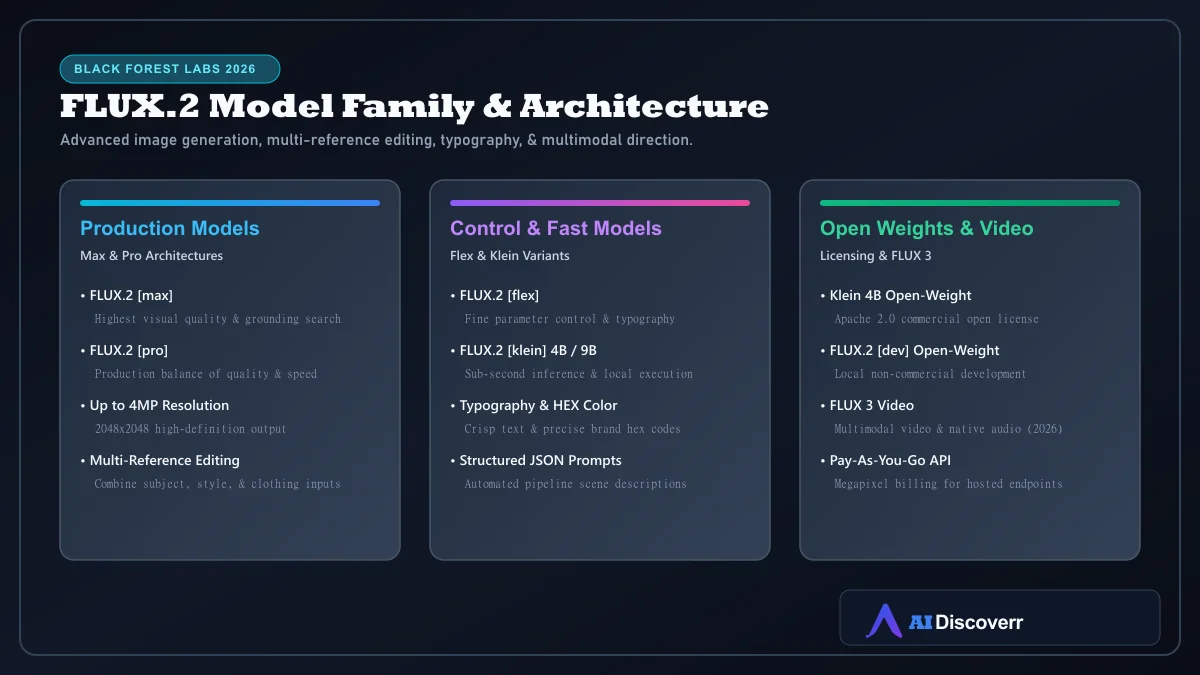
Developed by Black Forest Labs, FLUX is a family of generative models. For new image projects, BFL recommends the FLUX.2 family (Max, Pro, Flex, Klein, Dev), while expanding into video with FLUX 3 Video.
FLUX AI at a Glance
| Category | Details |
|---|---|
| Tool | FLUX |
| Developer | Black Forest Labs (BFL) |
| Recommended family | FLUX.2 (Max, Pro, Flex, Klein 4B/9B, Dev) |
| Multimodal expansion | FLUX 3 Video (clip generation + native audio) |
| Best for | Designers, developers, agencies, e-commerce, & local AI workflows |
| Maximum resolution | Up to 4MP output for FLUX.2 |
| Key features | Multi-reference editing, typography, HEX color control, API, & open weights |
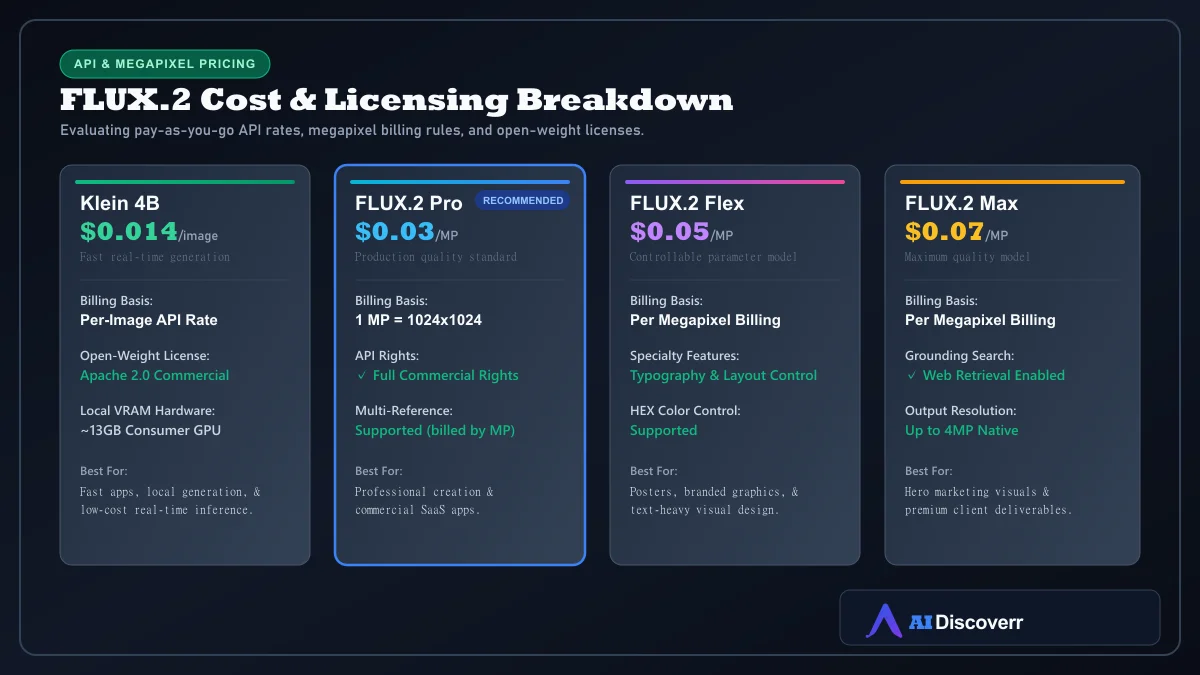
| Hosted pricing | Pay-as-you-go megapixel billing (from $0.014/img to $0.07/MP) |
| Local open-weight options | Yes (Klein 4B Apache 2.0; Klein 9B & Dev Non-Commercial) |
Is FLUX AI Worth It in 2026?
Yes, for professional workflows requiring visual control and integration. FLUX.2 makes the most sense when you want to:
- Achieve precise photorealism and exact prompt adherence
- Edit existing visuals using multi-reference input images
- Render crisp text, logos, product labels, and posters
- Specify exact brand HEX colors in prompt structures
- Deploy scalable image APIs into custom SaaS products or internal workflows
- Run open-weight models locally on consumer GPUs (e.g., Klein 4B under Apache 2.0)
What Is FLUX AI?
FLUX is a family of generative AI models created by Black Forest Labs. While early releases centered on FLUX.1 (Pro, Dev, Schnell), BFL now recommends the FLUX.2 family for image creation and editing, alongside FLUX 3 Video for multimodal video generation.
Which FLUX Model Should You Use?
| Your Goal | Recommended Model | Access & Pricing |
|---|---|---|
| Highest-quality final output | FLUX.2 Max (includes grounding search) | Hosted API ($0.07/MP) |
| Production quality standard | FLUX.2 Pro (balanced speed & quality) | Hosted API ($0.03/MP) |
| Typography & layout control | FLUX.2 Flex (controllable parameters) | Hosted API ($0.05/MP) |
| Fast real-time / local app | FLUX.2 Klein 4B (sub-second inference) | API ($0.014/img) / Apache 2.0 Open Weight |
| Local non-commercial dev | FLUX.2 Dev (local fine-tuning) | Free local / Non-Commercial License |
FLUX.2 Features Explained
Text-to-Image Generation
Generate images up to 4MP resolution with high fidelity to complex multi-subject prompt descriptions.
Multi-Reference Image Editing
Combine elements from multiple reference photos (e.g., subject from image 1, clothing from image 2, environment from image 3, lighting from image 4) into a single cohesive output.
Typography & Precise HEX Color Control
Render sharp text directly on graphics and specify exact brand colors using HEX color codes (e.g., #1E3A8A) within prompts.
How to Use FLUX AI
- Access the platform: Use Black Forest Labs' Playground or hosted API endpoints.
- Select your model: Choose Pro for production, Max for top quality, or Klein for fast generation.
- Formulate your prompt: Write affirmative descriptions of subject, action, lighting, and style.
- Add reference images: Upload optional reference photos for multi-image editing.
- Generate & review: Inspect prompt adherence, text placement, and color rendering.
How to Write Better FLUX Prompts
FLUX Pricing & Megapixel Economics
| Model | Hosted Starting Price | Billing Unit | Open-Weight License |
|---|---|---|---|
| FLUX.2 Klein 4B | $0.014 / image | Per Image | Apache 2.0 (Commercial OK) |
| FLUX.2 Klein 9B | $0.015 / image | Per Image | FLUX Non-Commercial |
| FLUX.2 Pro | $0.03 / MP | Per Megapixel (1024x1024) | Hosted API Only |
| FLUX.2 Flex | $0.05 / MP | Per Megapixel | Hosted API Only |
| FLUX.2 Max | $0.07 / MP | Per Megapixel | Hosted API Only |
Is FLUX Free?
Selected open-weight models (like FLUX.2 Klein 4B and Dev) are free to download and run locally. Hosted API generation uses pay-as-you-go pricing.
Commercial Licensing Rules
Generations made via the BFL API include commercial usage rights. For local deployments, only models released under open licenses (such as Klein 4B under Apache 2.0) permit commercial exploitation.
Best FLUX Use Cases
- E-Commerce & Product Shots: Multi-reference product imagery in varied lifestyle settings.
- Brand Graphics & Posters: Visual designs requiring exact HEX colors and crisp typography.
- Developer SaaS Applications: Integrating pay-as-you-go image generation APIs.
- Local AI Workflows: Executing Klein 4B on consumer GPUs (~13GB VRAM).
FLUX AI Pros and Cons
Where It Shines
Industry-leading prompt adherence and photo realism
Multi-reference image editing (combining subject, style, & clothing)
Crisp typography and exact HEX color code support
Sub-second fast inference with Klein 4B open weights (Apache 2.0)
Scalable pay-as-you-go API for developer integration
Up to 4MP native resolution output
Where It Falls Short
Complex model taxonomy can confuse new users
Megapixel billing scales costs for higher resolutions and multiple inputs
Does not support traditional negative prompts
Some open-weight variants carry non-commercial restrictions
FLUX AI vs Midjourney vs Stable Diffusion
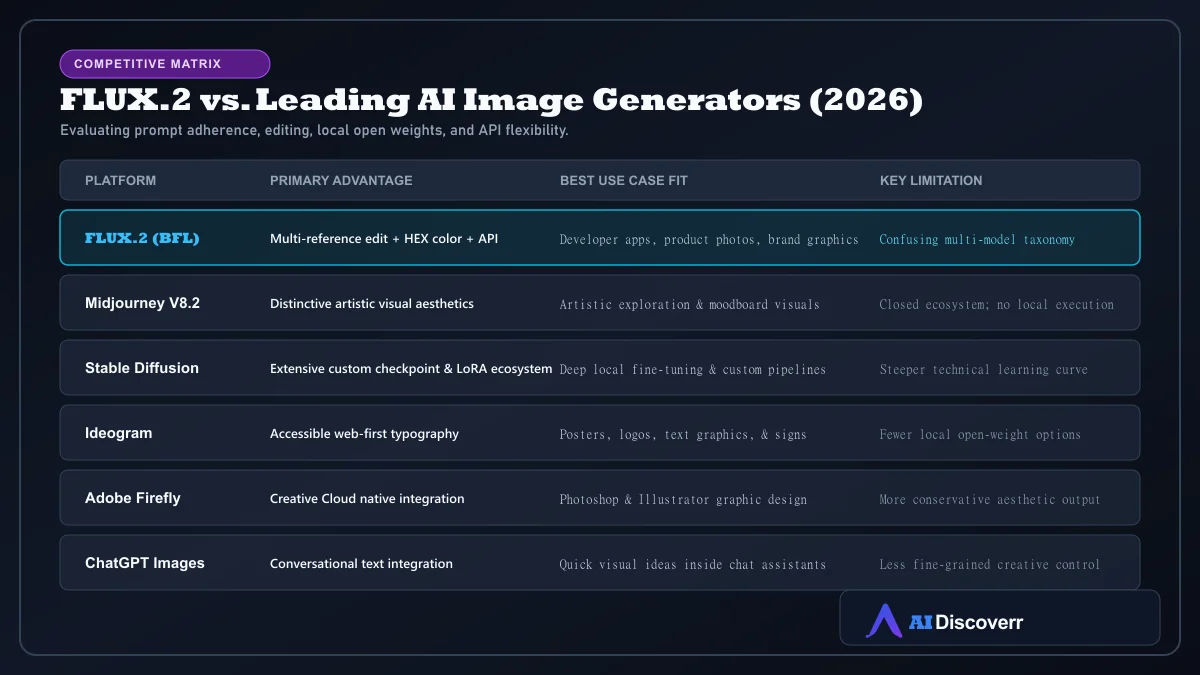
Best FLUX Alternatives
- Midjourney V8.2: Best for creators prioritizing out-of-the-box artistic styling.
- Leonardo AI: Best for multi-model creative suite editing and custom LoRA training.
- Runway AI: Best for video-first creative production.
Frequently Asked Questions
Frequently Asked Questions
Is FLUX AI free?
Selected open-weight models (like FLUX.2 Klein 4B and Dev) can be downloaded and executed locally for free on compatible GPUs. Hosted API access operates on a pay-as-you-go per-megapixel model.
What is the difference between FLUX.1 and FLUX.2?
FLUX.1 models (Pro, Dev, Schnell) are previous-generation models. FLUX.2 is Black Forest Labs' current recommended family, featuring higher resolution (up to 4MP), multi-reference editing, HEX color controls, and refined typography.
Does FLUX.2 support negative prompts?
No. FLUX.2 is designed to follow direct affirmative instructions without requiring negative prompt strings.
Can FLUX render text and typography?
Yes. FLUX.2 includes dedicated typography capabilities for rendering clear text, signs, logos, and product labels.
Can I run FLUX locally?
Yes. Open-weight models such as FLUX.2 Klein 4B can run locally on consumer GPUs requiring approximately 13GB VRAM.
What is FLUX 3?
FLUX 3 Video is Black Forest Labs' multimodal video generation model introduced in August 2026, generating clips up to 20 seconds with native audio.
Can I use FLUX images commercially?
Yes, for images generated via the official API or open-weight models with commercial licenses (such as Klein 4B under Apache 2.0). FLUX.2 Dev and Klein 9B open weights are non-commercial.
Is FLUX AI better than Midjourney?
FLUX AI offers superior prompt adherence, multi-reference editing, HEX color accuracy, API access, and local execution. Midjourney is preferred for its out-of-the-box artistic community aesthetic.
Final Verdict
FLUX.2 by Black Forest Labs is a top-tier choice in 2026 for creators, developers, and businesses seeking visual precision.With multi-reference editing, typography rendering, HEX color control, scalable APIs, and local open-weight options, it is an essential foundation for modern visual workflows.