Midjourney AI Review 2026: Pricing, Features, V8.2 & How to Use It
Lead AI Tech Analyst & Editorial Director
If you want an AI image generator that focuses heavily on visual quality and creative style, Midjourney remains one of the most important tools to consider in 2026.
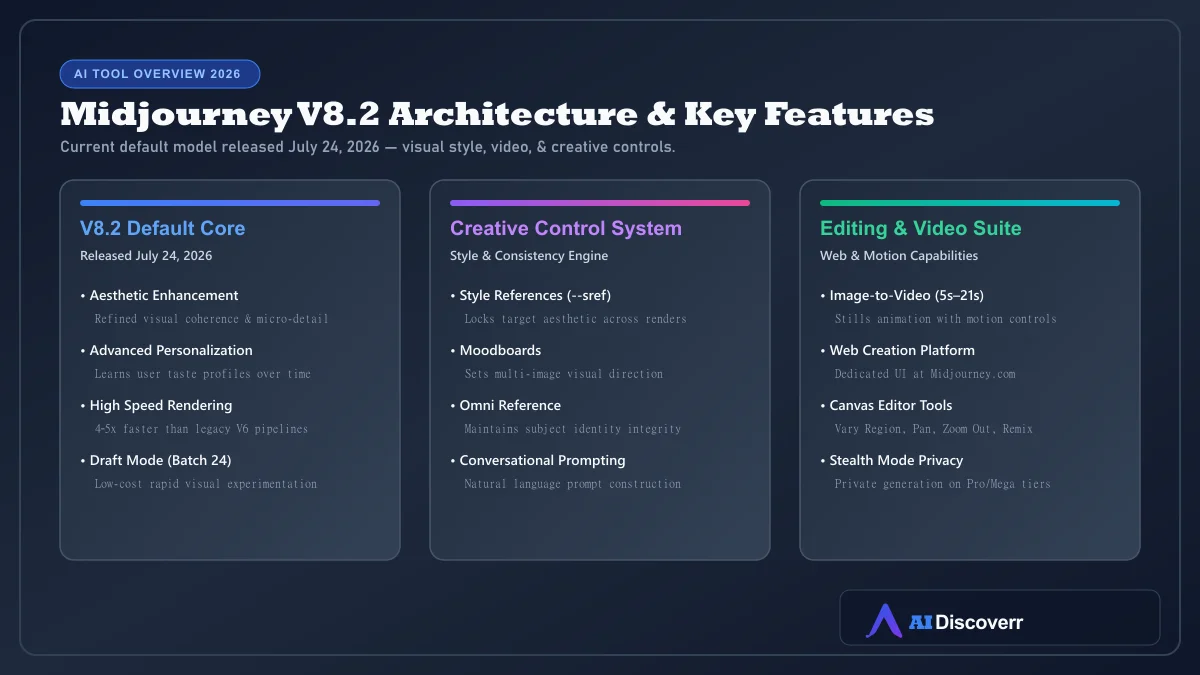
The current default model is V8.2, not V7. Midjourney also offers a web-based creation experience, image editing, Personalization, Style References, Draft Mode, and image-to-video generation.
Midjourney at a Glance
| Category | Details |
|---|---|
| Tool | Midjourney |
| Best for | AI artwork, concept art, creative visuals, stylized imagery |
| Current default model | V8.2 (Released July 24, 2026) |
| Free plan | No standard free subscription tier |
| Starting price | $10/month (Basic) |
| Subscription plans | Basic ($10/mo), Standard ($30/mo), Pro ($60/mo), Mega ($120/mo) |
| Web access | Yes (Midjourney.com) |
| Discord access | Yes |
| Image generation | Yes |
| Video generation | Yes (5-second stills-to-video, extendable to 21s) |
| Image editing | Yes (Remix, Vary Region, Pan, Zoom Out) |
| Private generation | Pro and Mega via Stealth Mode |
| Best reason to choose it | Strong creative image generation and style control |
Is Midjourney Worth It in 2026?
Yes, if visual quality is your priority
Midjourney makes the most sense for people who care about:
- Concept art and moodboards
- Editorial imagery and marketing creative
- Fantasy art and cinematic scenes
- Creative direction and visual experimentation
- Character and style exploration
Public discussions show creators choosing Midjourney specifically for its artistic character and style controls, even as competing products improve.
Maybe not, if you need precise control
You should consider another tool if your main requirement is:
- Exact graphic layouts or technical diagrams
- Heavy text inside images (ideally use Ideogram)
- Simple conversational image creation
- Free image generation
- Highly automated API workflows
What Is Midjourney?
Midjourney is a generative AI platform for creating images and videos, developed by Midjourney, Inc. You describe an idea using a text prompt, and the model generates visual content based on that description.
You can also use images as references and control parameters such as aspect ratio, personalization, style weight, motion speed, and rendering mode.
What's New in Midjourney V8.2?
Midjourney's official documentation states that V8.2 became the default version on July 24, 2026. The release focuses on aesthetics, image quality, and Personalization.
V8.2
The current model focuses on:
- Improved aesthetics and visual coherence
- Better image quality and fine detail
- Stronger Personalization taste matching
- Updated creative behavior
V8.1
V8.1 was notable for speed and improved prompt handling. Midjourney stated V8.1 was approximately 4–5 times faster than earlier models for standard jobs.
V7
V7 remains important because it introduced features such as Draft Mode and Omni Reference while upgrading prompt and image handling.
Why older Midjourney tutorials can be confusing
Many tutorials online were written around older models (V5, V6, V7) or outdated Discord-only workflows. Always verify which model version and interface a tutorial uses before following its instructions.
Midjourney's Key Features
Text-to-image generation
The basic workflow is: Idea → Prompt → Generation → Selection → Refinement. You describe the subject, environment, style, lighting, composition, or mood to generate visual options.
Personalization
Personalization allows Midjourney to learn your preferred visual taste. By selecting images you like, you create a profile that influences future generations toward your aesthetic preferences.
Style References (`--sref`)
Style References let you influence the visual look of a generation using another image or a Style Reference Code. This ensures several images share a consistent aesthetic.
Moodboards
Moodboards help establish the overall style, color palette, and mood of a project, making them ideal for brand concepts and campaign direction.
Omni Reference
Omni Reference places a person or object consistently into generated images. Note that while V7 Omni Reference is supported, the V8 implementation remains in active development.
Describe Tool
The Describe tool turns an uploaded image into suggested text descriptions, helping you analyze visual styles or find prompt inspiration.
Draft Mode
In V8.1/V8.2, Draft Mode generates batches of 24 lower-resolution images at lower GPU cost, enabling rapid visual brainstorming before final rendering.
Conversational Mode
Conversational Mode lets you describe your idea in natural language (or voice), helping construct effective prompts without memorizing complex parameters.
Midjourney Image Editing
Midjourney includes an Editor supporting Remix, Vary Region (inpainting), Pan, and Zoom Out.
Midjourney Video Generation
Midjourney can transform a still image into a 5-second video, extendable up to 21 seconds. Controls include Low Motion, High Motion, Raw, Loop, and End Frame at SD (480p) or HD (720p) resolution.
Midjourney Pricing and Plans
| Plan | Monthly | Annual Equivalent | Fast GPU Time | Relax & Stealth Mode |
|---|---|---|---|---|
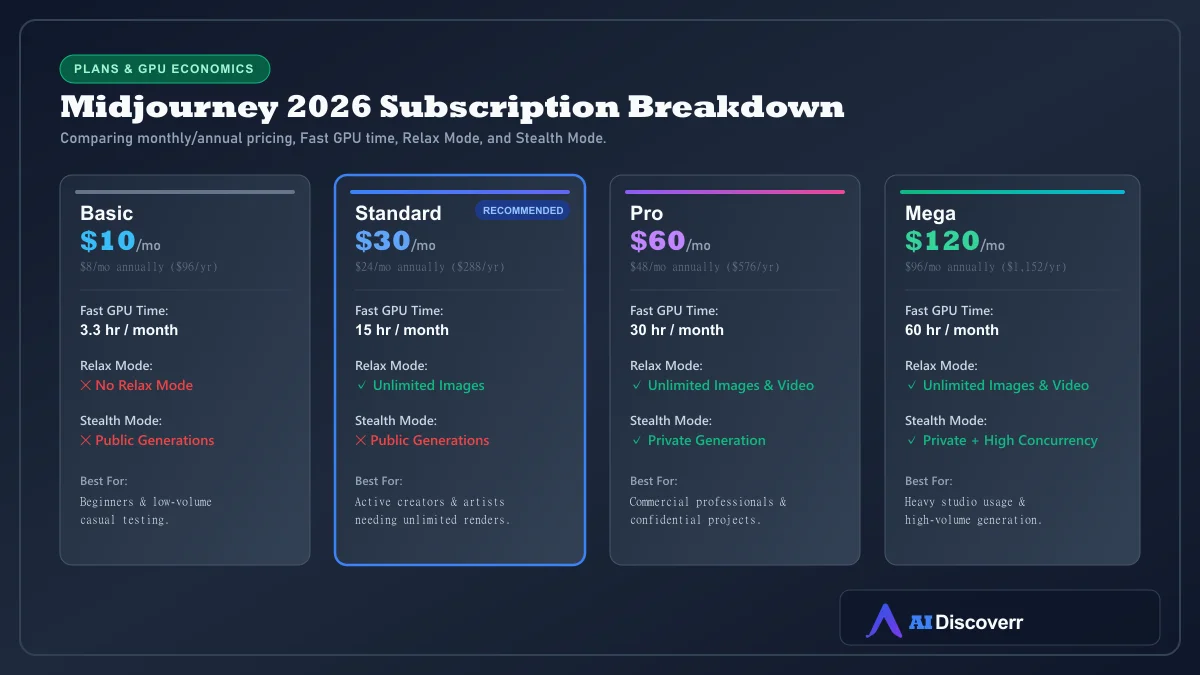
| Basic | $10/mo | $8/mo ($96/yr) | 3.3 hr/month (200 min) | No Relax Mode, Public only |
| Standard | $30/mo | $24/mo ($288/yr) | 15 hr/month | Unlimited Relax images, Public only |
| Pro | $60/mo | $48/mo ($576/yr) | 30 hr/month | Unlimited Relax images & video, Stealth Mode |
| Mega | $120/mo | $96/mo ($1,152/yr) | 60 hr/month | Unlimited Relax images & video, Stealth Mode |
Which Midjourney Plan Should You Choose?
- Choose Basic ($10/mo) if: You are learning Midjourney or generate images occasionally.
- Choose Standard ($30/mo) if: You create images regularly and want unlimited Relax Mode generation. For most creators, Standard is the most balanced plan.
- Choose Pro ($60/mo) if: You require private generations via Stealth Mode or heavy video generation.
- Choose Mega ($120/mo) if: Your team requires maximum Fast GPU allocation and concurrent generation.
How to Use Midjourney
- Create an account: Visit Midjourney.com and sign in via Google or Discord.
- Choose a plan: Select Basic, Standard, Pro, or Mega based on your usage needs.
- Open the Create page: Use the web Imagine bar to type your prompt.
- Write a prompt: Combine subject, environment, composition, lighting, style, and aspect ratio.
- Refine the result: Use Variations, Remix, Style References, or Personalization.
- Edit or animate: Modify regions using the Editor or create a short video clip.
How to Write Better Midjourney Prompts
Focus on details that materially change the image:
- Subject: matte black electric sports car
- Environment: parked outside a rainy Tokyo convenience store at night
- Visual style: cinematic editorial photography
- Composition & lighting: wide establishing shot, neon reflections on wet pavement
- Parameters: Use
--ar 16:9,--sref [code], or--v 8.2deliberately.
Best Midjourney Use Cases
Midjourney delivers strong performance for:
- Concept art and editorial artwork
- Marketing creative & campaign moodboards
- Fantasy, sci-fi, & cinematic character design
- Social media hero graphics
Midjourney Pros and Cons
Where It Shines
Industry-leading visual style and artistic aesthetic quality
Powerful Style References (--sref), Moodboards, and Personalization
Web-based creation interface alongside Discord support
Unlimited image generation in Relax Mode on Standard, Pro, and Mega plans
Built-in image-to-video animation features
Where It Falls Short
No standard free subscription tier available
Stealth Mode private generation restricted to $60+/mo plans
Text rendering and exact graphic layouts remain inferior to specialized tools
Editor tools operate on legacy V6.1 functionality
Midjourney Privacy and Commercial Use
Generations on Basic and Standard plans are publicly visible in community galleries. If confidential client assets or unreleased products are involved, Stealth Mode on Pro or Mega is required.
Copyright and Legal Considerations
Midjourney is involved in consolidated U.S. copyright litigation regarding AI training sets. While ordinary output is commercially usable under Midjourney's terms, commercial entities should stay informed on legal developments surrounding AI content ownership.
Midjourney vs Alternatives
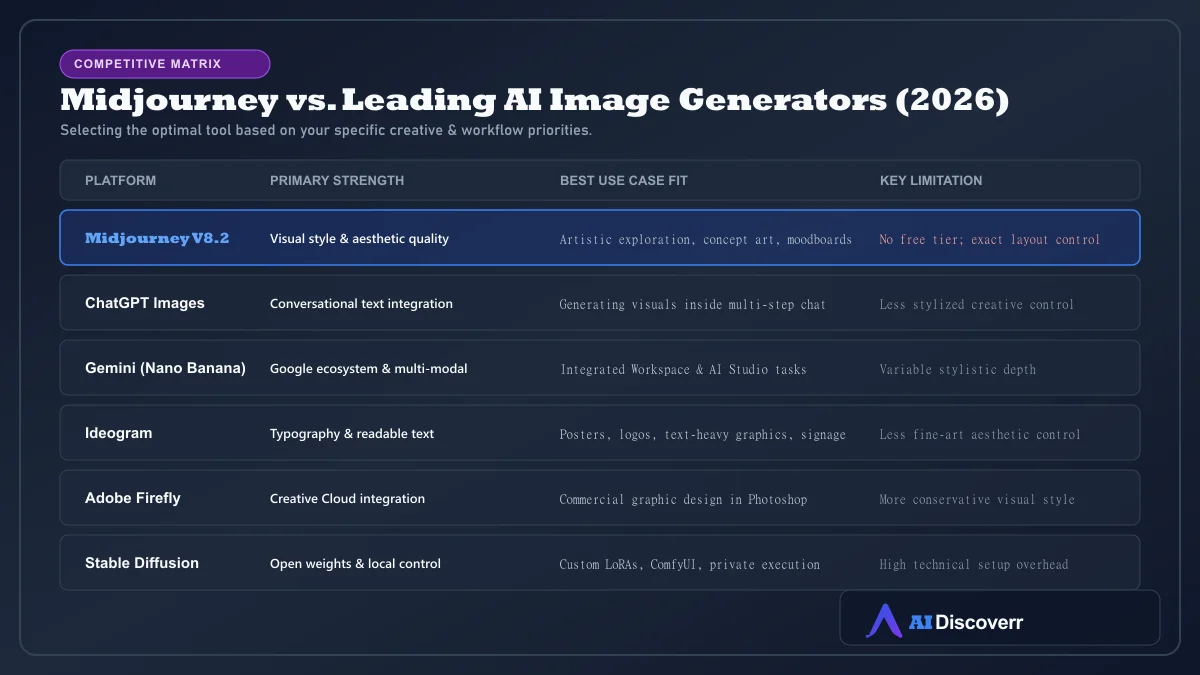
Key alternative choices include:
- Midjourney vs ChatGPT: Midjourney wins on dedicated creative aesthetics; ChatGPT wins for conversational image generation during brainstorming.
- Midjourney vs Ideogram: Ideogram is superior for readable typography, posters, and text-heavy graphics.
- Midjourney vs Adobe Firefly: Firefly excels inside Photoshop/Illustrator commercial design workflows.
- Midjourney vs SeaArt: SeaArt AI is a budget-conscious option built on Stable Diffusion.
Who Should Use Midjourney?
Digital artists, concept designers, creative directors, and marketers who value visual style, aesthetics, and iterative visual exploration.
Who Should NOT Use Midjourney?
Users seeking completely free art generators, exact technical diagramming, heavy text typography, or local open-source models.
Frequently Asked Questions
Frequently Asked Questions
Is Midjourney free?
No standard free subscription tier is currently listed in Midjourney's official plan comparison. The Basic plan starts at $10 per month.
How much does Midjourney cost?
Current monthly pricing is $10 for Basic, $30 for Standard, $60 for Pro, and $120 for Mega. Annual billing provides a 20% discount.
What is the latest Midjourney model?
Midjourney's official documentation identifies V8.2 as the default model, released on July 24, 2026.
Can I use Midjourney without Discord?
Yes. Midjourney provides a web-based creation experience at Midjourney.com, while continuing to support Discord.
Does Midjourney create videos?
Yes. Midjourney can transform still images into 5-second videos and extend them up to 21 seconds with motion controls.
Can Midjourney edit images?
Yes. Its Editor supports features including Remix, Vary Region (inpainting), Pan, and Zoom Out.
Does Midjourney have a private mode?
Yes. Stealth Mode allows private generation, but it is available exclusively on Pro ($60/mo) and Mega ($120/mo) plans.
Can I use Midjourney images commercially?
Midjourney's plan documentation provides general commercial usage rights for subscribers, subject to its Terms of Service. Companies generating over $1M in annual gross revenue must subscribe to Pro or Mega.
Is Midjourney worth paying for?
Midjourney is worth paying for when visual quality, aesthetic style, and creative exploration matter more than free access or precise graphic layout control.
Is Midjourney better than ChatGPT for images?
Midjourney is stronger for dedicated creative image quality and artistic direction. ChatGPT is better when image generation needs to take place inside a broader conversational chat workflow.
Is Midjourney good for beginners?
Yes. The web interface makes starting straightforward, eliminating the need to navigate Discord for standard image generation.
Final Verdict
Midjourney V8.2 remains a top-tier choice in 2026 for dedicated visual art and concept creation. While conversational AI tools and specialized typography engines serve utility niches, Midjourney provides an unmatched environment for creators iterating on visual ideas.