Claude API Setup Guide 2026: How to Get an API Key and Make Your First Request
Table of Contents
- At a Glance
- What Is Claude API?
- Claude API vs Claude.ai
- Prerequisites
- 1. Create Console Account
- 2. Create API Key
- 3. Add API Credits
- 4. Install Claude SDK
- 5. Store API Key Securely
- 6. First API Request
- 7. Messages API Basics
- Model Selection
- Pricing & Billing
- JavaScript Integration
- Security Architecture
- Multi-Turn Chat
- Streaming Responses
- Tool Use & Agents
- Troubleshooting Errors
- FAQ
- Final Verdict
Lead AI Tech Analyst & Editorial Director
If you want to put Claude inside your own application, you need the Claude API.
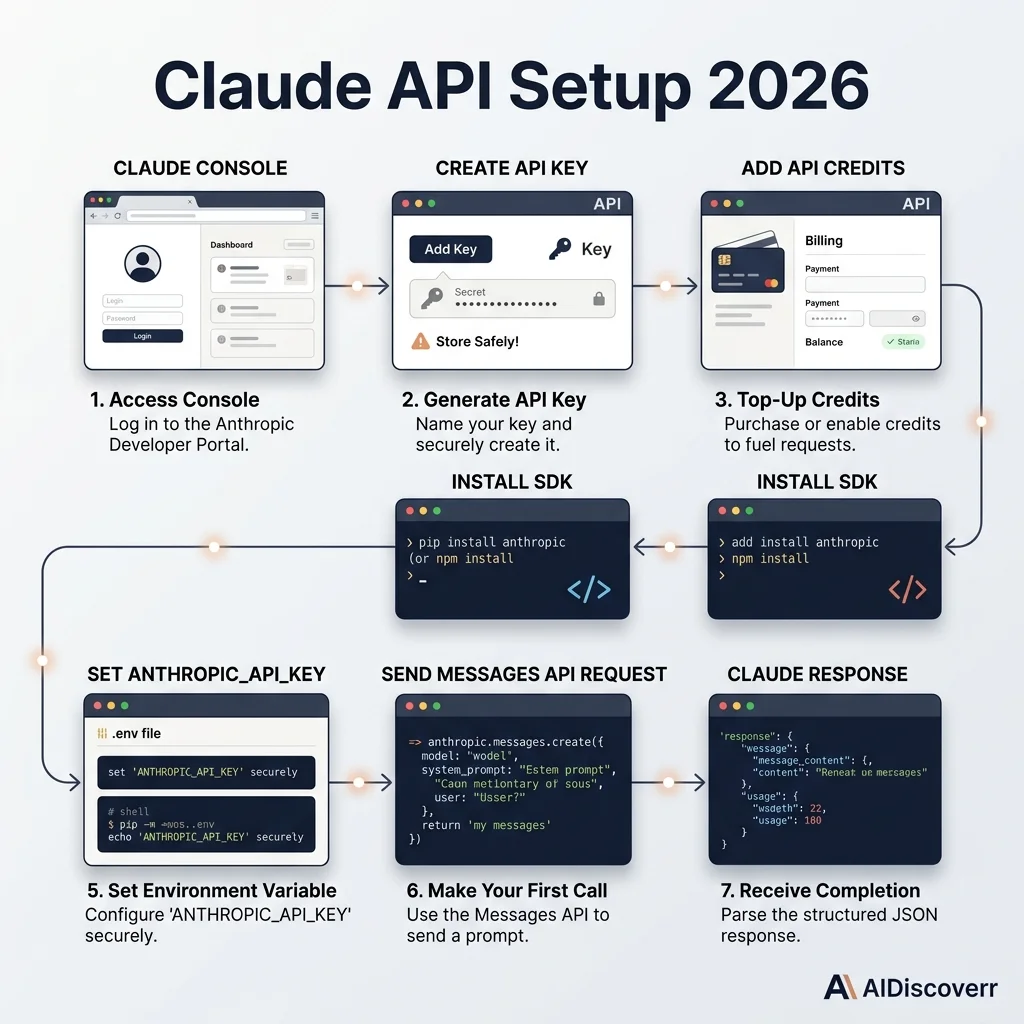
The setup is straightforward. You create an Anthropic Console account, generate an API key, add API credits, install an SDK or make HTTP requests directly, and send your first message.
The confusing part comes later.
You also need to understand model selection, authentication, billing, conversation history, streaming, tool use, and API-key security.
Claude API Setup at a Glance
| Category | Details |
|---|---|
| API Name | Claude API |
| Company | Anthropic |
| Main Use Case | Build Claude-powered applications & agents |
| API Protocol | REST API (JSON) |
| Main Endpoint | https://api.anthropic.com |
| Authentication | API key or Workload Identity Federation |
| Official SDKs | Python, TypeScript / JavaScript, Go, Java, Ruby, C# |
| Core API | Messages API |
| Billing Model | Usage-based (per token) |
What Is the Claude API?
The Claude API lets your software communicate directly with Claude. For example, imagine you are building a customer-support application. Instead of asking an employee to manually copy a customer question into Claude, your application can send the question directly to the API.
The basic flow looks like this:
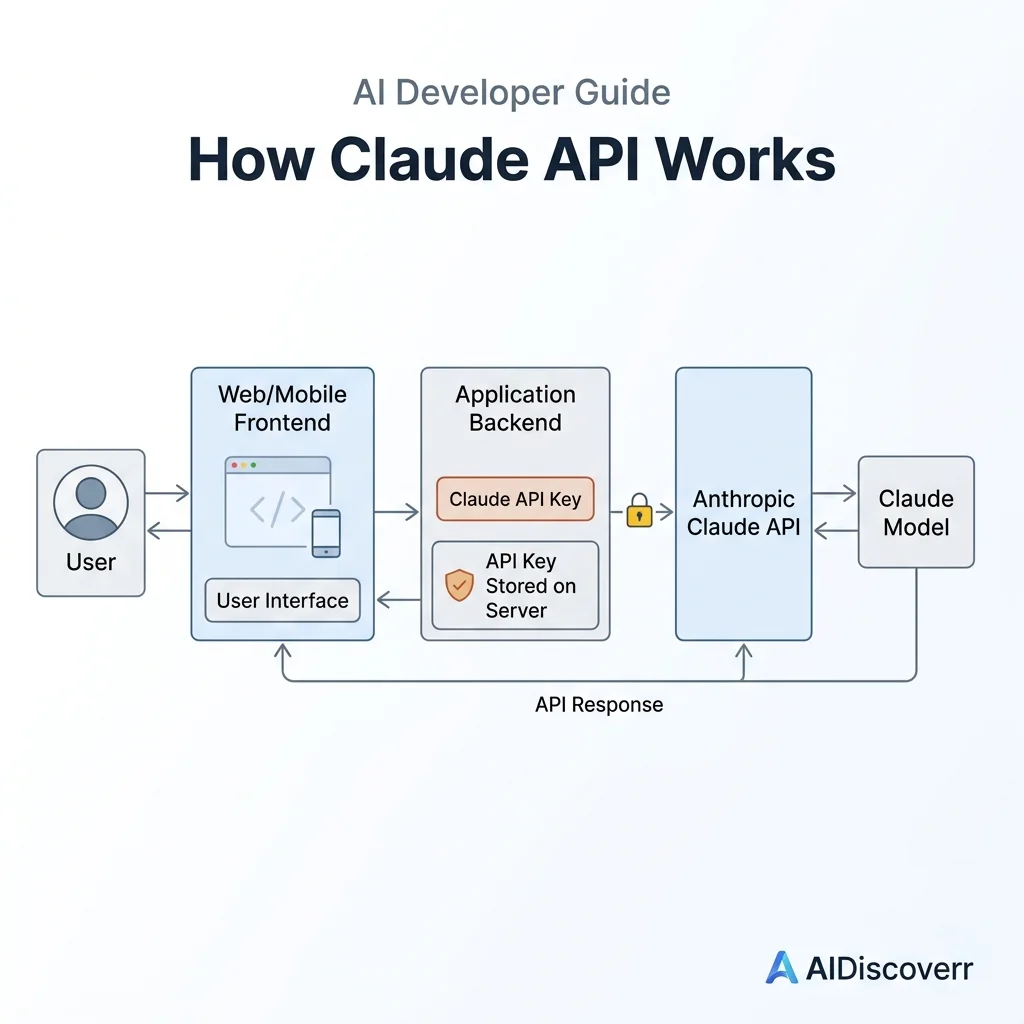
Your application ➔ Claude API ➔ Claude model ➔ AI response ➔ Your application
Claude API vs Claude.ai
This distinction is critical:
- Claude.ai is the consumer-facing chatbot interface where you interact with Claude through a browser or mobile app.
- Claude API is designed for software developers building Claude into their own custom codebases.
Anthropic's Help Center specifies that API billing and consumer Claude Pro subscriptions are managed separately. Having a Claude Pro subscription does not grant free API tokens.
What You Need Before Starting
- An Anthropic/Claude Console account.
- An API key or authentication setup.
- API credits added to your billing balance.
- A programming environment (Python 3.9+ or Node.js 18+).
Step 1: Create a Claude Console Account
Navigate to the Anthropic Console to register your developer account. This console acts as your administrative hub for managing team permissions, monitoring API usage, generating API keys, and experimenting inside the Claude Workbench.
Step 2: Create Your Claude API Key
API keys authenticate requests from your code. To generate a key, navigate to Settings ➔ API Keys inside the Console. Click Create Key, give it a descriptive name (e.g., development-laptop), and copy the full key immediately.
Step 3: Add API Credits
Claude API uses a prepaid credit system. Go to Billing inside the Console to purchase initial credits (minimum $5). You can also configure automatic reload thresholds so your production apps do not get cut off when credits run low.
Step 4: Install the Claude SDK
Install the official SDK for your development language:
Python:
pip install anthropic
JavaScript / TypeScript:
npm install @anthropic-ai/sdk
Step 5: Store Your API Key Securely
Store your key in an environment variable rather than hardcoding it in source code.
macOS / Linux:
export ANTHROPIC_API_KEY="sk-ant-api03-..."
Windows PowerShell:
$env:ANTHROPIC_API_KEY="sk-ant-api03-..."
Step 6: Make Your First Claude API Request
Create a file named quickstart.py and add the following code:
import anthropic

client = anthropic.Anthropic()

message = client.messages.create(
    model="claude-3-5-sonnet-20241022",
    max_tokens=1000,
    messages=[
        {
            "role": "user",
            "content": "Explain what an API is in simple English."
        }
    ]
)

for block in message.content:
    if block.type == "text":
        print(block.text)
Run the script:
python quickstart.py
Step 7: Understand the Messages API
The Messages API requires two parameters on every request: model and max_tokens, along with the array of messages. You can also specify an optional top-level system prompt to give higher-level instructions:
response = client.messages.create(
    model="claude-3-5-sonnet-20241022",
    max_tokens=500,
    system="You are a helpful technical documentation expert.",
    messages=[
        {"role": "user", "content": "Summarize how REST APIs work."}
    ]
)
Which Claude Model Should You Use?
| Use Case | Recommended Model | Key Strength |
|---|---|---|
| Complex reasoning & deep analysis | Claude 3.5 Opus | Highest benchmark accuracy & nuanced reasoning |
| Coding & general app development | Claude 3.5 Sonnet | Best balance of intelligence, speed, and cost |
| Fast, lightweight, budget tasks | Claude 3.5 Haiku | Lowest cost and extremely fast response latency |
Claude API Pricing
Pricing is calculated per million tokens (MTok):
| Model Tier | Input Price / MTok | Output Price / MTok |
|---|---|---|
| Claude 3.5 Opus | $15.00 | $75.00 |
| Claude 3.5 Sonnet | $3.00 | $15.00 |
| Claude 3.5 Haiku | $0.80 | $4.00 |
How to Use Claude API With JavaScript
import Anthropic from "@anthropic-ai/sdk";

const client = new Anthropic();

const response = await client.messages.create({
  model: "claude-3-5-sonnet-20241022",
  max_tokens: 500,
  messages: [{ role: "user", content: "Explain APIs to a beginner." }]
});

console.log(response.content);
Never Put Your Claude API Key in Frontend Code
Always route requests through your server or backend API route. Never call the Claude API directly from a browser or React client component.
How to Build a Multi-Turn Claude Conversation
To maintain context in a chat conversation, append previous turn messages to the request array:
messages = [
    {"role": "user", "content": "My name is Alex."},
    {"role": "assistant", "content": "Nice to meet you, Alex!"},
    {"role": "user", "content": "What is my name?"}
]
How to Stream Claude Responses
with client.messages.stream(
    model="claude-3-5-sonnet-20241022",
    max_tokens=1000,
    messages=[{"role": "user", "content": "Write a short essay on AI ethics."}]
) as stream:
    for text in stream.text_stream:
        print(text, end="", flush=True)
Claude API Tool Use & Agents
The Messages API accepts a tools parameter defining JSON schema tools that Claude can invoke to perform real-world actions, retrieve database records, or query external web APIs.
Common Claude API Errors & Troubleshooting
- 401 Unauthorized: Invalid API key or missing
x-api-keyheader. Verifyecho $ANTHROPIC_API_KEY. - 429 Too Many Requests: Rate limit exceeded or insufficient prepaid credit balance.
- 400 Invalid Request: Check model string formatting or missing
max_tokensparameter.
Frequently Asked Questions
Frequently Asked Questions
What is Claude API?
Claude API is Anthropic's programmatic interface for integrating Claude models into applications. It allows developers to send requests to Claude from their own software.
How do I get a Claude API key?
Create a Claude Console account and create an API key from the API key settings under Settings ➔ API keys.
Is Claude API free?
Claude API is primarily usage-based. Anthropic may provide limited credits for new users, but you should not treat the API as an unlimited free service.
Do I need Claude Pro to use the API?
No. Claude's consumer subscription (Claude Pro) and API access are separate products and billing systems.
Can I use Claude API with Python?
Yes. Anthropic provides an official Python SDK. Install it using 'pip install anthropic'.
Can I use Claude API with JavaScript?
Yes. Anthropic provides an official TypeScript/JavaScript SDK. Install it using 'npm install @anthropic-ai/sdk'.
Where should I store my Claude API key?
Store it in an environment variable (like ANTHROPIC_API_KEY) or a secure secret-management system. Never expose it in browser frontend code.
Does Claude API remember previous messages?
Your application manages the conversation history and sends the relevant messages sequence with subsequent requests.
Can Claude API stream responses?
Yes. Anthropic supports streaming through server-sent events, and its official SDKs provide simple streaming helper methods.
Can Claude API use tools?
Yes. The Messages API supports tool definitions and structured tool inputs, allowing Claude to interact with application-defined functions.
Final Verdict: Is Claude API Worth Using?
Claude API is an outstanding platform for developers building AI software, coding assistants, and multi-tool agents. Its strong reasoning benchmarks, clean SDK implementations, and prompt caching features make it a top choice for modern AI application development.
Developer setup guide. Verified against official Anthropic documentation. Not affiliated with Anthropic.