Leonardo AI Review 2026: Features, Pricing, How It Works & Alternatives
Lead AI Tech Analyst & Editorial Director
If you want one platform for AI-generated images, visual editing, model selection, creative consistency, and video,Leonardo AI is worth considering.
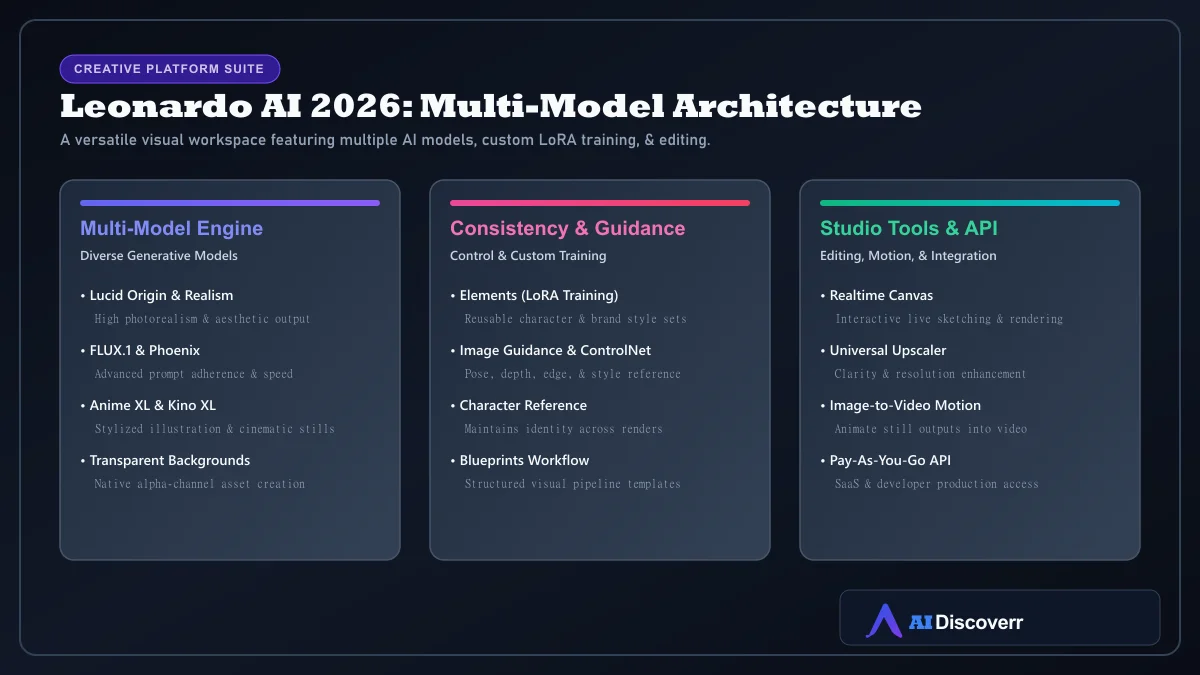
Part of Canva, Leonardo currently combines image generation, editing, Realtime Canvas, visual consistency tools (Elements/LoRA), upscaling, video capabilities, multiple AI models, and an API.
Leonardo AI at a Glance
| Category | Details |
|---|---|
| Tool | Leonardo.Ai (Canva Ecosystem) |
| Best for | AI image creation, editing, concept art, consistent visual assets |
| Free plan | Yes (150 Fast Tokens / day) |
| Entry paid plan | Essential — $12/month |
| Higher plans | Premium $30/month; Ultimate $60/month |
| API | Yes, separate Pay-As-You-Go system |
| Models supported | Lucid Origin, Lucid Realism, FLUX.1, Phoenix, Anime XL, Kino XL, SDXL |
| Key strength | Creative control + multiple models + consistency workflows |
| Best reason to choose it | Multi-model selection, Image Guidance, and custom LoRA Elements |
Is Leonardo AI Worth It in 2026?
Yes, if you need a multi-model workspace with visual control. Leonardo makes the most sense when you want to:
- Access multiple AI models (Lucid, Phoenix, FLUX, SDXL) in a single platform
- Maintain character and style consistency across images using Elements (LoRA)
- Guide compositions using pose, depth, edge, or style references
- Edit images and sketch in real time via Realtime Canvas
- Test features via a generous daily free tier (150 Fast Tokens/day)
What Is Leonardo AI?
Leonardo AI is a generative AI creative platform developed by Leonardo.Ai (part of Canva). Instead of relying on a single AI generation model, Leonardo provides access to multiple native and third-party models alongside interactive editing tools.
What Can Leonardo AI Do?
1. Generate Images from Text
Describe what you want using a prompt, select an appropriate model, and generate visual options across photorealistic, anime, cinematic, or illustrative styles.
2. Transform Existing Images
Use Image Guidance to apply style references, character references, or ControlNet pose/depth guidance onto source media.
3. Edit and Refine Images
Modify and edit generated images in real time while preserving core character, composition, and style elements.
4. Generate Video
Transform still images into animated video clips, with relaxed video generation supported for Ultimate subscribers on selected models.
5. Upscale Images
Enhance resolution and clarity for client deliverables using the Universal Upscaler tool.
Leonardo AI's Most Useful Features
Model Selection
Choose from Lucid Origin, Lucid Realism, FLUX.1 variants, Leonardo Phoenix, Anime XL, Kino XL, and SDXL based on your specific visual goals.
Image Guidance
Apply structural guidance (ControlNet, pose, depth, edge) and visual style references to maintain artistic control over output.
Elements & LoRA Training
Train custom Elements on a set of images to lock in recurring character identities, brand assets, or custom art styles across generations.
Realtime Canvas
Sketch or prompt and see the output update in real time for rapid visual brainstorming and inpainting.
Which Leonardo Features Matter Most for Different Users?
| User Type | Most Useful Features |
|---|---|
| Beginner | Text-to-image, presets, basic generation |
| Designer | Image guidance, editing, Canvas, upscaling |
| Character Artist / Game Dev | Character references, Elements (LoRA) training |
| Marketer / Brand Team | Elements, private generations, team workflows |
| Developer | Pay-As-You-Go API, model selection |
How to Use Leonardo AI
- Create an account: Start with the free tier (150 daily Fast Tokens).
- Formulate your prompt: Specify subject, environment, composition, lighting, style, and camera angle.
- Select your model: Match the model (Lucid, Phoenix, FLUX, Anime XL) to your target aesthetic.
- Generate & compare: Create multiple variations to evaluate output quality.
- Refine & edit: Use Image Guidance, Realtime Canvas, or Elements for fine adjustments.
- Upscale & export: Apply Universal Upscaler before downloading finished assets.
Leonardo AI Pricing in 2026
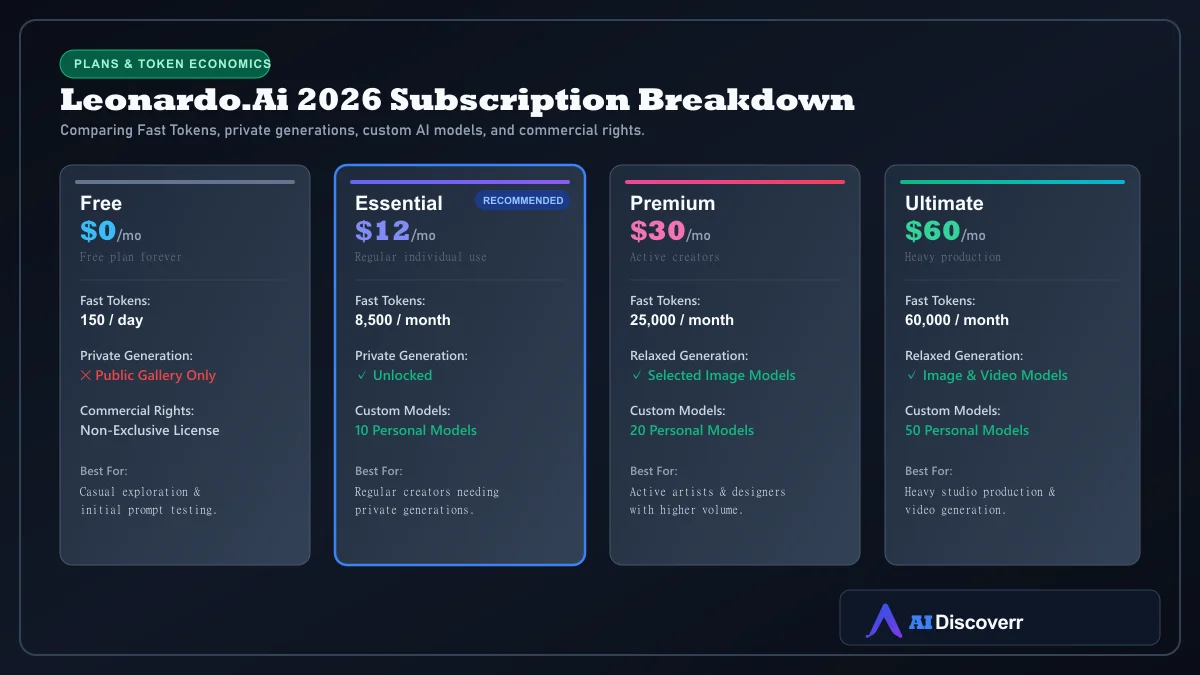
| Plan | Price / Month | Fast Tokens | Key Capabilities |
|---|---|---|---|
| Free | $0 | 150 / day | Basic access, public gallery, non-exclusive commercial license |
| Essential | $12/mo | 8,500 / month | Private generations, 10 personal AI models, 25.5k Token Bank |
| Premium | $30/mo | 25,000 / month | 20 personal AI models, 75k Token Bank, selected relaxed image gen |
| Ultimate | $60/mo | 60,000 / month | 50 personal AI models, 180k Token Bank, selected relaxed image + video |
How Leonardo AI Tokens Actually Work
Fast Tokens are computational credits. A single image does not cost 1 token—token consumption varies depending on the model used, resolution, upscaling, and feature complexity. Unused tokens on paid plans roll over into a Token Bank up to plan limits.
What "Unlimited" Means on Leonardo AI
Is Leonardo AI Free?
Yes. Leonardo provides a Free plan with 150 Fast Tokens per day that reset daily, ideal for casual experimentation.
Commercial Rights and Ownership
Paid subscribers retain full copyright and ownership rights over generated images. Free users receive a non-exclusive, royalty-free commercial license while Leonardo retains rights to use free-tier creations.
Best Leonardo AI Use Cases
- Game Concept Art & Assets: Visual exploration, props, character design, and environment concept art.
- Character Consistency: Reusing character LoRA Elements across storyboards and illustrations.
- Marketing & Social Graphics: Ad concepts, campaign variations, and blog visuals.
- Product Imagery: Render product ideas and studio context scenes.
Leonardo AI vs Midjourney
Leonardo offers superior model selection, custom LoRA training, interactive editing, and an API.Midjourney V8.2 is preferred by creators who prioritize its specific artistic style.
Best Leonardo AI Alternatives
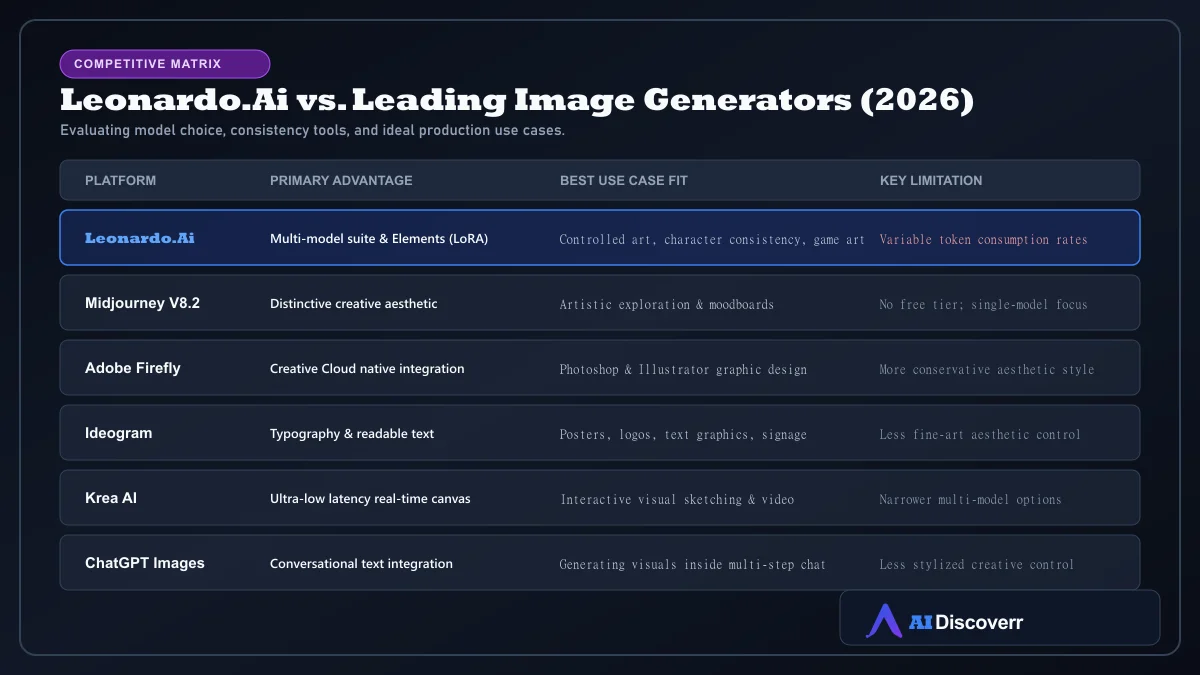
- Leonardo vs Adobe Firefly: Firefly excels inside Photoshop/Illustrator design workflows.
- Leonardo vs Runway: Runway AI is stronger for dedicated AI video production.
- Leonardo vs SeaArt: SeaArt AI offers a budget-conscious Stable Diffusion alternative.
Leonardo AI Pros and Cons
Where It Shines
Generous free tier with 150 daily Fast Tokens
Broad model variety (Lucid, Phoenix, FLUX.1, Anime XL, SDXL)
Elements (LoRA) system for custom character & style consistency
Image Guidance (ControlNet, pose, depth, edge) controls
Realtime Canvas & Universal Upscaler tools
Pay-As-You-Go API for developer integration
Where It Falls Short
Token consumption rates vary depending on feature and model selection
Feature-dense user interface requires a learning curve
Relaxed generation rules exclude certain third-party models
Free plan creations are public and subject to different ownership terms
Who Should Use Leonardo AI?
Designers, game developers, digital artists, marketers, and content creators who need image generation combined with control, editing, and custom style training.
Who Should NOT Use Leonardo AI?
Users seeking a single-prompt basic interface, fixed-cost per-image pricing, or specialized vector-only design engines.
Frequently Asked Questions
Frequently Asked Questions
Is Leonardo AI free?
Yes. Leonardo AI offers a Free plan that provides 150 Fast Tokens per day for basic exploration and testing.
How much does Leonardo AI cost?
Current monthly pricing is $12 for Essential (8,500 tokens/mo), $30 for Premium (25,000 tokens/mo), and $60 for Ultimate (60,000 tokens/mo). Taxes may apply.
How do Leonardo AI tokens work?
Tokens are computational credits used for generating images, videos, upscaling, and training models. Token consumption varies based on model choice and image settings.
Does Leonardo AI generate videos?
Yes. Leonardo supports video generation from still images, with relaxed video generation available on selected models for Ultimate plan subscribers.
Does Leonardo AI have an API?
Yes. Leonardo provides a separate Pay-As-You-Go API system for developers and enterprise software integration.
Can Leonardo AI create consistent characters?
Yes. Leonardo supports Character References and Elements (custom LoRA models) to maintain character visual consistency across scenes.
Can Leonardo AI generate transparent images?
Yes. Leonardo supports transparent-background image generation for compatible models and workflows.
Can I use Leonardo AI images commercially?
Paid subscribers retain full copyright and ownership rights over generated media. Free plan users receive a non-exclusive commercial license subject to Leonardo's terms.
Is Leonardo AI better than Midjourney?
Leonardo AI offers greater model variety, custom LoRA training, and interactive editing tools. Midjourney is preferred by creators who prioritize its specific artistic aesthetic.
Final Verdict
Leonardo.Ai is a top recommendation in 2026 for creators who demand control and versatility.Its multi-model architecture, custom Elements training, and interactive studio tools make it one of the most effective visual platforms available.