Runway AI Review 2026: Features, Pricing, Gen-4.5 & Alternatives
Lead AI Tech Analyst & Editorial Director
If you want to create AI-generated videos, Runway is one of the platforms worth considering in 2026. However, it is no longer just a simple text-to-video generator.
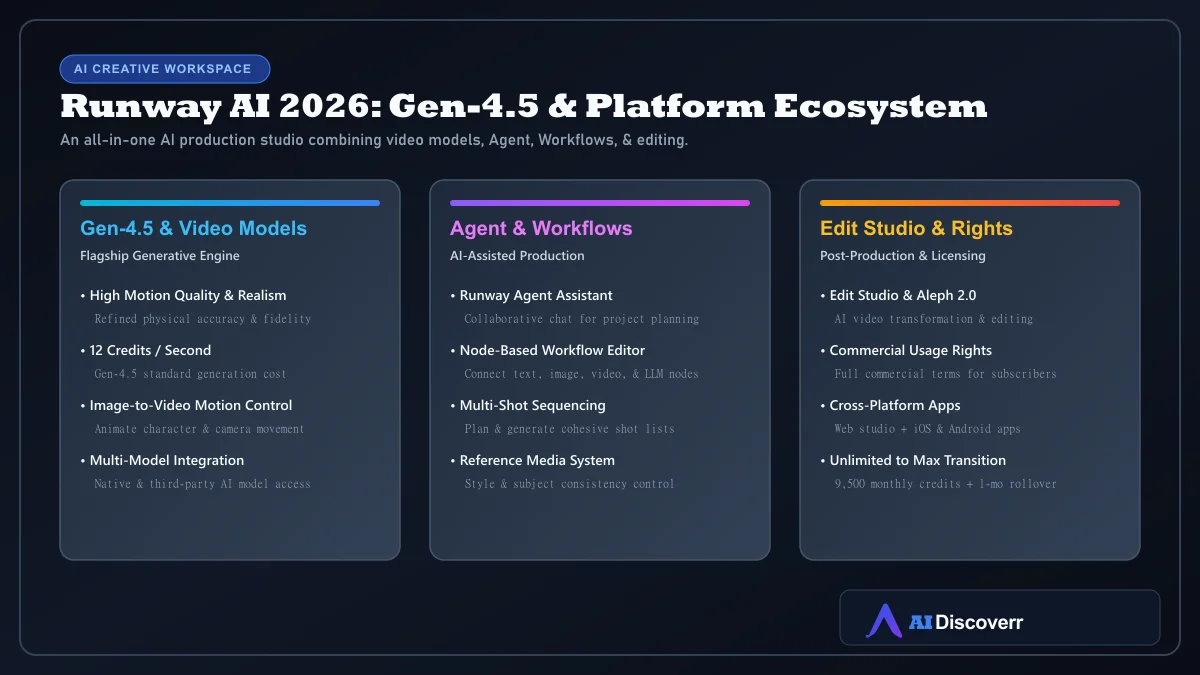
Runway now combines AI video generation (Gen-4.5), image generation, video editing (Aleph 2.0 & Edit Studio), Agent-based production, workflows, and access to several third-party models in one unified creative workspace.
Runway AI at a Glance
| Category | Details |
|---|---|
| Tool | Runway |
| Main use | AI video, image, audio, and creative production workspace |
| Best for | Filmmakers, creators, marketers, designers, and production teams |
| Flagship video model | Gen-4.5 |
| Free plan | Yes, 125 one-time credits |
| Starting paid price | $15/month ($12/month with annual billing) |
| Paid plans | Standard ($15/mo), Pro ($35/mo), Max ($95/mo), Enterprise |
| Agentic AI | Yes (Runway Agent) |
| Workflows | Yes (Node-based visual workflow editor) |
| Mobile apps | iOS and Android |
| Commercial use | Permitted under Runway's stated usage rights |
| Main drawback | Credit-based economics (12 credits/sec for Gen-4.5) can scale up costs quickly |
Is Runway Worth It in 2026?
Yes, if you need a broad AI video-production environment. Runway makes the most sense when you want to:
- Generate original shots and animate reference images
- Edit existing footage with AI using Aleph 2.0 & Edit Studio
- Maintain character and style references across scenes
- Build repeatable node-based workflows
- Use Agent to assist with multi-shot project planning
Its value is less obvious if you only need one short AI clip every few weeks or require specialized talking presenters.
What Is Runway AI?
Runway is a generative AI creative platform developed by Runway AI, Inc. It allows users to create and manipulate media using both native AI models and integrated third-party models.
What Can You Do With Runway?
1. Generate AI Video
You can start from text prompts, static images, or reference media. Runway's AI video generator lets creators refine, extend, upscale, and export clips.
2. Turn Images into Video
Image-to-video provides superior control over character design, composition, and lighting compared to raw text prompts, allowing prompts to focus on camera movement and motion.
3. Edit Existing Footage
Using tools like Edit Studio and Aleph 2.0, creators can modify, stylize, and transform existing video files rather than generating content entirely from scratch.
Runway Gen-4.5 Explained
Gen-4.5 is Runway's flagship video model, focusing on prompt adherence, motion quality, physical accuracy, and visual fidelity. Gen-4.5 consumes 12 credits per second of output.
Runway Agent: What Is It?
Runway Agent is a chat-based creative assistant that can plan multi-shot sequences, generate images and videos, analyze assets, and organize timelines.
Runway Pricing and Credits
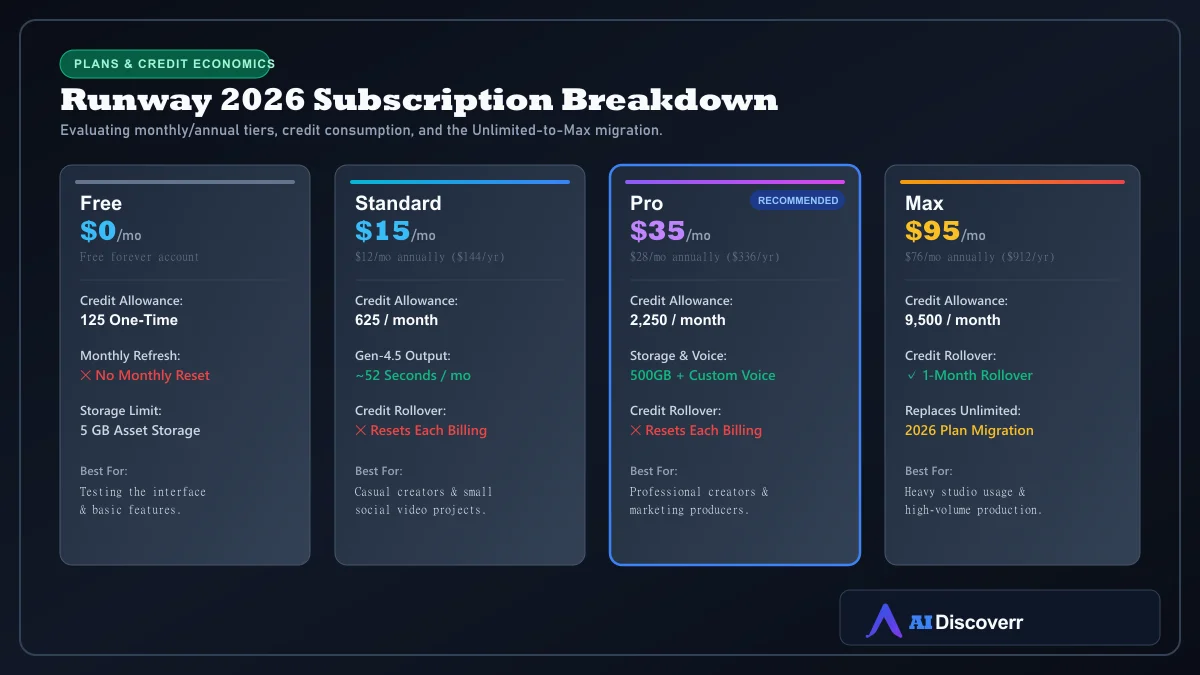
| Plan | Monthly Price | Annual Price | Credits / Month | Key Features |
|---|---|---|---|---|
| Free | $0 | $0 | 125 one-time | 5GB storage, non-renewing credits |
| Standard | $15/mo | $12/mo ($144/yr) | 625 / month | ~52s of Gen-4.5, standard generation |
| Pro | $35/mo | $28/mo ($336/yr) | 2,250 / month | Custom voice, 500GB storage |
| Max | $95/mo | $76/mo ($912/yr) | 9,500 / month | 1-month credit rollover, studio export |
How Much Video Do Runway Credits Actually Buy?
Because Gen-4.5 costs 12 credits per second, 625 monthly credits on Standard yield roughly 52 seconds of footage. However, because production involves iterations and retries, actual finished footage yields vary.
Runway Unlimited Is Changing to Max
How to Use Runway AI
- Create an account: Sign up at Runway.com via Chrome web browser or mobile app.
- Select your entry point: Start from text, image, existing video, or Runway Agent.
- Construct your prompt: Combine subject, motion action, camera movement, and visual style.
- Review & iterate: Adjust camera tracking or motion weights incrementally.
- Edit & assemble: Use Edit Studio to refine clips before final assembly.
Best Runway Workflows
- Social Video: Concept → reference image → image-to-video → edit → export.
- Product Commercial: Product photo → reference camera shot → variation → edit.
- Short Film Production: Script → character references → shot generation → Edit Studio assembly.
Commercial Rights and Privacy
Runway states that creators retain commercial usage rights over generated media. However, Runway's Terms note that user inputs and outputs may be used for AI model training. Sensitive enterprise teams should consult corporate data protections.
Runway Pros and Cons
Where It Shines
Comprehensive AI video studio (Gen-4.5, Agent, Edit Studio, Workflows)
Image-to-video motion control and reference media support
Node-based workflow automation for complex production pipelines
Stated commercial ownership rights for subscribers
Web studio interface plus native iOS and Android apps
Where It Falls Short
Gen-4.5 credit cost (12 credits/sec) can make iteration expensive
Free plan credits (125) are one-time and non-renewing
Standard and Pro monthly credits do not roll over
Unlimited plan is being sunset in favor of credit-capped Max tier
Who Should Use Runway?
Filmmakers, video editors, creative agencies, and visual marketers who require a multi-tool workspace rather than a single prompt box.
Who Should NOT Use Runway?
Users seeking low-cost bulk generation, specialized talking-head avatars (use HeyGen/Synthesia), or fixed-cost unlimited video output.
Runway Alternatives
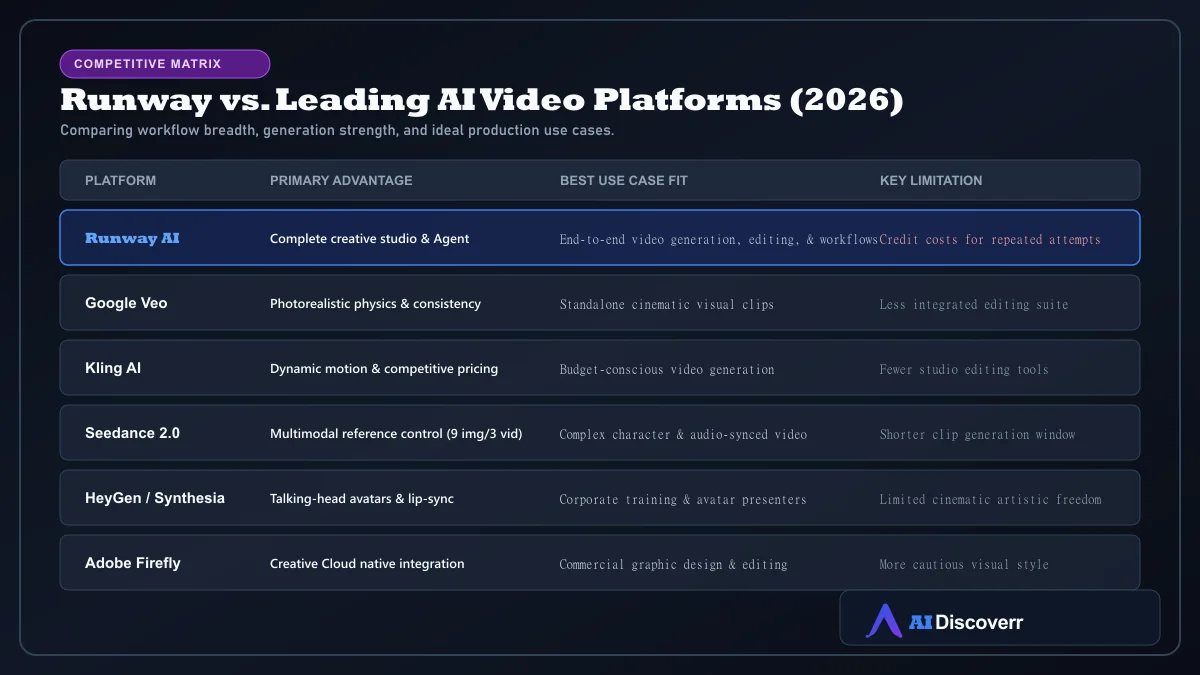
- Runway vs Google Veo: Veo offers photorealistic physics in standalone clips; Runway offers superior workflow tools.
- Runway vs Seedance: Seedance 2.0 excels at multi-image and audio reference control.
- Runway vs Midjourney: Midjourney leads in static artistic image generation.
Frequently Asked Questions
Frequently Asked Questions
Is Runway AI free?
Yes. Runway offers a Free plan that includes 125 one-time credits and 5GB of asset storage. The credits do not refresh monthly.
How much does Runway AI cost?
Current monthly pricing is $15 for Standard, $35 for Pro, and $95 for Max. Annual billing provides a 20% discount ($12/mo, $28/mo, and $76/mo).
How many credits does Gen-4.5 use?
Runway Gen-4.5 consumes 12 credits per second of video generated.
Can I use Runway videos commercially?
Yes. Runway's plan terms grant subscribers ownership and commercial usage rights over generated media.
Do Runway credits roll over?
Standard and Pro monthly credits do not roll over. Max plan subscribers can roll over unused credits for up to one month.
Is Runway Unlimited still available?
Runway is transitioning from Unlimited to Max for new subscribers. Existing Unlimited users are scheduled to transition to Max on September 1, 2026.
Is Runway good for beginners?
Yes, but beginners should start simple. While simple text-to-video is accessible, advanced features like Agent, node workflows, and Edit Studio have a steeper learning curve.
Is Runway better than Kling or Veo?
Runway's main advantage is its complete creative production environment (Agent, Workflows, editing). Models like Veo or Kling may be preferred for specific standalone clip qualities or lower costs.
Final Verdict
Runway is a top-tier choice in 2026 for professional AI video production. Its true value lies in the integration of Gen-4.5, Runway Agent, Edit Studio, and node workflows into one creative ecosystem.