Seedance 2.0 Review 2026: Features, Pricing, Safety & How It Works
Table of Contents
Seedance 2.0 is ByteDance's multimodal AI video model for creating and editing short videos using text, images, video and audio references. Its biggest advantage is not simply image quality. It is the amount of control you can give the model through multiple reference assets and natural-language instructions.
ByteDance launched Seedance 2.0 in February 2026. The model supports mixed text, image, video and audio inputs and can generate short multi-shot audio-video sequences.
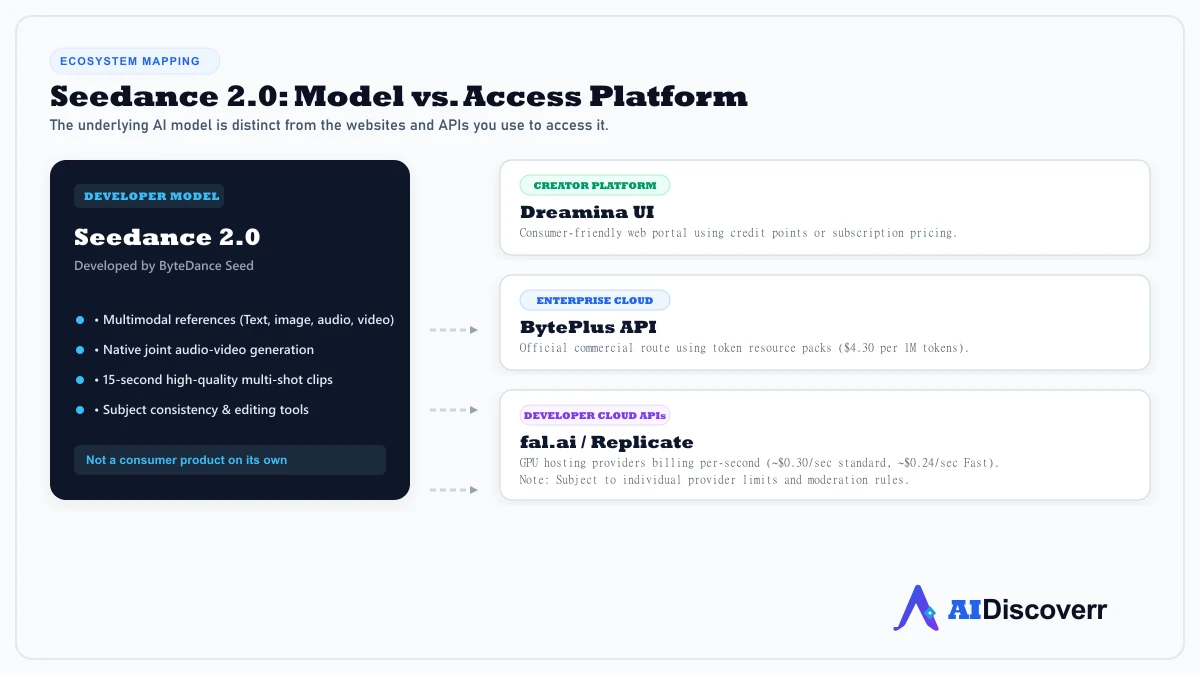
The catch is that Seedance 2.0 is not a single subscription product with one universal price. You may encounter it through Dreamina, BytePlus or third-party API providers, and the cost and available controls can differ.
So, is Seedance 2.0 worth using in 2026?
For creators who need reference-heavy video generation, complex motion and synchronized audio, it is one of the most interesting models to test. For users who only want simple text-to-video generation or long continuous videos, another tool may fit better.
What Is Seedance 2.0?
Seedance 2.0 is an AI video-generation model created by ByteDance Seed. Unlike a basic text-to-video model, it can use several types of information at once.
For example, you could provide a character image, a location image, a reference video showing camera movement, an audio track, and a written description. The model can then use those references together when creating the new video.
ByteDance says the model supports up to 9 images, 3 videos and 3 audio clips alongside natural-language instructions. That makes Seedance 2.0 especially interesting for creators who already have assets and want AI to transform them into a coordinated video.
Is Seedance 2.0 Actually Good?
Yes, but its strongest selling point is control rather than perfect realism.
ByteDance reports improvements in motion stability, physical accuracy, visual realism, instruction following, multimodal reference understanding, and audio-visual synchronization.
However, the company also openly acknowledges remaining problems involving detail stability, hyper-realism, dynamic movement, multi-subject consistency, text rendering, and occasional audio distortion.
That matters. A good AI video model does not need to produce a perfect result every time. What matters is whether it helps you reach a usable result with fewer iterations. Independent reviews also tend to highlight Seedance's control and reference workflows rather than treating raw visual quality as its only advantage.
Seedance 2.0 Key Features
Multimodal Reference Generation
This is arguably Seedance 2.0's defining feature. You can combine multiple types of references instead of relying on one prompt.
For example: Image 1 provides the character, Image 2 provides the environment, Video 1 provides the camera movement, and Audio 1 provides the music. The prompt describes the action itself. This is much closer to giving an AI system a creative brief than simply asking it to invent a video.
Text-to-Video
Seedance 2.0 can create videos from written instructions. A useful prompt can describe the subject, action, environment, camera angles, lighting, style, and audio. The key is to make the visual relationships clear rather than writing extremely long, complex sentences.
Image-to-Video
Image-to-video lets you start with an existing image (like product photography, character art, illustrations, or portraits) and describe how you want it to move. Current API documentation exposes image-to-video endpoints with configurable resolution, duration, and audio options.
Video References
Seedance can use video as a reference, which is particularly useful for tracking camera movements, motion rhythms, action sequences, or scene pacing. The model uses the reference material to guide its generation rather than trying to invent every movement from text.
Native Audio Generation
Seedance 2.0 is designed around joint audio-video generation. It supports stereo audio, dialogue, ambient sounds, and background music synchronized directly with the video. This reduces the need to generate silent footage and build every sound layer separately, although occasional audio distortion remains.
Video Editing and Extension
Seedance 2.0 is not limited to generating new clips from scratch. Users can request targeted modifications to clips, characters, actions, or storylines, and extend existing videos to continue a shot. However, video extension is not a replacement for traditional editing when assembling longer cinematic stories.
Character and Subject Consistency
By anchoring the model with character reference sheets (up to 9 images), creators can generate different scenes containing the same character with reduced identity drift.
Camera and Motion Control
The model translates camera motion instructions (pan, tilt, zoom) and movement references with greater physical stability. However, complex multi-subject interactions can still result in minor glitches.
What Can You Make With Seedance 2.0?
- Social media videos: Dynamic, sound-synced short clips for TikTok, Instagram Reels, and YouTube Shorts.
- Product advertising: Visual commercial concepts using product photography and movement references.
- Music videos: Visual sequences driven natively by the rhythm and mood of an uploaded audio reference.
- Storyboards and previsualization: Visualizing camera angles, lighting, and action blocks before traditional film production.
- Educational animations: Short visual demonstrations of scientific or historical concepts.
How Seedance 2.0 Works
Seedance 2.0 operates as a unified multimodal architecture. Instead of processing text instructions, visual frames, and audio tracks in isolated pipelines, it processes them jointly. This allows the model to output synchronized audio and video in a single generation step.
How to Use Seedance 2.0
- Define the final destination: Establish aspect ratio, resolution, and audio needs based on target platforms.
- Prepare your references: Gather your character images, product photos, or camera reference clips.
- Write structural instructions: Format prompts to specify: Subject → Action → Environment → Camera → Lighting → Style → Audio.
- Assign references: Map reference assets to specific tags in the interface (e.g., character, style, audio).
- Generate and review: Start with lower-cost or fast draft settings before running final high-resolution clips. Review for hand, face, and audio consistency.
Seedance 2.0 Pricing
Why There Isn't One Universal Price
The model is offered through multiple front-ends and cloud APIs, each using different metrics like tokens, credits, subscription packs, or per-second billing.
BytePlus Pricing
BytePlus lists official Seedance 2.0 enterprise resource packs:
| Pack Size | Seedance 2.0 Standard | Seedance 2.0 Fast |
|---|---|---|
| 1 Million Tokens | $4.30 | $3.30 |
| 10 Million Tokens | $43.00 | $33.00 |
| 100 Million Tokens | $430.00 | $330.00 |
API Pricing
Third-party GPU host APIs (like fal.ai) use per-second run rates:
- 720p Standard: ~$0.3034 per second
- 720p Fast: ~$0.2419 per second
- 1080p Standard: ~$0.682 per second
What Does Seedance 2.0 Really Cost Per Usable Clip?
Nominal pricing is misleading. If a 10-second clip costs $3.00, but it takes four attempts to get a clip without hand glitches, floating objects, or audio drift, your actual production cost is $12.00 per usable shot.
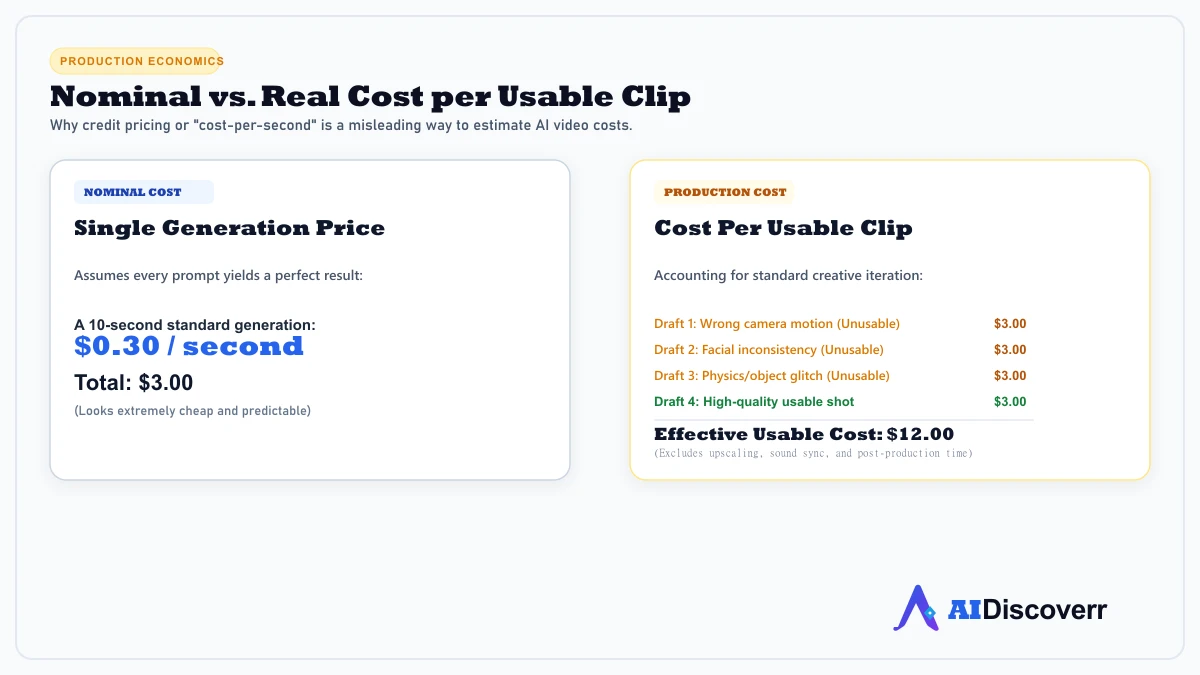
Always calculate your budget based on your average successful-generation rate rather than the nominal single-generation cost.
Is Seedance 2.0 Free?
No permanent free tier exists for the model. Some third-party access providers or reseller apps offer limited free trial credits upon signup, but official commercial and developer access through BytePlus and API clouds is entirely pay-as-you-go.
Is Seedance 2.0 Safe?
From a software perspective, the model is secure and does not compromise system safety. From a content perspective, safety depends heavily on user inputs and the specific moderation layers enforced by your chosen access provider.
Seedance 2.0 Copyright and Commercial Use
Seedance 2.0 faced immediate copyright controversy at launch. Reports from Reuters and TechCrunch noted that ByteDance delayed its planned global rollout after U.S. film studios raised concerns about the model's ability to generate depictions of copyrighted characters and celebrity likenesses without authorization.
Before using Seedance for commercial client work, confirm that you own or have licensed all reference inputs (images, audio, videos) and verify the specific commercial licensing terms provided by your access platform.
Seedance 2.0 Limitations
- Short duration: Max output remains around 15 seconds, requiring separate assembly for longer stories.
- Physics and scene errors: Multiple subjects or fast-moving objects still result in deformations.
- Text rendering: Logos, product packaging, and typography can appear blurred or misshapen.
- Audio distortion: Occasional robotic tones or static can occur in generated sound effects or voice tracks.
- Provider dependency: Access speeds, costs, and content filters vary widely depending on the provider wrapper.
Seedance 2.0 vs Sora vs Veo vs Kling
| Feature | Seedance 2.0 | Sora | Veo | Kling |
|---|---|---|---|---|
| Multimodal Refs | Excellent | Strong | Strong | Strong |
| Native Audio | Yes | Varies | Yes | Varies |
| Max Length | Up to 15s | Up to 60s | Up to 60s | Up to 10s |
| Best Workflows | Reference-heavy shots | Cinematic scenes | High-resolution video | Creative motion controls |
Who Should Use Seedance 2.0?
- Content Creators: Excellent for generating highly-customized, short-form clips with matching music or ambient sound.
- Marketers: Perfect for rapid advertising concepts matching specific client product shots.
- Filmmakers: A valuable tool for previsualization, testing camera positions, and scene blocking.
Who Should Not Use Seedance 2.0?
- Creators requiring long, single continuous shots (Sora 2 or Veo are better suited).
- Enterprise teams requiring absolute legal copyright guarantees for AI outputs without independent licensing validation.
- Users wanting a simple, cheap prompt-to-video workflow with zero editing or technical setup.
Seedance 2.0 vs Seedance 2.0 Mini and 2.0 4K
Dreamina's current Seedance family includes three models:
- Seedance 2.0: The standard balance of speed and resolution.
- Seedance 2.0 Mini: Optimized for faster generation speeds and lower token costs, ideal for drafts.
- Seedance 2.0 4K: Optimized for high-definition visual clarity and upscale-quality details.
Seedance 2.0 Pros and Cons
Where It Shines
Highly controllable reference-driven video generation (up to 9 images, 3 videos)
Native joint audio-video synthesis with synchronized voice and background tracks
Improved handling of complex motion and character consistency
Advanced in-context video editing and continuation (extension) workflows
Official enterprise API routes available alongside user-friendly web portals
Where It Falls Short
Production costs accumulate quickly due to failed draft iterations
Underlying model delayed/restricted globally due to studio copyright issues
Short output duration limits (typically 4 to 15 seconds per clip)
Occasional audio distortion and rendering glitches remain areas of weakness
Model variants and provider-specific configurations complicate workflow choices
Is Seedance 2.0 Worth It?
If you need precise reference matching and native audio-video sync, yes. However, you should budget for the cost of multiple generation iterations, as first drafts rarely yield final-quality clips. Start with lower-cost Mini generation before committing to final high-resolution renders.
Frequently Asked Questions
Frequently Asked Questions
What is Seedance 2.0?
Seedance 2.0 is a ByteDance AI video-generation model that supports text, images, video and audio as multimodal inputs. It is designed for controllable video generation, editing and extension.
Is Seedance 2.0 free?
Not universally. Access depends on the platform. Official commercial/API routes use paid resources, while some consumer platforms may offer trials or credits.
How long can Seedance 2.0 videos be?
ByteDance's official launch description says Seedance 2.0 supports up to 15-second high-quality multi-shot output. Actual limits can vary by access route.
Can Seedance 2.0 generate audio?
Yes. Native audio-video generation is one of its key features.
How many images can Seedance 2.0 use?
According to ByteDance's official launch description, Seedance 2.0 can accept up to 9 images as visual reference inputs to guide character, scene, or object consistency.
Can Seedance 2.0 use video references?
Yes. The model supports up to 3 video clips as references, allowing creators to guide motion rhythm, camera movement, or pacing from existing footage.
Can I use Seedance 2.0 commercially?
Commercial usage rights are not determined by the model itself, but by the platform or API provider you use to access it. Additionally, you must ensure you have full legal rights to any reference images, videos, audio, or likenesses uploaded.
Does Seedance 2.0 have an API?
Yes, official commercial API access is provided via BytePlus. Third-party cloud API services like Fal.ai and Replicate also offer Seedance 2.0 integration with per-second or invocation-based pricing.
How much does the API cost?
Pricing varies by provider. For example, Fal.ai charges approximately $0.3034 per second for 720p standard and $0.2419 per second for 720p Fast. BytePlus offers token-based resource packs starting at $4.30 per million tokens.
Is Seedance 2.0 better than Sora?
It depends on the workflow. Seedance 2.0 excels at reference-driven control and native audio-video generation, making it a stronger tool for creators who have existing assets. Sora and other models may offer longer continuous outputs or different stylistic qualities.
What are the limitations of Seedance 2.0?
Key limitations include a short generation window (typically 4 to 15 seconds per clip), potential for physical movement errors in complex scenes, occasional audio distortion, and text rendering issues.
Final Verdict
Seedance 2.0 represents a significant shift from simple text-to-video generation toward a highly controllable, asset-driven workflow. Its native multimodal references and joint audio-video architecture make it a powerful tool for social media creators, storyboard artists, and advertisers.
However, it is not a magic solution. Real-world costs can quickly escalate due to the iterations needed for a usable clip, and copyright concerns remain a significant issue for commercial creators. For those requiring precise camera, character, and audio styling from existing assets, it is a must-test tool in 2026. For simple prompt-to-video needs or long-form narrative production, other workflows remain more practical.
Editorial review. Not affiliated with ByteDance or Seedance. Features and prices change — confirm details on official provider channels before purchasing resources.
Lead AI Tech Analyst & Editorial Director