Kling AI Review 2026: Features, Pricing, How to Use It & Alternatives
Lead AI Tech Analyst & Editorial Director
If you need realistic AI video generation, image-to-video quality, character consistency, and native audio,Kling AI (Kling 3.0) is one of the most capable platforms available in 2026.
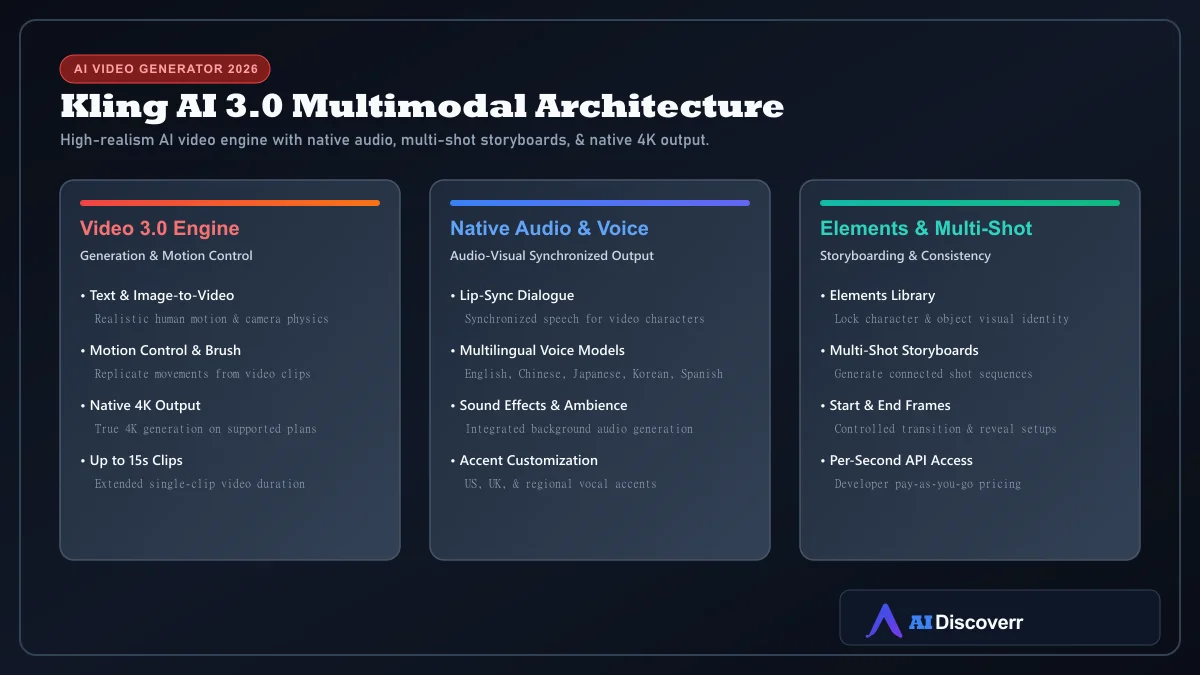
Developed by Kuaishou Technology, Kling 3.0 combines text-to-video, image-to-video, native audio, lip-sync, Motion Control, multi-shot storyboarding, and native 4K output.
Kling AI at a Glance
| Category | Details |
|---|---|
| Tool | Kling AI (Kuaishou Technology) |
| Main use | AI video generation, image-to-video, native audio, and storyboarding |
| Best for | Short-form video creators, YouTubers, animators, and digital marketers |
| Flagship generation | Kling 3.0 / Kling 3.0 Turbo |
| Free plan | Yes (Basic plan with limited daily credits) |
| Entry paid plan | Standard — $10/month ($6.99 1st mo promo) |
| Higher plans | Pro ($37/mo), Premier ($92/mo), Ultra ($180/mo) |
| Video length | Up to 15 seconds per output clip |
| Maximum resolution | Native 4K on supported plans/settings |
| Native audio | Yes (dialogue, sound effects, lip-sync) |
| Commercial rights | Included on Standard and higher paid memberships |
Is Kling AI Worth It in 2026?
Yes, for creators who prioritize realistic motion and image-to-video fidelity. Kling AI is particularly compelling if you want to:
- Generate realistic human motion and camera physics
- Convert static visual assets into video clips (image-to-video)
- Maintain character and visual element consistency via Elements
- Produce videos with synchronized native dialogue and lip-sync
- Create multi-shot storyboards with connected scenes
- Output high-resolution 4K clips on supported plans
What Is Kling AI?
Kling AI is a generative AI creative platform developed by Kuaishou Technology. Launched originally in 2024, Kling 3.0 (released in February 2026) operates as an all-in-one multimodal system supporting text, images, video, and audio inputs and outputs.
Who Is Kling AI For?
Kling AI is a strong fit for short-form social creators (TikTok, Reels, Shorts), YouTubers needing cinematic B-roll, digital marketers, video agencies, animators, and filmmakers developing concept visual storyboards.
Who Should NOT Use Kling AI?
Kling may not be your first choice if you require full timeline NLE editing inside one application (platforms like Runway provide broader editing suites), zero-queue instant rendering during peak server hours, or fixed flat-rate pricing without credit management.
Kling 3.0: What's New?
Native Audio & Lip-Sync
Kling 3.0 introduces synchronized audio generation, including lip-sync dialogue, vocal accents (US, UK, regional), sound effects, and background ambient tracks.
Multi-Shot Storytelling
Generates connected sequences of shots from a single creative direction, allowing creators to build continuous visual narratives.
Character & Element Consistency
The Elements library allows users to lock in recurring character identities, props, or brand style sets across multiple generations.
Native 4K Resolution
Kling 3.0 introduced true native 4K video rendering on eligible subscription tiers and settings.
Kling AI Features Explained
Text-to-Video
Describe a scene using detailed prompts specifying subject, action, environment, camera movement, lighting, and style.
Image-to-Video
Provide a reference image to control character appearance, product aesthetics, or photographic composition before generating movement.
Motion Control & Motion Brush
Replicate movements from uploaded reference video clips and pair them with custom character images.
Start and End Frames
Define starting and ending visual frames to control transformations, product reveals, or scene transitions.
★ Kling AI Credit System Explained
Kling AI Pricing in 2026
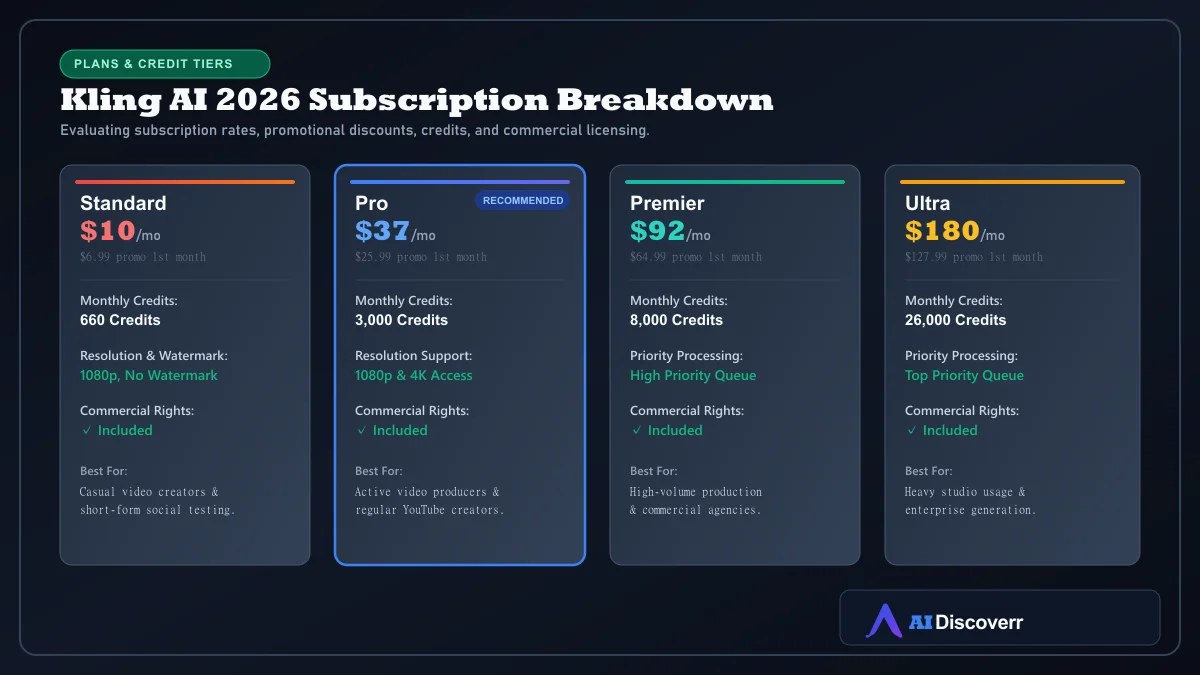
| Plan | Monthly List Price | Promotional Offer* | Monthly Credits | Key Features |
|---|---|---|---|---|
| Basic | Free | Free | Limited | Basic testing, non-commercial license, watermarked exports |
| Standard | $10/mo | $6.99 1st mo | 660 / month | 1080p output, watermark removal, commercial license |
| Pro | $37/mo | $25.99 1st mo | 3,000 / month | Priority generation, 4K access, commercial license |
| Premier | $92/mo | $64.99 1st mo | 8,000 / month | High-volume production queue, commercial license |
| Ultra | $180/mo | $127.99 1st mo | 26,000 / month | Enterprise studio volume credit tier |
*Promotional first-month discounts apply to initial subscriptions on official Kling pricing pages.
Is Kling AI Free?
Yes. Kling offers a free Basic plan for initial exploration. Free exports include watermarks and carry a non-commercial license.
How to Use Kling AI
- Sign in: Create an account on the Kling platform.
- Select creation mode: Choose Text-to-Video, Image-to-Video, or Motion Control.
- Select model: Choose Kling 3.0 or Kling 3.0 Turbo based on speed vs quality requirements.
- Enter prompt: Formulate clear visual instructions.
- Upload reference: Add visual references for character or composition guidance.
- Adjust settings: Set duration (up to 15s), resolution (1080p/4K), aspect ratio, and native audio.
- Generate & review: Evaluate output motion quality, lip-sync, and camera physics.
- Export: Download finished clips for your production pipeline.
How to Write Better Kling AI Prompts
Use a structured prompt formula:
Subject + Action + Environment + Camera Movement + Lighting + Motion Physics + Style + Audio
Best Kling AI Use Cases
- YouTube Shorts & Reels: High-impact visual hooks, B-roll, and cinematic clips.
- Product Visualizations: Animating static product photos into video commercials.
- Cinematic Storyboards: Visualizing film concepts and commercial pitch reels.
- Talking Avatar Characters: Dialogue scenes using native audio and lip-sync.
Kling AI Pros and Cons
Where It Shines
High realistic human motion physics and camera movement
Native audio generation with lip-sync dialogue in multiple languages
Multi-shot storytelling and Elements character consistency
Native 4K output on supported plans and settings
Image-to-video fidelity and Motion Control features
Free Basic tier for initial evaluation
Where It Falls Short
Credit consumption varies by resolution, duration, and audio settings
Queue times can fluctuate during peak global server loads
Lacks built-in timeline NLE video editing capabilities
Basic free plan carries non-commercial usage restrictions
Kling AI Limitations
- Queue Fluctuations: Server rendering times can vary during peak global traffic.
- Credit Variance: High-resolution 4K and long-duration clips consume credits rapidly during heavy revision cycles.
- Content Moderation: Automated filters enforce safety guidelines on prompts and images.
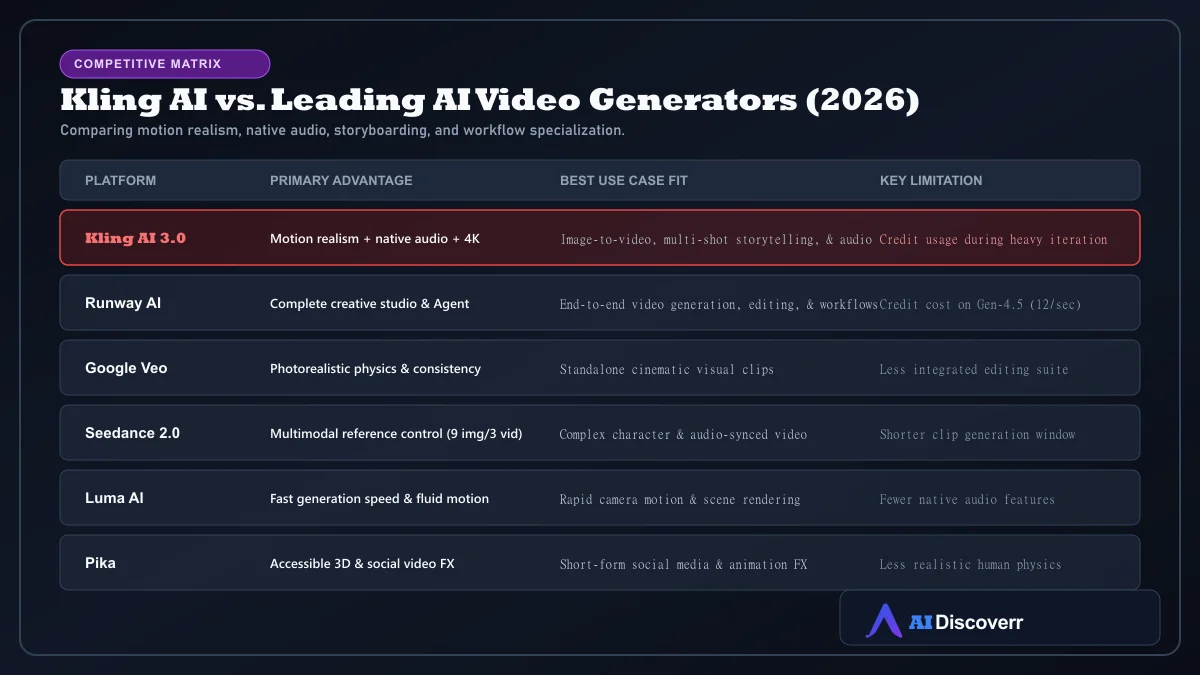
Kling AI vs Runway vs Google Veo
Best Kling AI Alternatives
- Runway AI: Best for creators needing an all-in-one production studio with Gen-4.5 and video editing tools.
- Seedance 2.0: Excellent for multi-reference input control (up to 9 images and 3 videos).
- Google Veo: Top choice for standalone photorealistic cinematic physics clips.
Frequently Asked Questions
Frequently Asked Questions
Is Kling AI free?
Yes. Kling AI offers a free Basic tier for initial testing, though free credits are limited and exports are non-commercial and watermarked.
How much does Kling AI cost?
Paid consumer memberships start at $10/month (Standard), $37/month (Pro), $92/month (Premier), and $180/month (Ultra), with promotional first-month rates available.
Does Kling 3.0 generate audio?
Yes. Kling 3.0 supports native audio generation, including lip-sync dialogue, sound effects, and ambient background audio across multiple languages.
How long can Kling AI videos be?
Kling 3.0 supports video generation up to 15 seconds per single generation.
Can Kling AI generate 4K videos?
Yes. Kling 3.0 supports native 4K resolution output on eligible plans and settings.
Can I use Kling AI videos commercially?
Yes, full commercial usage rights are included on Standard, Pro, Premier, and Ultra paid subscriptions.
Can Kling AI turn images into videos?
Yes. Image-to-video is one of Kling's core workflows, allowing users to animate static source images into motion clips.
Is Kling AI better than Runway?
Kling AI excels at realistic human motion physics, image-to-video realism, and native audio. Runway offers a broader end-to-end video editing suite (Gen-4.5, Agent, and Edit Studio).
Final Verdict
Kling AI (Kling 3.0) is a top-tier recommendation in 2026 for creators who demand motion realism and multimodal features.With native audio, multi-shot storyboarding, character consistency, and native 4K output, it stands as one of the most effective generative video platforms available.