Agnai AI Review 2026: Features, Pricing, How It Works & Alternatives
Table of Contents
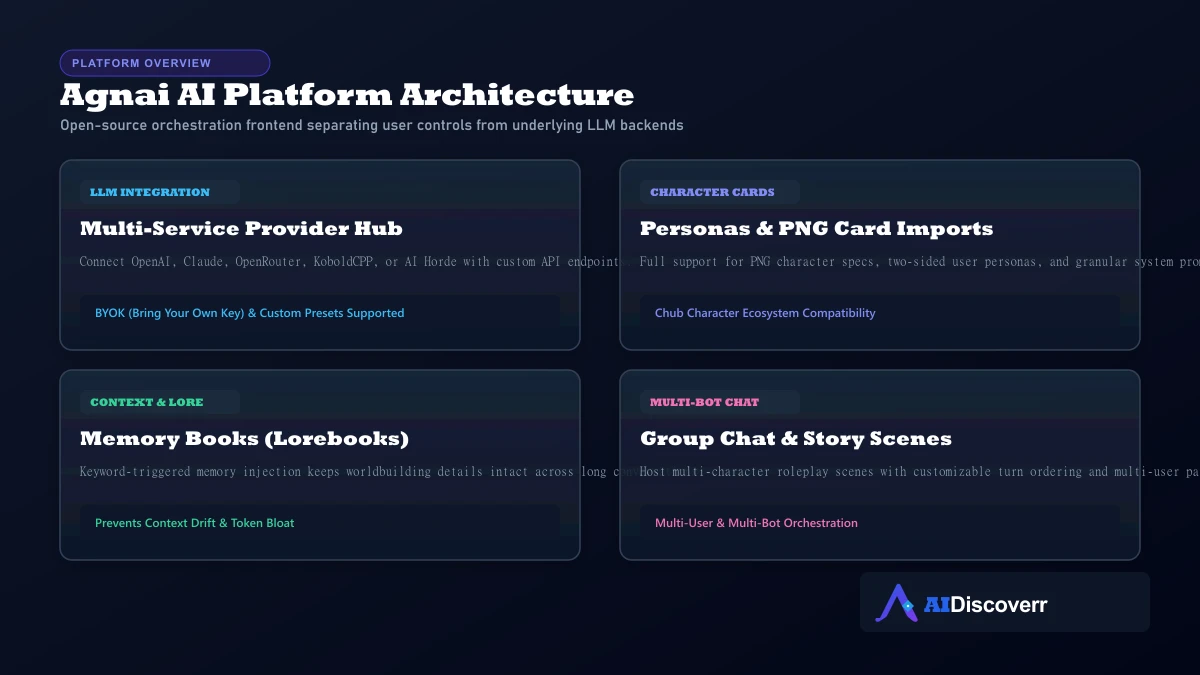
If you want an AI character-chat platform with far more control than a typical closed chatbot, Agnai is worth serious evaluation. It supports custom characters, personas, group conversations, Memory Books, multiple AI services, image generation, voice features, and full self-hosting.
The single most critical concept to understand is that Agnai is not the AI model itself. It is an open-source interface and orchestration layer that routes your conversation to the AI backend of your choice. That means the quality of your responses depends directly on the model you select, your character prompt engineering, and your context settings.
Agnai at a Glance
| Category | Details |
|---|---|
| Tool / Platform | Agnai / Agnaistic |
| Primary Use | AI character chat, interactive fiction, and roleplay |
| Best For | Character creators, roleplayers, and technical power users |
| Free Access | Yes (usable free tier + guest mode) |
| Paid Access | Optional subscriptions on agnai.chat & BYOK API costs |
| AI Model Approach | Multi-service (OpenAI, Claude, OpenRouter, Kobold, Horde) |
| Character Import | Custom characters & standard PNG character card specs |
| Group Chat | Yes (multi-user and multi-bot scenes supported) |
| Memory System | Memory Books (Lorebooks) & long-term memory options |
| Self-Hosting | Yes (Docker, npm, AGPL-3.0 open source) |
What Is Agnai?
Agnai (also known as Agnaistic) is an open-source AI chat platform built around flexibility. The project describes itself as AI-agnostic, multi-user, multi-bot, and specifically optimized for conversational character roleplay.
Unlike closed commercial apps such as Character.AI or Replika where the vendor locks down the interface, underlying LLM, and content filters, Agnai decouples these layers:
- Closed Companion Apps: Provide a single black box. If the model output degrades or content guardrails tighten, you cannot change the underlying engine.
- Agnai Architecture: Functions as an orchestration client. You can plug in Claude 3.5 Sonnet for creative narrative writing, switch to an open-source model via OpenRouter, or run a local GGUF model offline via KoboldCPP.
Is Agnai Free?
Yes, Agnai has a usable free core tier.
However, understanding "free" requires looking at how you deploy and access the service:
- Hosted Free Tier (agnai.chat): Allows instant guest or account-based chatting using free tier models provided by the platform.
- Bring Your Own Key (BYOK): Connect your own API key from OpenAI, Anthropic Claude, or OpenRouter. You only pay the model vendor directly per token consumed.
- Self-Hosted (Local / Cloud Server): Download the AGPL-3.0 codebase from GitHub and run it via Docker completely free, connecting it to local GPUs (Ollama, KoboldCPP) for $0 ongoing API costs.
- Managed Subscriptions: Optional paid tiers on agnai.chat for users who want seamless access to premium models without managing API billing accounts.
How Does Agnai Work?
Agnai processes your input through an assembly pipeline before making a call to your selected LLM backend:
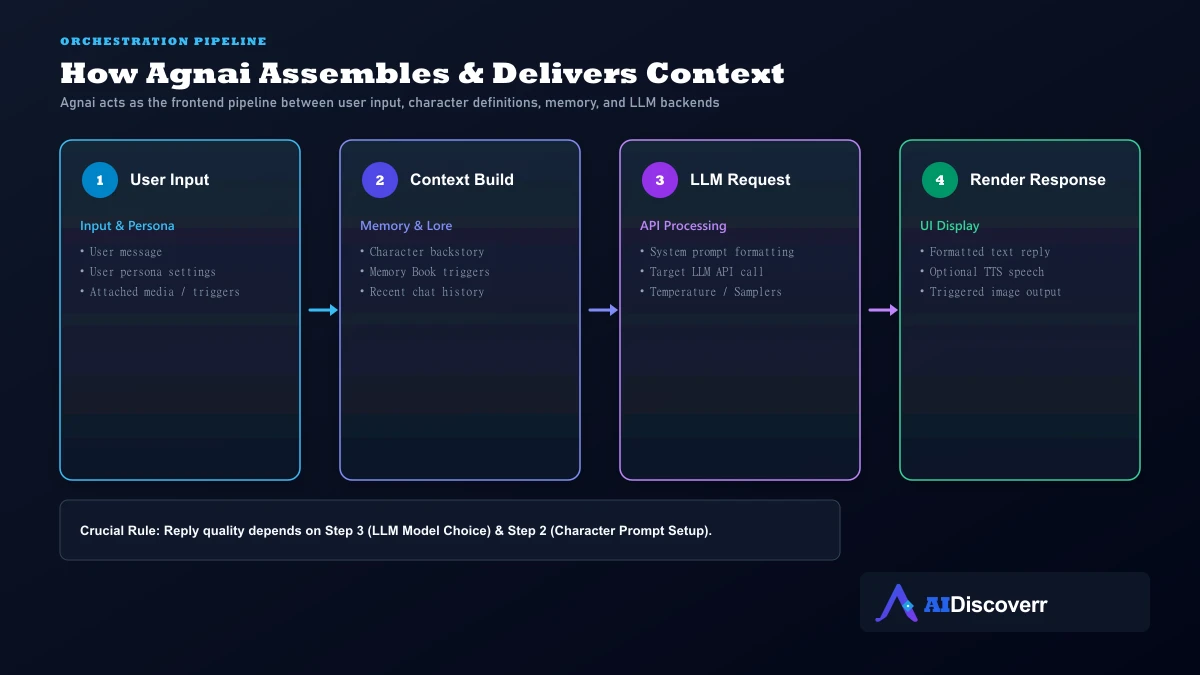
When you type a message in Agnai:
- Persona Attachment: Agnai attaches your user persona definitions (your name, description, role).
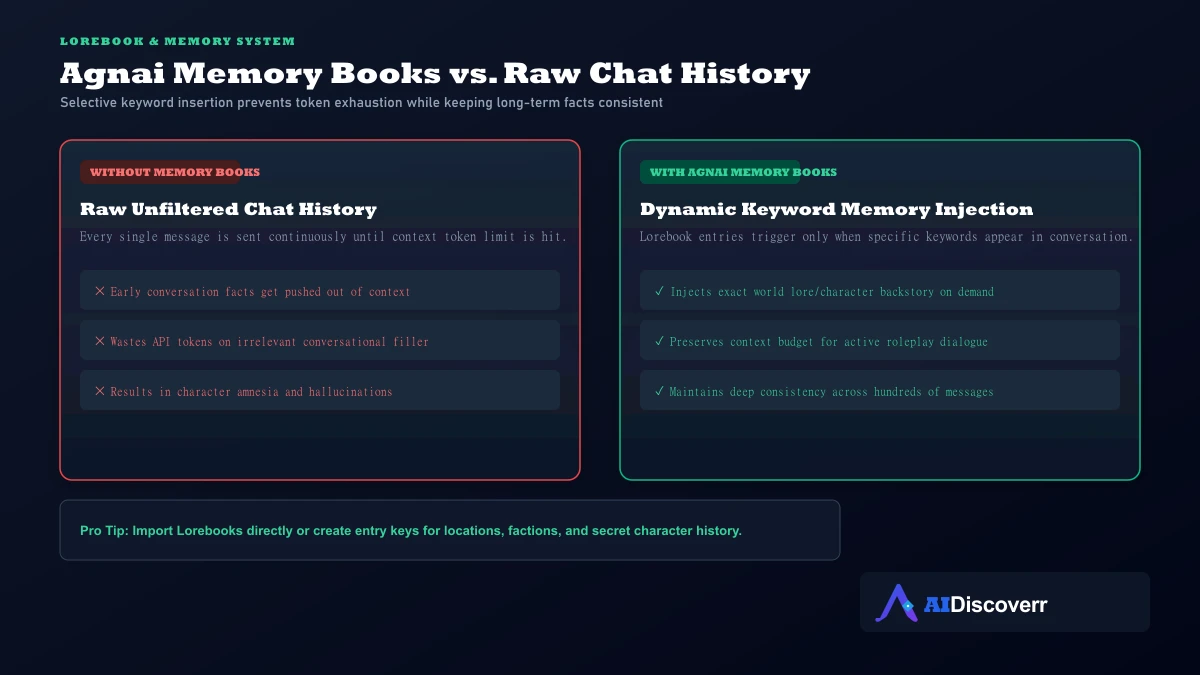
- Lorebook Scan: Agnai scans your message for keywords matching entries in your active Memory Book.
- Context Assembly: It combines active memory entries, character background, system prompt instructions, and chat history within the context window limit.
- LLM Dispatch: It formats the payload and sends it to your configured AI service (OpenAI, Claude, OpenRouter, or local model).
- Response Rendering: The returned response is rendered in the chat window, with optional triggers for image generation or text-to-speech voice.
Agnai Core Features
Character Creation & Card Compatibility
Agnai permits deep character customization including greeting lines, personality tags, scenario descriptions, and example dialogues. It natively parses standard PNG character cards (V1 and V2 specs), making it effortless to import characters built for platforms like Chub Venus.
User Personas
In interactive roleplay, the AI needs context on both participants. Personas allow you to switch identity profiles—adjusting your character's physical description, backstory, or narrative position depending on the scene.
Memory Books (Lorebooks)
Standard chat histories suffer from context window limits—as conversations grow, older facts get forgotten. Agnai solves this via Memory Books:
For a comprehensive comparison of how different AI companion apps implement persistent memory systems, consult our deep-dive guide: How AI Companion Memory Works.
Group Conversations
Unlike basic one-on-one chatbots, Agnai supports multi-user and multi-bot conversations. You can place three separate AI characters in a single room and configure whether they respond sequentially, randomly, or on direct mentions.
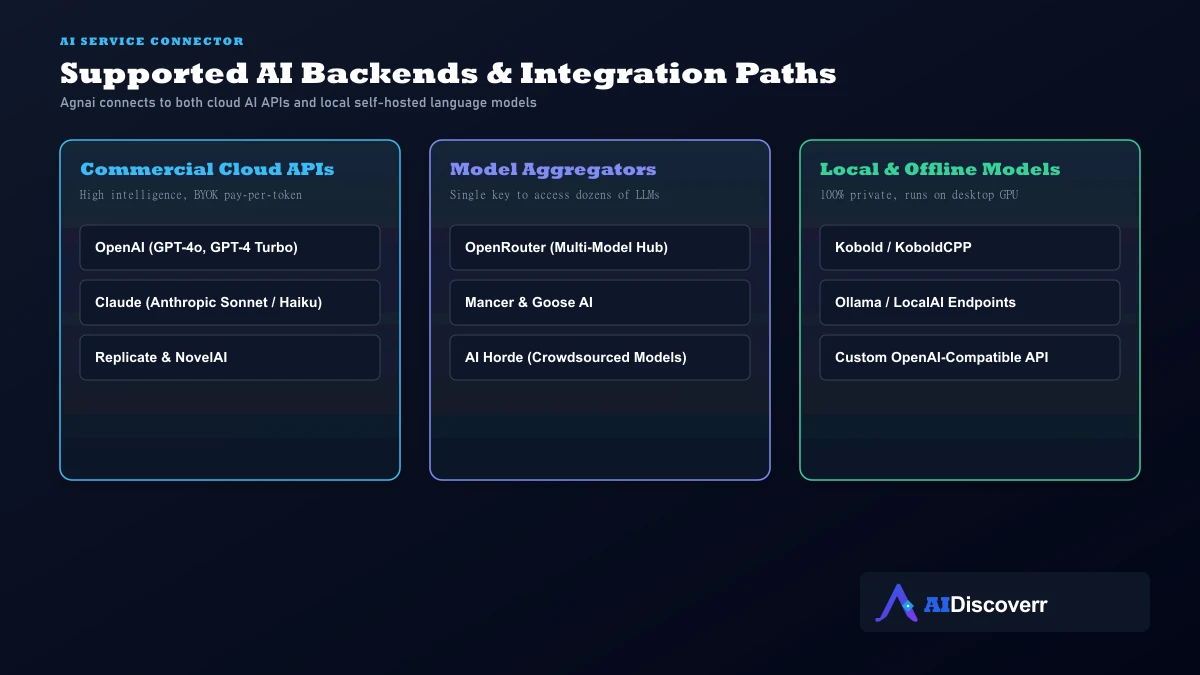
Multi-Service Provider Hub
Agnai offers native configuration screens for major API backends:
★ Why Agnai's AI Model Choice Matters
New users often blame Agnai when a character gives repetitive or shallow responses. However, because Agnai is just the frontend interface, the output quality is dictated by the underlying LLM model you select.
If responses degrade during a roleplay session, use this step-by-step troubleshooting checklist:
- Model Tier: Switch from a small free model to a higher-parameter LLM (e.g., Claude 3.5 Sonnet or a top OpenRouter roleplay fine-tune).
- Generation Settings: Check your temperature (typically 0.8–1.0 for creative writing) and repetition penalty.
- Context Budget: Avoid setting "Maximum New Tokens" excessively high, which shrinks the remaining window for past chat history.
- Prompt Conflicts: Ensure character personality instructions don't contain contradicting statements.
- Lorebook Keywords: Confirm your Memory Book entry keys match words actually being used in conversation.
How to Use Agnai
- Access the Site: Navigate to official agnai.chat or launch your local Docker instance.
- Choose Guest or Account Mode: Continue as a guest for instant testing, or register an account for cross-device cloud saving.
- Configure AI Provider: Open Settings → Generation Service and select your provider (Free Tier, OpenAI, Claude, OpenRouter, or Kobold).
- Import or Build a Character: Upload a PNG character card or fill in character definition fields manually.
- Attach Persona & Lorebook: Add your persona details and optional Memory Book files.
- Begin Roleplaying: Start chatting and fine-tune samplers as needed.
Agnai Privacy and Security
Evaluating Agnai's security requires distinguishing between the hosted service and self-hosted deployments:
Hosted agnai.chat
The official privacy policy outlines standard data collection practices for registered accounts (email, technical log data, usage metrics). Crucially, guest mode does not store persistent account data on Agnai servers.
Self-Hosted Security & History
If you self-host Agnai on your home network or server, you have total privacy control—your chat logs never leave your hardware.
However, self-hosting requires maintaining security updates. In 2024, public advisories disclosed path traversal and arbitrary file upload vulnerabilities in older self-hosted builds (versions below 1.0.330). The project maintainers patched these vulnerabilities promptly and confirmed that hosted `agnai.chat` was unaffected. If you run Docker, ensure your image is updated to the latest build.
For broader safety advice across AI companions, see our full research piece: Are AI Companion Apps Safe?.
Who Should Use Agnai?
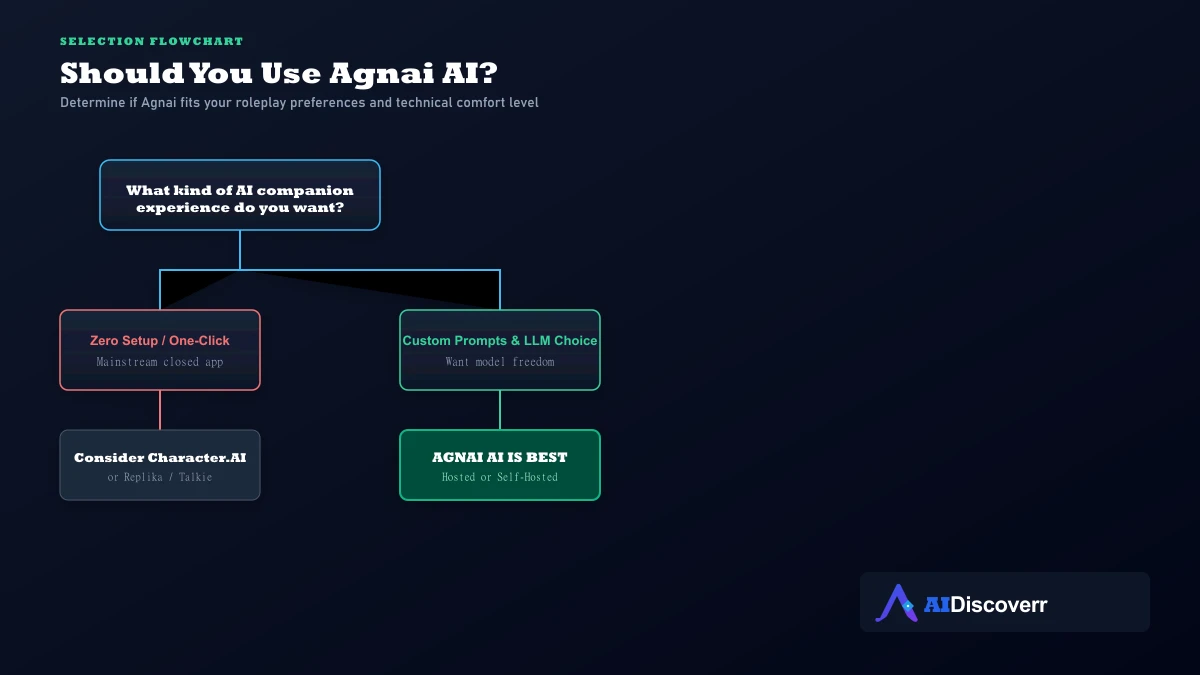
Agnai is ideal for:
- Advanced roleplayers wanting to switch between OpenAI, Claude, and OpenRouter models.
- Users who want to import PNG character cards from the Chub ecosystem.
- Interactive fiction writers managing multi-bot group chats and worldbuilding Lorebooks.
- Privacy-focused technical users seeking a Docker-ready self-hosted chat frontend.
Agnai is less suitable for:
- Casual users looking for a single-click mobile app with zero configuration screens.
- Users who don't want to think about temperature settings, samplers, or context tokens.
Agnai Pros and Limitations
Where It Shines
AGPL-3.0 open-source architecture with full Docker self-hosting support
AI-agnostic model freedom (OpenAI, Claude, OpenRouter, KoboldCPP, AI Horde)
Advanced Memory Books (Lorebooks) for targeted context injection
Multi-user and multi-bot group conversation support
Custom personas allowing detailed user-side context in roleplay
Usable free tier on agnai.chat plus guest access without registration
Where It Falls Short
Steeper learning curve than zero-configuration companion apps
Response quality depends heavily on external model choices and API setup
Density of generation settings can intimidate non-technical beginners
Third-party API providers incur separate pay-per-token costs
Self-hosted installations require manual updates for security patches
Agnai vs. Alternatives
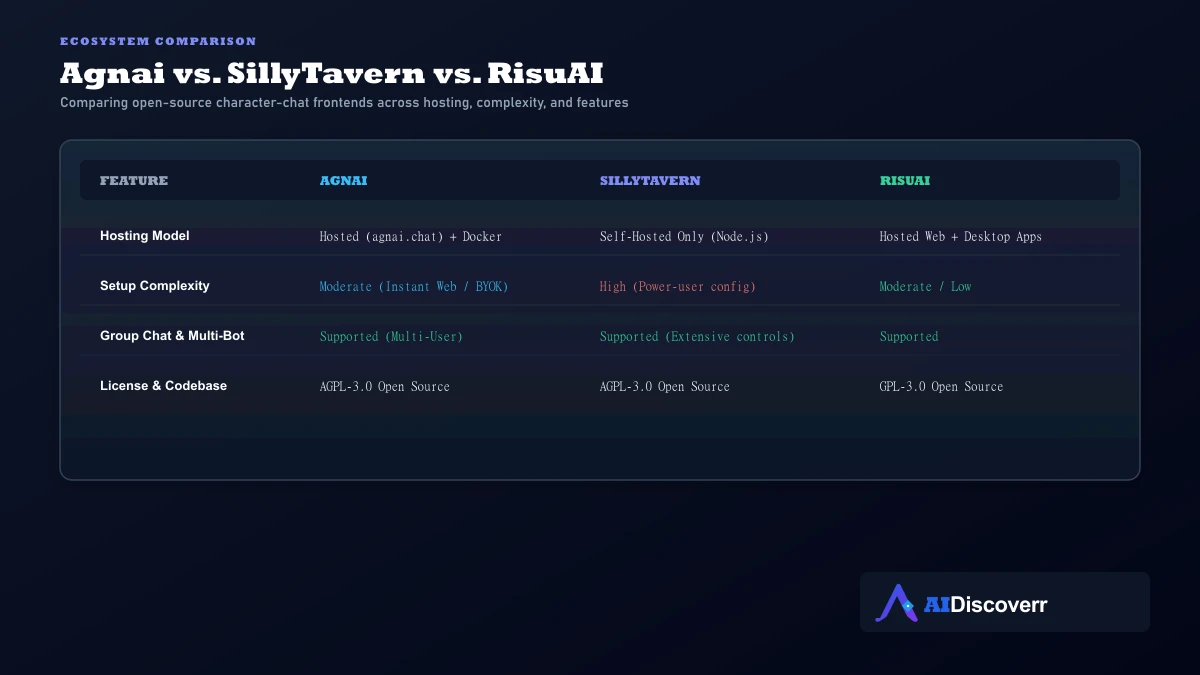
Agnai vs. SillyTavern
SillyTavern is the benchmark power-user desktop frontend. It offers deeper extension support, UI customization, and prompt overrides, but must be run locally. Agnai offers a cleaner hosted option (agnai.chat) alongside Docker self-hosting, making it easier to access across devices without running a dedicated desktop server.
Agnai vs. Caveduck
Caveduck is a managed anime character platform featuring native multilingual capabilities and a points/wings currency model. Agnai is open-source and model-agnostic, catering to users who bring their own APIs or run local hardware.
Agnai vs. HammerAI
HammerAI focuses on running local AI models directly inside a desktop app with zero technical setup. Agnai requires Docker for self-hosting but supports web-hosted BYOK API orchestration.
Final Verdict: Is Agnai Worth Using?
Agnai is one of the most capable open-source AI character platforms available in 2026.
Its power lies in its independence: it does not lock you into a single model, restrict your persona definitions, or force you into a proprietary ecosystem. Whether you use the hosted free tier on agnai.chat, connect Claude 3.5 Sonnet via OpenRouter, or spin up a local Docker container for complete privacy, Agnai gives you complete control over your AI roleplay environment.
Recommendation: Start with the hosted guest mode on agnai.chat. Experiment with character creation and test different free or BYOK models before deciding whether to deploy a full self-hosted server.
Frequently Asked Questions
Is Agnai completely free?
Agnai has a usable free core tier on agnai.chat. Costs only arise if you choose optional paid managed subscriptions or bring your own paid API keys (such as OpenAI, Claude, or OpenRouter).
Does Agnai have its own AI model?
No. Agnai is an interface and orchestration platform rather than a single proprietary model. It connects to multiple external AI services and local model backends.
Does Agnai support OpenAI and Claude?
Yes. Official documentation and project repositories list OpenAI, Claude, OpenRouter, Replicate, Kobold, and other providers among supported integrations.
Does Agnai have memory?
Yes. Agnai features Memory Books (Lorebooks) and persistent memory settings that inject contextual facts when specific keywords are triggered in conversation.
Can Agnai handle multiple characters in one chat?
Yes. Multi-user and multi-bot group conversations are core features of the platform, making it suitable for party roleplay and interactive storytelling.
Can I self-host Agnai?
Yes. The official GitHub repository provides Docker, npm, and manual self-hosting instructions under the AGPL-3.0 open-source license.
Is Agnai good for beginners?
Agnai has a higher learning curve than plug-and-play companion apps. It is best suited to users willing to learn how AI models, system prompts, context limits, and generation samplers work.
Why does my Agnai character produce poor roleplay responses?
Response quality depends heavily on the chosen underlying LLM model, system prompt clarity, generation samplers (temperature/top_p), and Memory Book configuration. Changing the underlying model often resolves poor output.
Lead AI Tech Analyst & Editorial Director