How AI Companion Memory Works: Persistent Memory Explained
Table of Contents
- Quick Answer
- What Does Memory Mean?
- The Memory Stack
- Context vs. Persistent Memory
- How Long-Term Memory Works
- Why Memory Feels Forgetful
- Why Companions Forget
- Can AI Remember Everything?
- Can AI Have False Memories?
- How to Test Memory
- What Makes a Good System?
- How Major Apps Approach Memory
- Is AI Memory Private?
- How to Improve Memory
- AI Memory vs. Human Memory
- FAQ
An AI companion can appear to remember your name, preferences, past conversations, relationships, or important events. But it does not necessarily remember them the way a person does.
In most systems, AI companion memory is a combination of current conversation context, stored information, summaries, and retrieval mechanisms.
The important distinction is this:
An AI companion does not need to permanently “know” something inside its language model to use that information later. The system can store the information separately and retrieve it when it becomes relevant.
That is why one AI companion may remember something you said weeks ago while another forgets it after you start a new chat.
Quick Answer: How Does AI Companion Memory Work?
AI companion memory generally works in a pipeline:
Conversation → memory extraction → storage → retrieval → current context → AI response
During a conversation, the system may identify useful information such as your name, preferences, important events, or relationship details. It can store those details outside the model.
When you return later, the system searches its stored memory for information relevant to your new message. The selected memories are then added to the context sent to the language model.
The model generates its response using that retrieved information.
Long-term memory systems for AI agents commonly use external memory stores and retrieval mechanisms rather than relying only on the model's immediate conversation context.
What Does “Memory” Mean in an AI Companion?
The word memory can describe several different technologies. This is one of the biggest reasons AI companion memory is confusing.
1. Context memory
The simplest form is the conversation currently visible to the AI model.
For example:
- You: "My dog's name is Max."
- AI: "How is Max doing?"
The AI does not necessarily have a permanent memory of Max. The relevant conversation may simply still be inside the current context. A context window is therefore better thought of as working memory or active attention, not necessarily long-term memory.
2. Conversation summaries
An application may summarize older conversations. Instead of keeping thousands of messages in the active prompt, the system might reduce them to something like: "The user has a dog named Max and recently started a new job as a designer."
This saves context space. The downside is that summarization can remove details. A long conversation about an argument might become: "The user had a disagreement with a friend." The basic event survives, but the exact details may not.
3. Stored facts
A stronger memory system may extract specific facts and save them separately.
For example:
- "My dog Max is a Golden Retriever." → Stored memory: User's dog is Max
- "I work as a designer." → Stored memory: User works as a designer
- "I hate horror movies." → Stored memory: User dislikes horror
These facts can then be retrieved during future conversations.
4. Retrieval-based memory
This is where persistent memory becomes more powerful. Suppose you told the companion about a job interview two weeks ago. Today you say: "I finally got the result."
The system may search its stored memories for information related to the job interview. If it finds the relevant memory, it can put that information into the current context. The language model then generates an answer based on the retrieved information.
The AI Companion Memory Stack
A useful way to understand the entire system is to imagine six stages:
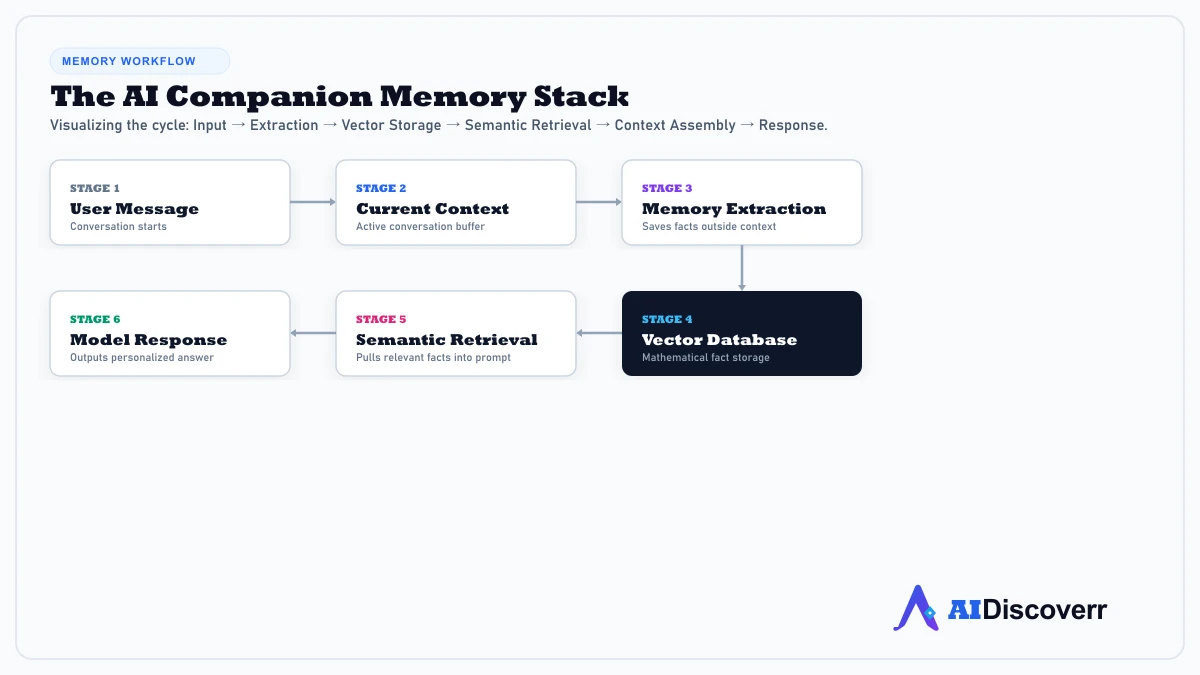
- Conversation: The process begins with your interaction (e.g., "I am starting a new job next Monday").
- Memory Extraction: The application decides whether the information is worth remembering (e.g., "User is starting a new job next Monday").
- Memory Storage: The extracted information is saved in external storage (e.g., databases, vector stores, knowledge graphs).
- Memory Retrieval: Later, you say: "My first day went better than expected." The system searches stored memories for related information.
- Context Assembly: The application combines your current message, recent conversation, retrieved memories, and character backstory.
- Response Generation: The language model generates the answer.
Each stage can succeed or fail independently. That explains an important mystery: an AI companion can have persistent memory and still forget something. The information might exist in storage but never be retrieved.
Context Window vs. Persistent Memory
These concepts are often confused.
| Feature | Context window | Persistent memory |
|---|---|---|
| Main purpose | Current conversation | Long-term continuity |
| Usually temporary? | Yes | No |
| Works across sessions? | Not by itself | Yes |
| Stores selected facts? | Not necessarily | Often |
| Requires external storage? | Not necessarily | Usually |
| Can retrieve old info? | Only if supplied | Yes |
A longer context window can improve continuity inside a conversation, but a larger context window alone does not automatically create persistent memory across separate sessions.
How Long-Term AI Memory Works
Technical discussions often divide memory into categories such as semantic, episodic, and procedural memory.
Semantic memory
This is information about facts:
- Your name
- Your job
- Your favorite music
- Your pet's name
- Your preferences
Episodic memory
This represents events or experiences (e.g., "The user attended a concert last Friday"). The difference is subtle but important: semantic memory is "The user likes concerts," while episodic memory is "The user attended a concert last Friday."
Procedural memory
Procedural memory represents how something should be done (e.g., "When preparing the user's weekly report, use this format").
★ Why Persistent Memory Can Still Feel Forgetful
Stored memory does not guarantee successful recall.
Imagine that your companion saved this: "User has a dog named Max." You later ask: "How is my dog doing?" The system needs to retrieve the memory about Max. If retrieval fails, the model may not know what “my dog” refers to.
So there are at least three different questions:
- Was the information stored?
- Was it retrieved?
- Did the model interpret it correctly?
Why AI Companions Forget Things
- The fact was never saved: The memory system may decide that a detail was not important enough to retain.
- The memory was stored but not retrieved: The database can contain the information while the AI fails to surface it for the current conversation.
- The memory was summarized badly: A detailed experience may be compressed into a short summary, losing specific context.
- Memories conflict: If you change your preferences over time (e.g., "I don't like coffee" vs. "I finally found a coffee shop I love"), the system can get confused.
- The underlying model changes: The database can remember you while the AI's behavior and personality change following model updates.
- Memory limits apply: Unlimited storage is not useful if retrieval surfaces irrelevant details, leading to strict limits.
★ How to Test an AI Companion's Memory
Don't test memory only by asking: "What's my name?" Use a multi-step test:
- Test 1: Specific Fact: Tell the AI: "My favorite book is The Hobbit." Chat about other topics for 40 messages, then ask: "What kind of books do I like?"
- Test 2: Indirect Recall: Tell it: "My sister Maya is moving to Denver." Later ask: "What was happening with my sister?" This tests semantic retrieval.
- Test 3: Delayed Recall: Wait several days before asking about the event indirectly to test longer-term persistence.
- Test 4: Contradiction: Tell it: "I work in marketing." Later say: "I recently moved into software development." See if the AI updates the old info.
- Test 5: Correction: Tell it: "My dog's name is Max." Then correct it: "Actually, his name is Milo." Later ask about your dog.
Can AI Companions Remember Everything?
Usually, you should not assume they can. Storing every message forever is not automatically useful. A memory system that retrieves hundreds of irrelevant conversations could make the AI less accurate. This is why memory architecture involves selection and retrieval, not simply unlimited storage.
Can AI Companions Have False Memories?
Yes, the experience of a “false memory” can occur. An AI might claim to remember something you never said due to model inferences, mixed stored files, or general hallucinations.
A confident memory statement is not proof that the memory is correct.
What Makes a Good AI Companion Memory System?
- Recall: Can it retrieve relevant information after starting a new session?
- Relevance: Does it retrieve the right memory instead of unrelated details?
- Accuracy: Does it remember what you actually said?
- Recency: Can it update old information?
- Persistence: Does useful information survive over time?
- Transparency & Control: Can you see, edit, or delete what has been stored?
- Privacy: Can you understand where the information goes?
How Major AI Companions Approach Memory
- Nomi: Markets memory as a core part of its experience. Officially advertises short-, medium-, and long-term memory layers alongside its Mind Map system. Read our Nomi Review for details.
- Kindroid: Uses highly customizable memory configurations, including customizable "Lorebooks" and memory journals that let users pin important rules. Read our Kindroid Review.
- Replika: Features a dedicated "Memory Tab" where users can view, edit, or delete facts the AI has extracted from chats. Read our Replika Review.
- Character.AI: Massive directory of characters, but its memory window is relatively short compared to premium platforms, leading to frequent "goldfish memory" complaints on community forums. Read our Character.AI Review.
Is AI Companion Memory Private?
This is an important question because companion conversations can contain highly personal information. The European Data Protection Supervisor warns that AI companions can process personal and potentially sensitive information and highlights concerns around transparency, storage, and possible secondary uses of collected data.
If you would not want the information stored in a company's database, think carefully before telling it to an AI companion.
How to Improve an AI Companion's Memory
- State important facts clearly: Use explicit statements like "Please remember that I started a new job as a designer" rather than vague hints.
- Correct outdated information: If something changes, tell the AI clearly (e.g., "My job changed. I am now a developer, not a designer").
- Use permanent memory fields: Utilize memory notes, profile fields, or pinned messages when available.
- Review stored memories: Check memory settings periodically to remove incorrect or sensitive facts.
Why “Long-Term Memory” Does Not Mean Human-Like Memory
AI companion memory is an engineered software system of databases, embeddings, retrieval algorithms, and summaries. When an AI says "I remember that," the safest interpretation is that the system has access to information representing that event, not that the AI experienced and internally remembers the event like a human.
Frequently Asked Questions
Frequently Asked Questions
How does AI companion memory work?
AI companion memory usually combines current conversation context with information stored outside the active language-model context.
What is persistent memory in an AI companion?
Persistent memory is information retained across conversations or sessions that the system can retrieve later.
Is a context window the same as memory?
No. A context window is the information currently available to the model. Persistent memory is information retained outside the immediate conversation.
Why does my AI companion forget things?
The information may never have been saved, may not have been retrieved, may have been summarized incorrectly, or may have conflicted with newer information.
Final Takeaway
AI companion memory is better understood as a software system than as human-like memory.
The basic process is: Save → store → retrieve → provide context → generate response.
The most important distinction is between having a memory and successfully retrieving it. When evaluating an AI companion, don't ask only: "Does it have memory?" Ask: "What does it remember, how does it retrieve it, can I see or correct it, how long does it persist, and what happens to my data?"
Lead AI Tech Analyst & Editorial Director