Vidqu Review 2026: Features, Pricing, Safety & How It Works
Table of Contents
Vidqu AI is a browser-based creative suite specializing in AI face swaps for photos, videos, and multi-face images. It offers an easy-to-use platform where users can swap characters, animate photos, or translate video voiceovers in a few clicks.
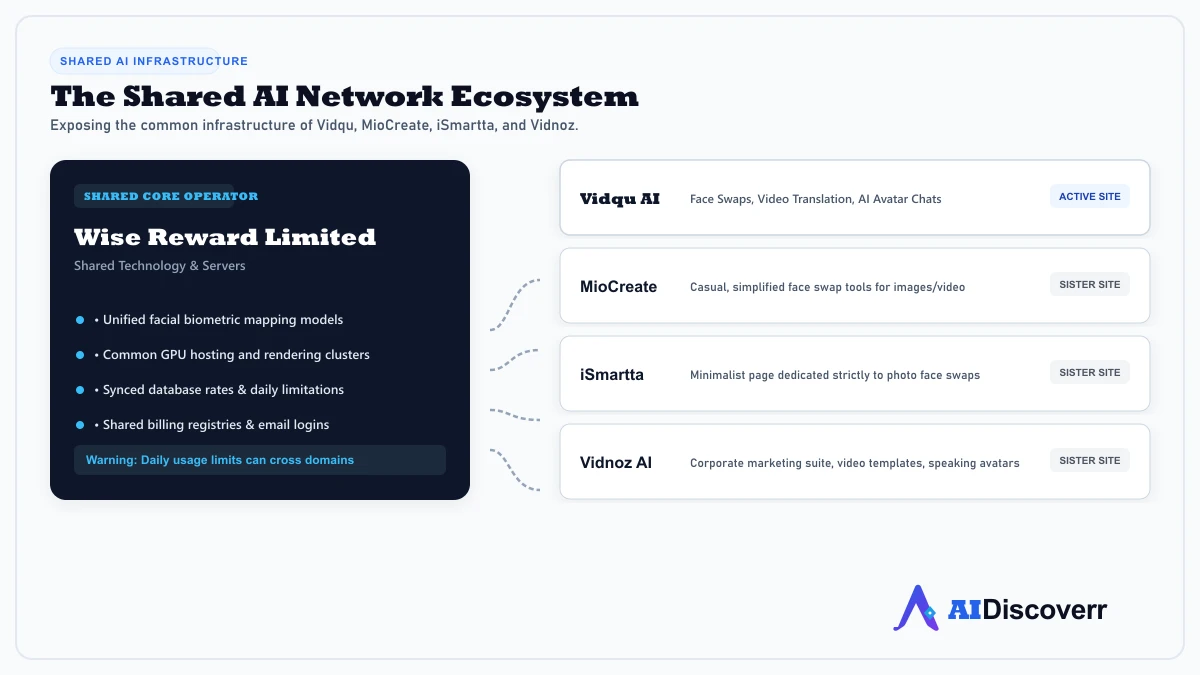
However, behind the simple user interface lies a complex network architecture. Vidqu shares its technology, servers, and ownership with MioCreate, iSmartta, and Vidnoz. If you hit a daily limitation on one of these sites, you may find yourself blocked across the entire network.
Is Vidqu worth paying for in 2026, or should you seek a more transparent alternative? Check our reviews of other creative generators like Seedance 2.0 or SeaArt AI for different creative capabilities.
What Is Vidqu?
Vidqu is an online AI-powered creative platform built around media transformation. Its flagship tool is its face-swapping algorithm, which allows users to map a target face onto any base image, GIF, or video clip.
In addition to face swapping, Vidqu packages other features like video translators, cartoon generators, and avatar chats. Unlike complex desktop editing software, Vidqu processes all files on cloud servers, requiring only a standard web browser to operate.
The Network Ecosystem: Vidqu, Vidnoz, MioCreate, & iSmartta
One of the most important facts for consumers to understand is that Vidqu is not an isolated independent service.
Online infrastructure audits show that Vidqu, MioCreate, iSmartta, and Vidnoz are part of the same network.
- Shared Infrastructure: They use the same facial-recognition models, server configurations, and database backends.
- Limitation Sharing: In many cases, daily generation limits or IP bans are synced across these domains. If you burn through your free credits on MioCreate, switching to Vidqu may not bypass the daily gate.
- Company Structure: The network is tied to entities like Wise Reward Limited (owners of Vidnoz). However, corporate transparency is low; the platforms do not publicize detailed leadership teams or corporate locations.
This network model is designed for search engine domination: by running multiple separate domains with similar tools, the parent company captures a larger share of the search results page (SERP) for queries like "free online face swap."
Vidqu Key Features
1. Photo and Video Face Swap
Vidqu's core tool maps faces onto photos or video uploads. The model reads the lighting, angles, and facial expressions of the base video and maps the target face onto it.
2. Multiple Face Swap
Vidqu allows you to select and swap up to 10 distinct faces in a single photo or group shot. This makes it popular for family photos, group memes, or movie posters.
3. Video Translator
A feature that translates video speech into over 140 different languages. It handles script translation, voice cloning, and AI lip-syncing to match the new language track.
4. Image-to-Video Animation
Allows users to upload static images and animate them, generating short clips with AI-directed camera pans, zooms, or character movements.
How Vidqu Works
At a high level, the face swap workflow follows a direct sequence:
- Select Target & Base: Upload the original photo/video containing the face to replace (the base), and the face you want to insert (the target).
- Facial Mapping: Vidqu's AI reads key facial landmark coordinates (eyes, nose, mouth) and maps the target face, adjusting the skin tone and lighting to blend the images.
- Cloud Generation: The file is processed on Vidqu's remote servers.
- Download: The output file is rendered and made available for download in your browser.
Vidqu Pricing: Understanding the Credit System
Free Plan vs. Subscription Tiers
Vidqu operates on a credit-based subscription model.
- Free Tier: Provides a small daily allowance of credits (typically resetting every 24 hours). Output files carry a Vidqu watermark, are capped at lower resolutions (typically 480p or 720p), and are subject to slow queue times.
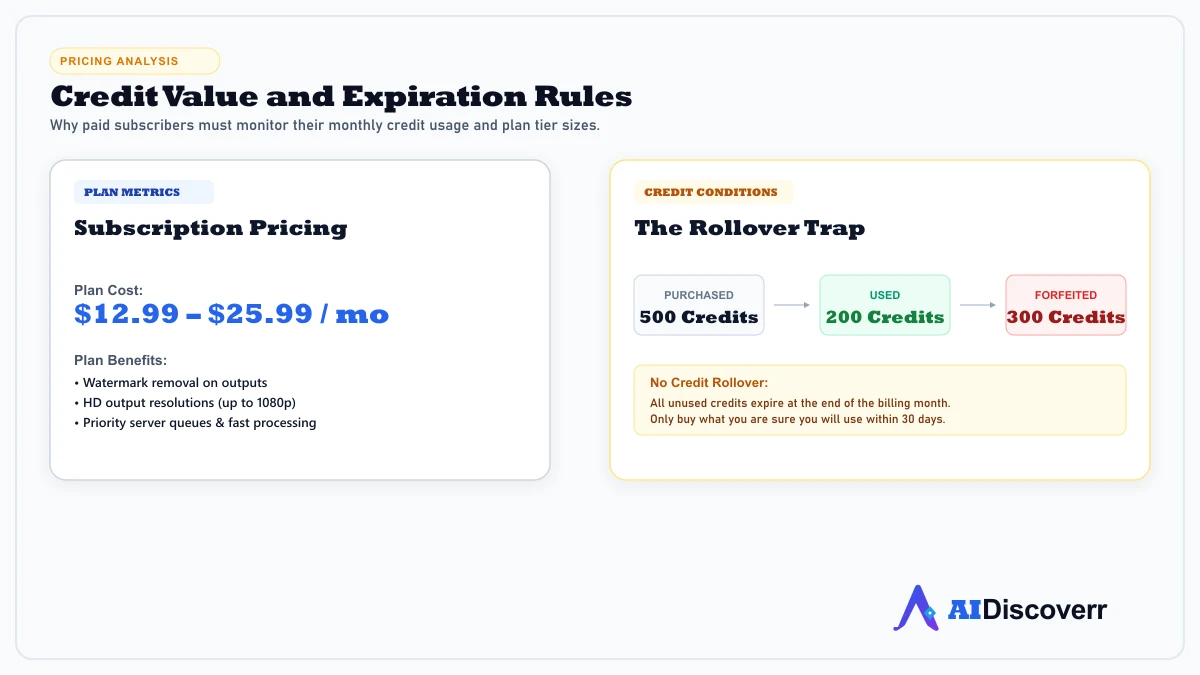
- Paid Plans: Range from $12.99 to $25.99 per month. These tiers remove watermarks, unlock priority server queues, support HD outputs (up to 1080p), and expand video upload file sizes (up to 500MB+).
The Rollover Catch
A critical detail often hidden in the terms of service: credits do not roll over. Any unused credits at the end of a monthly billing cycle are forfeited. If you purchase a plan with 500 credits but only use 200, the remaining 300 will disappear on your next billing date.
Safety, Privacy, and Data Security
Is Vidqu safe to use? The answer splits into technical safety and data privacy.
Technical Safety
Vidqu is a legitimate site. Security scans show that its website does not distribute malware, adware, or phishing pages. Connections are fully encrypted using HTTPS.
Data Privacy & Biometrics
Because Vidqu uses face swap technology, it processes biometric data (facial scans).
- Data Retention: Vidqu's documentation indicates that uploaded images are processed on their servers and typically deleted within 2 to 24 hours after creation.
- Corporate Opaqueness: Because the site's corporate leadership and parent company structures are not transparent, you have very little recourse if data policies change.
- Best Practice: Never upload photos of yourself or others without explicit consent. Avoid uploading highly private, sensitive, or professional media to their servers.
Vidqu Limitations
- Credit forfeiting: Unused credits are lost at the end of each month.
- Watermarks: The free tier adds a prominent watermark to all image and video outputs.
- Low transparency: Parental ownership and data management details are opaque.
- Network restrictions: Daily limits can be shared with sister sites like MioCreate.
- Quality inconsistencies: Face swaps in fast-moving videos or bad lighting often result in clipping, visual distortion, and face-stretching.
Vidqu Pros and Cons
Where It Shines
Very simple, no-install browser interface
Supports multiple face swaps (up to 10 faces)
Includes auxiliary video translation and animation tools
HTTPS encryption and fast temporary server deletion (2–24 hours)
Watermark-free paid options with priority server queues
Where It Falls Short
Paid plan credits do not roll over to the next month
Opaque company leadership and lack of corporate transparency
Free tier is restricted by queues, resolutions, and watermarks
Daily generation limitations are shared across network sister sites
Video swaps with fast movement lead to alignment distortion
Vidqu Alternatives
| Tool | Focus | Pricing | Best For |
|---|---|---|---|
| Vidqu | All-in-one face swap & translation | Credit-based ($12.99/mo+) | Casual swaps, animations, and simple translate |
| Vidnoz AI | Professional video & avatars | Freemium ($22.39/mo+) | Corporate marketing and training videos |
| MioCreate | Casual image swapping | Web-free (Freemium) | Quick social media memes and avatars |
| Remaker AI | Face swap & image editing | Pay-as-you-go credit system | Creators needing precise control without a monthly sub |
Who Should Use Vidqu?
- Casual creators making memes, social media edits, or character animations.
- Users looking for a single web interface that bundles face swaps, image animation, and translation.
Who Should NOT Use Vidqu?
- Professional editors requiring high-fidelity facial animations and manual timeline control.
- Privacy-conscious creators uncomfortable with uploading biometric scans to opaque parent networks.
- Users wanting pay-as-you-go credits that do not expire at the end of the month (Remaker AI is a better fit here).
Frequently Asked Questions
Frequently Asked Questions
Do my Vidqu credits roll over to the next month?
No. All unused credits expire at the end of each billing cycle. Ensure you select a plan size that matches your actual monthly needs.
Is Vidqu owned by Vidnoz?
Yes. Vidqu, Vidnoz, MioCreate, and iSmartta share the same underlying technology backend, servers, and corporate ownership structure (Wise Reward Limited).
Does Vidqu store my uploaded photos?
Uploaded photos and videos are stored temporarily on their cloud servers for processing and are automatically deleted within 2 to 24 hours.
Can I use Vidqu without an account?
No. You must create an account (via email or social login) to track your daily credit limits and save your project history.
Final Verdict
Vidqu AI is a highly convenient web suite for casual face swapping, video translation, and image animations. For creators who want a simple, no-install browser interface to generate quick visual concepts, it performs well.
However, the lack of corporate transparency, the shared daily restrictions with its sister sites (MioCreate and iSmartta), and the fact that paid credits do not roll over are significant drawbacks. If you need simple memes, stick to the free daily limit. For serious or commercial projects, consider alternatives like Remaker AI or Vidnoz AI.
Editorial review. Not affiliated with Vidqu or Wise Reward Limited. Features and prices change — confirm details on official provider channels before purchasing resources.
Lead AI Tech Analyst & Editorial Director