SoulGen AI Review 2026: Features, Pricing, How It Works & Alternatives
Table of Contents
- What Is SoulGen?
- SoulGen at a Glance
- What Can SoulGen Do?
- How to Use SoulGen
- SoulGen Pricing and Credits
- Is SoulGen Free?
- Is SoulGen Worth It?
- Who Should Use SoulGen?
- Who Should Not Use SoulGen?
- SoulGen Privacy & Safety
- Does SoulGen Have an API?
- SoulGen Pros and Cons
- Best SoulGen Alternatives
- SoulGen vs General AI
- Final Verdict
- FAQ
Lead AI Tech Analyst & Editorial Director
If you want to turn a text description into a custom AI character, SoulGen is one of the more specialized tools to consider.
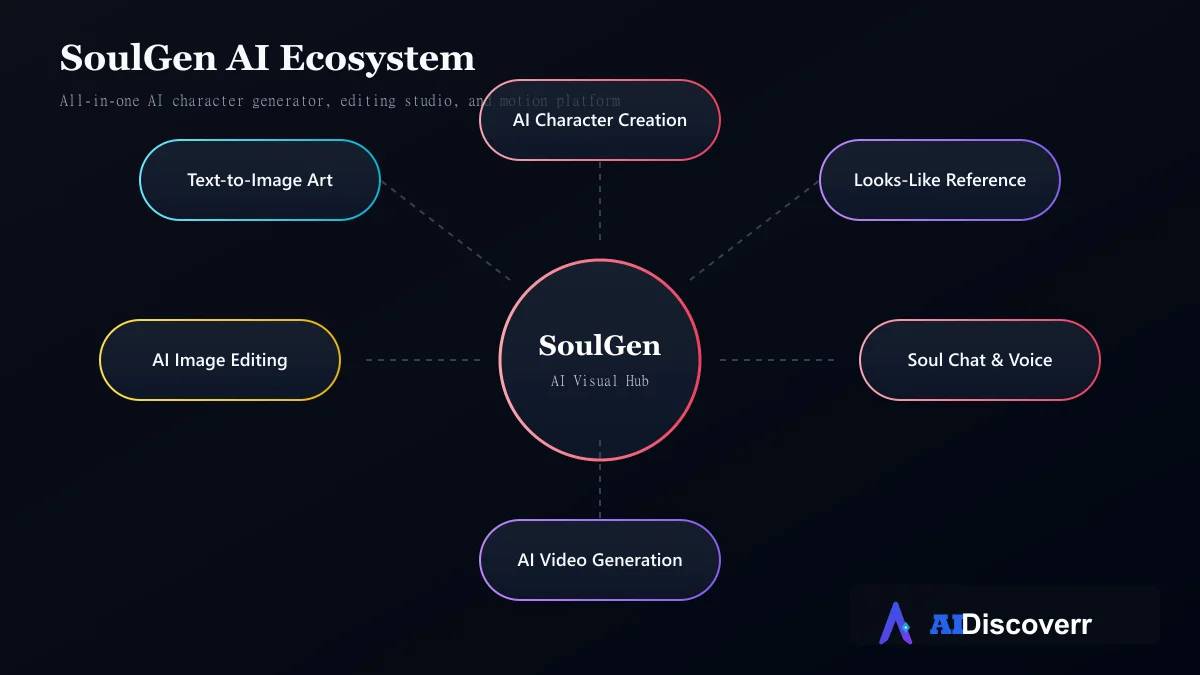
It started around AI character and image creation. The platform has since expanded into image editing, outpainting, video generation, and a companion-style chat feature.
But SoulGen is not the best choice for everyone.
Its credit system matters. Its content rules matter. And its current product is broader than the older "AI art generator" descriptions still found across the web.
In this SoulGen review, we explain what the platform does, how its pricing works, what you can create, its main limitations, and when another AI tool may be a better fit.
What Is SoulGen?
SoulGen is an AI-powered visual creation platform.
You can describe what you want using a text prompt and generate an image. The platform also supports reference images, character creation, image editing, outpainting and video generation.
Its current Terms of Service describe SoulGen as an online picture-creation application that uses AI algorithms to create content from text descriptions and selected or uploaded image features.
The important thing to understand is that SoulGen is more specialized than a general-purpose AI assistant. It is designed around visual creation and AI characters.
That makes it interesting for:
- Digital artists
- Character designers
- Storytellers
- Creators
- Hobbyists
- Social media creators
- People experimenting with AI-generated characters
SoulGen at a Glance
| Category | Details |
|---|---|
| Tool | SoulGen |
| Main use | AI character and visual generation |
| Image generation | Yes |
| Anime-style creation | Yes |
| Realistic character creation | Yes |
| Image editing | Yes |
| Outpainting | Yes |
| Video generation | Yes |
| AI chat | Yes |
| Credit system | Yes |
| Pro monthly pricing | $12.99/month |
| Pro annual pricing | $90.99/year |
| Monthly Pro credits | 100 |
| Public API | No official public API found in current materials |
| Best for | Character-focused visual creation |
What Can SoulGen Do?
AI Image Generation
The core SoulGen workflow starts with a prompt. You describe the character, appearance, environment, style, mood or scene you want, and the platform generates an image based on those instructions.
The current creation interface includes multiple character and model options, including realistic-oriented and anime-oriented workflows.
Example prompt structure
A useful prompt can describe:
- Subject
- Age category
- Hairstyle
- Clothing
- Expression
- Environment
- Lighting
- Camera angle
- Art style
For example:
“Adult fictional character, short dark hair, modern jacket, standing in a neon-lit city street at night, cinematic lighting, detailed digital illustration.”
The more useful approach is to describe the visual outcome, rather than stuffing the prompt with random adjectives.
AI Character Creation
Character creation is one of SoulGen's strongest areas. Instead of treating every generation as an unrelated image, you can start with a character concept and refine the visual direction.
The current platform includes AI Character workflows and different character-generation options. This can be useful for:
- Fictional characters
- Story projects
- Game concepts
- Avatars
- Social content
- Visual experiments
- Character references
Reference Images and Lookalike Creation
SoulGen also supports using an uploaded reference image to guide a creation. The official product material describes a workflow where users can upload a reference photo and ask the AI to create a character with a similar appearance.
This is useful when text alone cannot describe the desired appearance accurately. However, users should be careful when uploading photographs of real people. Do not upload or transform someone's likeness without appropriate permission, especially where the result could mislead, impersonate or violate privacy rights.
AI Image Editing
SoulGen is not limited to generating a new image from scratch. Its official product page describes text-based editing that can add, extend or remove elements from an existing image.
That creates a more practical workflow:
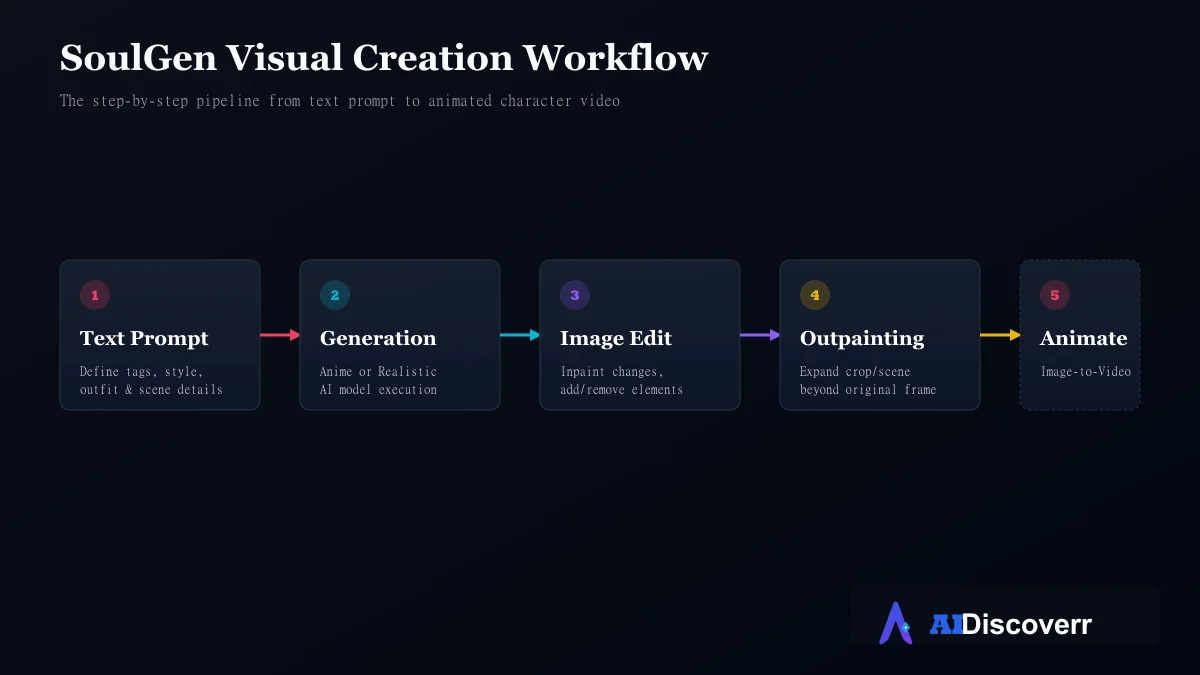
Generate → Review → Edit → Refine
Instead of throwing away a good image because one detail is wrong, you can attempt to change that specific element.
AI Outpainting
Outpainting expands an existing image beyond its original frame. For example, imagine you have a portrait that is tightly cropped. You may want to turn it into a wider scene.
Outpainting can add:
- Background
- Additional environment
- More visual space
- Additional scene elements
SoulGen's product materials specifically advertise AI outpainting for expanding images and adding elements beyond the original composition. This is particularly useful for creators who need different image aspect ratios.
AI Video Generation
SoulGen has expanded beyond still images into video. The current pricing documentation lists several video-generation workflows and models.
The official product page describes workflows where you can:
- Upload a reference image.
- Describe the desired movement.
- Generate the video.
- Download the result.
The current pricing page also lists different video models with different credit requirements. For example, SoulGen 2.0 currently costs 10 credits for five seconds without audio, while other video models have different credit requirements.
Why this matters
If you already have a character image you like, you do not necessarily have to start another project from scratch. You can move from:
Character image → Motion → Short video
That makes SoulGen more useful for visual storytelling than a basic text-to-image generator.
Soul Chat
SoulGen also includes a chat component called Soul Chat. The current pricing page lists separate credit costs for:
- Text messages
- Image generation
- Voice calls
- Creating a soulmate/character
This makes SoulGen different from a pure image generator. However, users should understand the product hierarchy.
If your main priority is deep conversation, long-term memory and a sophisticated AI companion, you may find dedicated companion platforms more appropriate. If your priority is creating the character visually first, SoulGen makes more sense.
How to Use SoulGen
The basic workflow is straightforward.
Step 1: Create an Account
SoulGen supports account creation and login through methods including email and Google according to its current Terms. Use the official SoulGen domain when signing up. The official website currently redirects from soulgen.net to soulgen.ai.
Step 2: Choose Your Workflow
Depending on what you want to accomplish, choose an appropriate workflow. You might start with:
- AI Character
- Image generation
- Image editing
- Video generation
- Reference-based creation
Do not immediately spend credits experimenting with every feature. Start with the simplest workflow that can solve your problem.
Step 3: Write a Clear Prompt
A good prompt should describe the desired result. A simple structure is:
Subject + appearance + clothing + environment + lighting + style + composition
For example:
Adult fictional character with dark shoulder-length hair, wearing a modern blue jacket, standing in a rainy downtown street at night, soft cinematic lighting, detailed anime-inspired illustration.
This gives the model a clearer visual target than a vague instruction such as: “Make a beautiful character.”
Step 4: Generate
Generate your first result. Do not try to fix ten things at once. If the face is good but the background is wrong, focus the next prompt on the background. If the lighting is wrong, adjust the lighting. This makes iteration easier and can reduce unnecessary credit consumption.
Step 5: Refine the Result
After generating an image, decide whether you need image editing, outpainting, another variation, a reference-based generation, or video generation. This is where SoulGen's broader toolset becomes useful.
SoulGen Pricing and Credits
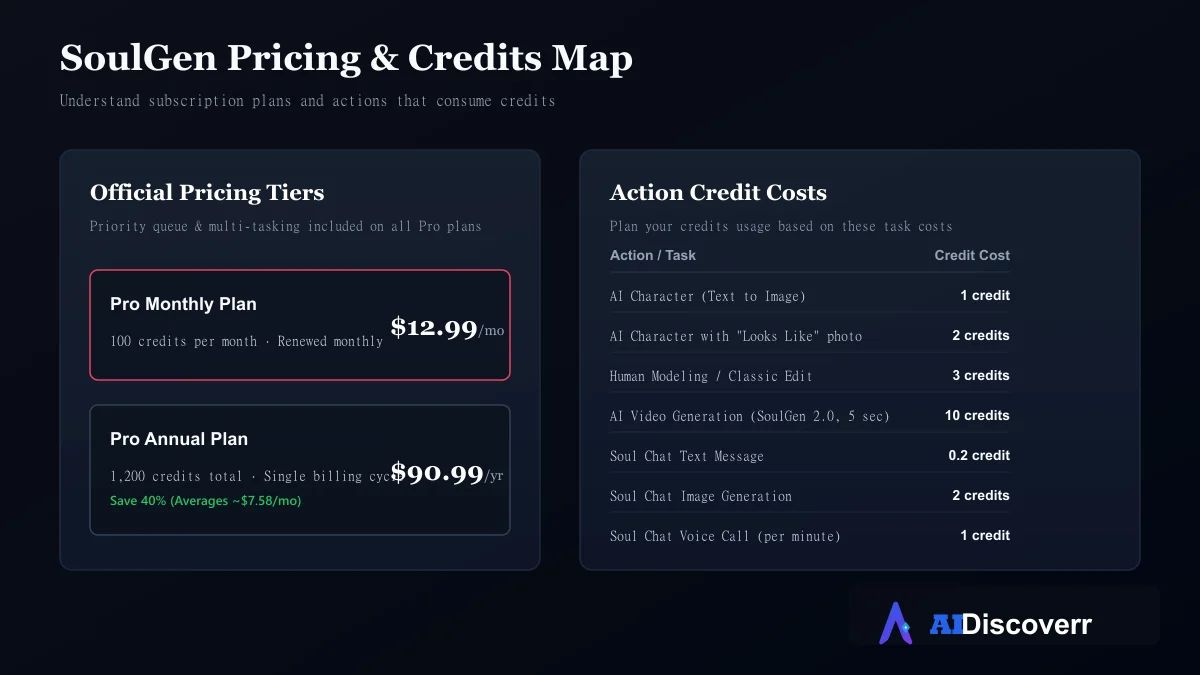
SoulGen's pricing deserves special attention because older articles contain inconsistent numbers. The current official pricing information lists:
Pro Monthly
$12.99/month
Pro Annual
$90.99/year
Credits
100 credits per month
The official pricing page also lists Pro benefits such as removing blur, priority queue, multitasking and multiple creations.
The annual plan works out to roughly $7.58 per month when averaged across the year, which explains why many third-party pages quote $7.58/month. That is an annual billing equivalent, not the standard month-to-month price.
Credit examples
| Action | Current listed cost |
|---|---|
| AI Character | 1 credit/image |
| AI Character with “Looks Like” | 2 credits/image |
| Human Modeling | 3 credits/image |
| Classic Edit | 3 credits/image |
| SoulGen 2.0 video | 10 credits/5 sec |
| Soul Chat text | 0.2 credits/message |
| Soul Chat image | 2 credits/image |
| Soul Chat voice | 1 credit/minute |
Is SoulGen expensive?
It depends on your workflow. If you mostly generate occasional character images, the entry-level subscription may be reasonable. If you create lots of video, repeatedly regenerate images or use several credit-consuming features, the effective cost can increase quickly.
The number to watch is not only the monthly subscription price. It is your credits per finished result.
Is SoulGen Free?
SoulGen has offered free or trial access at different points, but third-party pages frequently disagree about the exact current free allowance.
The safest approach is to check the live official signup and pricing page before publishing or purchasing. The current official pricing documentation focuses heavily on paid Pro credits, while the product pages may expose trial or starter functionality.
Do not assume an older "free daily credit" article accurately describes today's limits.
Is SoulGen Worth It?
SoulGen can be worth paying for if your primary need is AI character creation, realistic or anime-style character visuals, reference-based generation, image editing, outpainting, image-to-video workflows, or a simple browser-based workflow.
It becomes less attractive if you need:
- A professional design ecosystem
- Extensive developer access
- A mature public API
- Advanced team collaboration
- General-purpose AI assistance
- A large open model ecosystem
The best decision depends on your workflow rather than the tool's popularity.
Who Should Use SoulGen?
SoulGen is a strong fit for:
- Character creators: Useful if you want to create fictional visual characters quickly.
- Digital artists: Useful for concept exploration and rapid visual iteration.
- Storytellers: You can create character references and scenes before writing or producing a project.
- Content creators: The combination of image generation and video features can reduce the number of tools required for short visual workflows.
- Beginners: The browser-based workflow is easier to approach than many technically complex AI image systems.
Who Should Not Use SoulGen?
SoulGen may not be the best choice if you need:
- A developer API: We could not find an official public developer API in SoulGen's current official product and pricing materials. Third-party reviews also report that SoulGen does not currently provide a public API. If your goal is automated image generation from your own software, look at platforms that explicitly provide developer APIs.
- A professional creative suite: If you already work inside Adobe's ecosystem, Adobe Firefly may be more convenient.
- Advanced open-model control: Users who want deep model and parameter control may prefer more technical AI image platforms.
- Deep AI companionship: If conversation and long-term relationship features are more important than image creation, a chat-first companion platform may be a better fit.
SoulGen Privacy, Safety and Content Rules
This is an important part of the review.
SoulGen's current Terms of Service were revised in March 2026. The Terms state that users retain intellectual-property ownership of content they submit and generate, while granting SoulGen limited rights necessary to operate the service. The Terms also state that generated content is not intended to be used for advertising, promotion or model training.
However, users should still read the current Privacy Policy before uploading sensitive photographs or personal information. The privacy policy explains that SoulGen collects and processes personal information to provide the service.
Content restrictions
This is especially important because some third-party websites market SoulGen using descriptions that do not match the official Terms.
SoulGen's Terms prohibit content including pornography, indecent or lewd material, privacy-invasive material, and content involving exploitation of children.
Can SoulGen images be used commercially?
This question requires some nuance. The current SoulGen pricing material advertises commercial-use rights for certain paid credit packs and says that those purchases include commercial use.
However, licensing can depend on:
- The specific product
- The plan purchased
- The type of generated content
- Third-party intellectual-property rights
- The current Terms
- Whether you used someone else's image or likeness
The safest approach is to check the license associated with your exact purchase before using SoulGen outputs in a commercial project.
Does SoulGen Have an API?
There does not appear to be an official public SoulGen API documented on its current public product/pricing pages. Third-party research similarly reports no public API.
That means SoulGen is primarily suited to users who want to work through the platform itself. If you need to automate generations, generate images from your application, build an AI image SaaS, batch-process thousands of prompts, or integrate image generation into a backend, you should consider an image-generation provider with an explicit API offering.
SoulGen Pros and Cons
Where It Shines
Easy browser-based workflow
Strong focus on AI characters
Supports realistic and anime-style creation
Reference-image workflows
Text-based image editing & outpainting
Image-to-video functionality
Soul Chat integration
Multiple AI models available on the current platform
Where It Falls Short
Credit consumption can become difficult to predict
Pricing info across older third-party pages is inconsistent
Heavy video use can consume credits quickly
No clearly documented public API found
Not a replacement for a professional creative suite
Content rules can be misunderstood due to conflicting third-party descriptions
Users must review privacy and licensing terms before uploading likenesses
Best SoulGen Alternatives
The best alternative depends on what you actually want to create.
1. Midjourney — Best for Artistic Image Quality
Midjourney is worth considering if your priority is broader artistic image generation rather than SoulGen's character-first workflow.
Choose it when: artistic exploration and visual quality matter more than SoulGen-specific character workflows.
2. Adobe Firefly — Best for Creative-Cloud Workflows
Adobe Firefly makes more sense for users already working with Adobe's ecosystem. Capterra currently lists Firefly among SoulGen alternatives and positions it as a broader AI-powered content-creation platform.
Choose it when: your workflow already includes Photoshop, Illustrator or other Adobe tools.
3. PixAI — Best for Anime-Focused Creation
PixAI is frequently listed as a SoulGen alternative for anime-oriented workflows.
Choose it when: anime creation is your main priority and you want a platform centered more heavily around that community.
4. Runway — Best for Video Workflows
If your main objective is AI video rather than character images, a dedicated video platform may make more sense.
Choose it when: video production is the main task rather than an extension of an image workflow.
5. Dedicated AI Companion Apps — Best for Conversation
If your primary reason for considering SoulGen is the companion side, compare it with chat-first AI companion products. SoulGen's own pricing structure shows that chat, image generation and voice are separate credit-consuming capabilities.
Choose a chat-first alternative when: conversation, memory and interaction matter more than visual creation.
SoulGen vs General AI Image Generators
| Factor | SoulGen | General AI Image Generator |
|---|---|---|
| Character creation | Strong focus | Varies |
| Anime creation | Strong | Varies |
| Realistic characters | Yes | Usually |
| Image editing | Yes | Depends on tool |
| Outpainting | Yes | Depends on tool |
| Video | Yes | Depends on tool |
| Companion chat | Yes | Usually no |
| Developer API | No public API found | Often available on developer platforms |
| Professional design ecosystem | Limited | Depends on platform |
| Beginner friendliness | High | Varies |
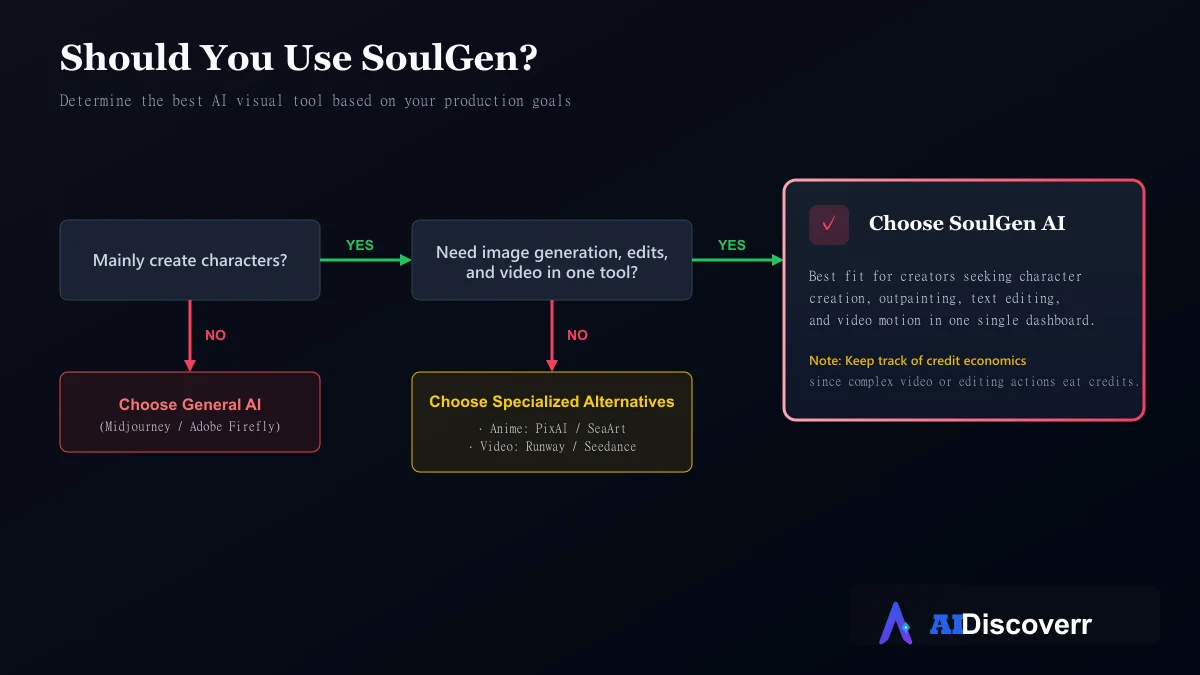
The important distinction is specialization. SoulGen is not trying to be every creative application for every professional. Its value comes from bringing character creation and related media workflows into one accessible platform.
Final Verdict: Should You Use SoulGen?
SoulGen is best viewed as a specialized AI character and visual-creation platform rather than a general-purpose AI image tool.
Its strongest advantage is the workflow. You can move from:
Prompt → Character → Image → Edit → Expand → Video
without switching between several applications.
The platform also makes character creation accessible to beginners who do not want to configure complex AI models.
However, the credit system deserves attention. Users who generate lots of images, edits or videos should calculate their expected monthly usage before subscribing.
There is also a second important point: do not rely on old third-party articles for current SoulGen policies or pricing. The platform has changed considerably, and some older pages contain outdated information.
Frequently Asked Questions
What is SoulGen AI?
SoulGen is an AI-powered visual creation platform focused on AI-generated characters, images, editing, outpainting and video workflows. It also includes a companion-style chat feature.
Is SoulGen free?
SoulGen has offered trial/free functionality, but exact allowances can change. Check the current official pricing page before relying on a specific free-credit amount.
How much does SoulGen cost?
The current official pricing information lists Pro at $12.99/month or $90.99/year, with 100 credits per month.
Does SoulGen generate videos?
Yes. The current platform supports image-to-video and other video-generation workflows, with different models consuming different numbers of credits.
Can SoulGen edit images?
Yes. SoulGen supports text-based image editing and workflows for adding, extending and removing image content.
Can SoulGen create anime characters?
Yes. Anime-style character creation is one of the product's established use cases.
Does SoulGen have an API?
I could not find an official public API in its current public documentation. Third-party research also reports that no public API is currently available.
Is SoulGen safe?
SoulGen has published Terms and a Privacy Policy, but users should review those documents before uploading sensitive information. Its current Terms also prohibit several categories of harmful or explicit content.
Can I use SoulGen images commercially?
The current pricing material advertises commercial-use rights for certain paid credit purchases. However, commercial licensing depends on the applicable purchase and terms, and users remain responsible for third-party copyright, trademark and likeness rights.
Is SoulGen worth paying for?
It can be worthwhile if you specifically want character-focused image creation, editing and video in one platform. It is less compelling if you need a developer API, advanced professional design tools or a general-purpose AI image ecosystem.