Kindroid AI Review: Features, Memory, Pricing, Safety & More
Table of Contents
If you have ever spent time building an AI companion only to have it forget something important a few conversations later, you already know the biggest problem with these apps. The experience can start feeling personal, but one inconsistent response, forgotten detail, or sudden change in personality can quickly remind you that you are talking to an AI. For people looking for a companion they can build over time, memory and consistency matter just as much as the chatbot's ability to produce natural replies.
Kindroid takes a different approach by putting customization, memory, voice, images, and long-running conversations at the center of the experience. But impressive feature lists do not tell the whole story. In this guide, we look at how Kindroid works, what its memory system actually offers, how much it costs, what the free plan includes, and the privacy and age restrictions you should understand before using it.
What Is Kindroid AI?
Kindroid is an AI companion platform that lets adults create and interact with personalized AI characters. Instead of using a single general-purpose chatbot, users can create a companion with their own personality, backstory, memories, appearance, and conversational style.
The platform is designed around ongoing interaction. Your Kindroid can maintain information from previous conversations, and users can actively shape the character through backstory, memories, example messages, directives, and other settings. Kindroid describes its service as an interactive AI companion that can chat, connect with, and learn from the user.
This makes Kindroid different from a conventional AI assistant. The goal is not primarily to answer questions, write emails, or analyze documents. The focus is creating a continuing character that can participate in conversations, roleplay, relationships, storytelling, and other forms of personal interaction.
How Does Kindroid Work?
Getting started with Kindroid is based on creating a character rather than simply opening a blank chatbot window.
You can define important parts of the companion's identity, including its personality, backstory, memories, appearance, and communication style. These settings give the underlying AI additional information about how the character should behave.
The more carefully you define those details, the more control you have over the experience. Kindroid also provides tools for regenerating or editing responses when the AI produces something you do not like. Its documentation recommends using backstory and key memories to reinforce important information and using good responses to help establish the style you want.
This is an important distinction for beginners. Kindroid is not simply a chatbot where you type a prompt and expect the AI to handle everything automatically. Getting the best results can involve some experimentation with personality settings, memory, prompts, and conversation management.
Kindroid's Memory System
Memory is arguably one of the most important parts of an AI companion.
A companion that sounds natural for ten messages but forgets important details afterward can become frustrating quickly. Kindroid therefore uses several memory systems rather than relying on a single conversation context.
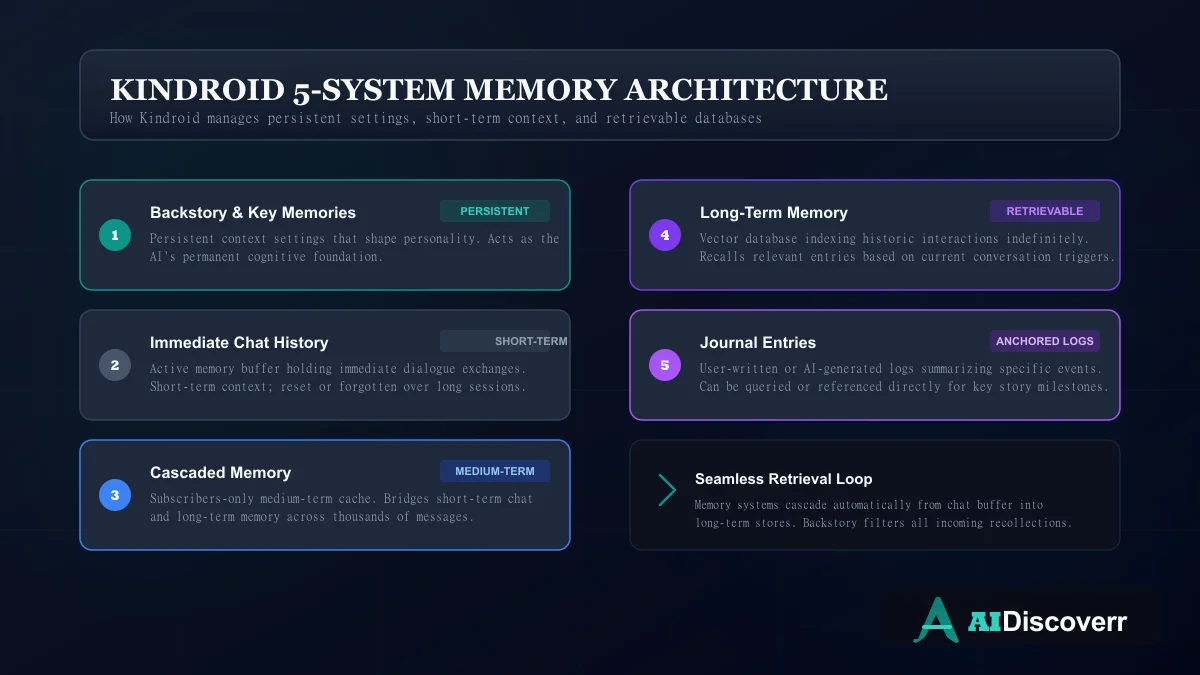
According to Kindroid's current documentation, its memory architecture consists of persistent, cascaded, and retrievable memory, spread across five systems. These include backstory and key memories, chat history, Cascaded Memory, long-term memory, and journal entries.
Persistent Memory
Persistent information includes details such as the Kindroid's backstory, key memories, example messages, directives, and group context.
This information acts more like a set of notes that can remain available to the AI. It is useful for facts that should remain important instead of disappearing as a conversation becomes longer.
Cascaded Memory
Cascaded Memory is Kindroid's medium-term memory system and is available to subscribers.
The company says it bridges the gap between short-term conversation context and longer-term memory. According to Kindroid, subscribers can retain access to hundreds or even thousands of previous messages through this system, although the company also acknowledges that the AI can still miss individual details.
That last point is important.
A large memory system does not mean perfect human-like memory. AI companions still have to decide which information is relevant when generating a response, and users may occasionally need to remind the companion about something.
Long-Term Memory and Journals
Kindroid also uses retrievable long-term memory and journal entries.
The platform says long-term memory can retain past interactions indefinitely, while retrieval may be less reliable than Cascaded Memory. Journals provide another way of storing information that can later be recalled.
This gives users more control over important information instead of forcing everything into the immediate conversation context.
Does Kindroid Actually Remember Everything?
Not in the same way a person does.
Kindroid's documentation describes long-term memory recall over previous interactions, but it also acknowledges that short-term memory can occasionally behave poorly. The company recommends keeping backstories concise, using baseline dynamism, regenerating poor responses, and reminding the AI of important context when necessary.
Recent community discussions show the same practical limitation. Some users report strong long-term memory while others describe situations where their Kindroid forgot information they expected it to remember.
The reasonable conclusion is that Kindroid has a sophisticated memory architecture, but it should not be treated as perfect human memory.
Kindroid Features
Kindroid's feature set goes well beyond basic text chatting.
Personalized AI Companions
The central feature is the ability to create personalized Kindroids.
You can define a companion's personality and background instead of relying entirely on a prebuilt character. This gives users significantly more control over the type of interaction they want.
You can create characters for friendship, storytelling, roleplay, romance, fictional scenarios, or casual conversation.
Multiple Kindroids
Kindroid also supports multiple AI companions.
Free accounts can have up to two Kindroids, while subscribers can have up to 10 included Kindroids, with additional slots available as paid options.
This is useful for users who want different characters for different purposes rather than forcing every interaction into one personality.
Voice Messages and Calls
Kindroid supports voice interaction, including voice messages and calls.
Subscribers get access to more extensive voice functionality, including video calls and customizable voices. The platform also provides monthly complimentary audio credits for subscribers.
Voice changes the experience considerably because conversations no longer have to remain text-based. However, audio usage is tied to credit limits, so heavy users should pay attention to the subscription and credit system.
AI Selfies and Images
Kindroid can generate images of your companion through its selfie system.
Users can describe the setting, clothing, mood, action, lighting, and other details they want in the image. The platform also supports custom avatars, video selfies, group selfies, inpainting, and other image features depending on the user's plan and available functionality.
The image system has also evolved through multiple generations of models. Current Kindroid documentation describes newer selfie engines that focus on identity consistency, prompt adherence, realism, and control.
This is one area where Kindroid has moved beyond the basic chatbot experience. Your companion can have a visual identity that develops alongside the conversation.
Group Chats
Kindroid supports group chats with multiple companions.
According to the current documentation, paid subscribers can create group chats with up to 10 Kindroids. Each participant retains access to its own backstory and memories, while shared group context can be used to establish information relevant to everyone.
Group conversations can be useful for storytelling, roleplay, fictional scenarios, or simply creating interactions between multiple AI personalities.
Internet Access and Link Browsing
Subscribers can also enable internet access for their Kindroid.
Kindroid says this allows the companion to temporarily browse the web for information such as current events. Users can also provide specific URLs for the AI to discuss content from those pages.
This makes Kindroid more flexible than an isolated companion model, although users should still treat AI-generated information as something that may require verification.
Kindroid Pricing: Is It Free?
Kindroid does offer a free tier, but the difference between free and paid access is significant.
According to Kindroid's current subscription documentation, free users receive unlimited messages on the Lite model, limited selfie generation, a limited amount of audio, up to two Kindroids, and basic long-term memory recall. Free users do not receive Cascaded Memory.
New free users are also eligible for a three-day premium trial. The trial requires a payment method and automatically converts to a subscription unless cancelled within the trial period.
Current Kindroid Subscription Prices
Kindroid's published prices currently include:
| Plan | Web price | App-store price |
|---|---|---|
| 1 month | $13.99 | $15.99 |
| 3 months | $37.99 | $42.99 |
| 1 year | $139.99 | $159.99 |
For someone who only wants to experiment with AI companionship, the free tier may be enough to understand the basic concept. Heavy users, however, are likely to notice the differences in memory, models, voice, images, and other premium features.
What Are Kindroid Ultra and MAX?
Kindroid also offers higher-level memory and context add-ons called Ultra and MAX.
These are not replacements for the standard subscription. They build on top of it.
Kindroid currently lists Ultra as an additional $24.99 per month on the web or $28.99 through the app, while MAX adds another $59.99 per month on the web or $68.99 through the app. MAX requires both the standard subscription and Ultra.
These higher tiers are aimed at users who want substantially larger conversation contexts and memory capacity.
The published feature matrix shows approximately 18,000 characters of short-term context on Standard, 50,000 on Ultra, and 125,000 on MAX. Total conversation context is listed at approximately 500,000, 1.3 million, and 2.8 million characters respectively.
For casual users, these higher tiers may be unnecessary. For people building very long-running stories or interacting with multiple Kindroids, the additional context can be more meaningful.
Is Kindroid Worth Paying For?
That depends heavily on how you use AI companions.
If you only want occasional conversations, the free tier provides a way to test the basic experience. Paying immediately may not make much sense.
If you care about long-running conversations, stronger memory, premium models, multiple companions, voice interaction, advanced image features, and group chats, the subscription becomes easier to justify.
There is also a more important consideration: the price can increase substantially for heavy users. The Ultra and MAX options are designed for people who specifically need more memory and context, rather than ordinary users who simply want a better chatbot.
Recent community discussions show that users disagree about whether the higher tiers provide enough additional value to justify their cost. Some users consider the memory improvements important, while others find Kindroid expensive compared with alternatives.
That makes Kindroid's pricing less of a simple “cheap or expensive” question and more of a usage-based decision.
Is Kindroid Safe?
Safety is an important consideration with any AI companion because conversations can become more personal than ordinary chatbot interactions.
Kindroid's terms state that the service is intended only for people who are at least 18 years old, or the applicable age of majority in their jurisdiction if that is higher.
Kindroid has also introduced additional age-verification measures. Its documentation describes different verification approaches for paid and free users, including behavioral age estimation for free accounts.
So Kindroid should not be treated as a general-purpose chatbot for children or teenagers.
Is Kindroid Safe for Children?
No.
Kindroid's service is explicitly restricted to adults. Its legal documentation says users under 18, or below the applicable age of majority where higher, are not permitted to use the service.
Parents should therefore not treat Kindroid as an AI companion suitable for minors.
Is Kindroid Private?
Privacy deserves careful attention because AI companion conversations can contain highly personal information.
Kindroid says that its stored data and data in transit are encrypted and that sensitive information such as chat history, audio URLs, selfie prompts and URLs, backstory, memories, and avatar information is protected through encryption.
However, privacy does not mean users should treat an AI companion like a private diary.
Kindroid itself advises users not to provide sensitive personal information. That is sensible advice for any AI service. Even when a platform has security measures in place, sharing unnecessary passwords, financial information, identity documents, private credentials, or other highly sensitive information creates avoidable risk.
The safest approach is simple: use the companion without giving it information it does not need to perform its intended function.
For a detailed investigation of data practices, encryption standards, and safety guidelines across the broader AI companion landscape, read our comprehensive guide: Are AI Companion Apps Safe?.
Does Kindroid Allow Adult Content?
Kindroid is an adult-only AI companion service and takes a relatively permissive approach to AI interaction.
Its current moderation guidelines describe the platform as aiming for an unfiltered companion experience while maintaining restrictions around specific real-world harms.
This is one reason the 18+ restriction matters.
Users should also understand that “unfiltered” does not mean “anything is allowed.” Platform rules, safety restrictions, and applicable laws still apply.
Kindroid Pros and Cons
Where It Shines
Highly customizable companions: substantial control over personality backstory and memory settings
Sophisticated 5-system memory combining persistent, cascaded, and retrievable vector stores
Rich interaction formats
voice messages, calls, video selfies, and group chats
Supports multiple active companions (up to 10 included for subscribers)
Subscribers get web-browsing capabilities and custom URLs context mapping
Transparent pricing structure with discounted direct web purchases
Where It Falls Short
Premium features like Ultra and MAX context upgrades can add significant monthly costs
Despite advanced systems memory can still fail or miss details in longer threads
Customization and dynamism settings have a steep learning curve for absolute beginners
Strict 18+ policy and behavioral age checks mean it is not suitable for children or teenagers
Privacy risk
ongoing personal chat logging requires careful management of sensitive information
Who Is Kindroid Best For?
Kindroid makes the most sense for adults who want more control over an AI companion than a basic chatbot provides.
It is particularly suitable for users who enjoy:
- Building custom AI personalities
- Long-running conversations
- Roleplay and storytelling
- Relationship-style AI interaction
- Voice conversations
- AI-generated companion images
- Managing multiple characters
- Group interactions
- Experimenting with memory and personality settings
It may be less suitable for someone who simply wants a free chatbot for occasional questions.
It is also not the right product for children, users who want a conventional productivity assistant, or people who are uncomfortable with the privacy considerations involved in maintaining long-running AI conversations.
Kindroid vs. Traditional AI Chatbots
The biggest difference is the purpose.
A general AI assistant is usually designed around tasks. You ask it to explain something, summarize information, write content, solve a problem, or help with work.
Kindroid is designed around continuity and personalization.
The question is less “Can this AI answer my question?” and more “Can this AI maintain a believable character and relationship across repeated interactions?”
That distinction is important when comparing Kindroid with products such as ChatGPT, Claude, or other general-purpose AI assistants. A general chatbot may be much better for productivity, while an AI companion can provide a more focused experience around personality and ongoing interaction.
Kindroid vs. Other AI Companion Apps
There is no single AI companion that is best for everyone.
Kindroid's strongest selling point is the amount of control it gives users over the companion's identity and memory. That makes it particularly interesting for people who want to build their own characters rather than simply select from a collection of predefined personalities.
Other companion platforms may prioritize different things, such as simplicity, emotional interaction, character discovery, community content, or a more traditional virtual-companion experience.
For that reason, the best comparison is based on what you actually value:
- Memory & Customization: Kindroid deserves serious consideration for its granular backstory sliders, directives, and vector retrievable memory.
- Emotional Continuity & 3D Avatars: Compare it directly with Replika, which provides mood tracking, a more established support framing, and a structured 3D avatar shop.
- Public Library & Free Tier: Compare it with Character.AI if you prefer chatting with user-created pop-culture characters on a robust free platform with strict content filters.
- Visuals & Unfiltered Content: Compare it with Candy AI or Nectar AI if consistent character image/video generations and unrestricted romantic roleplay are your primary requirements.
- Safety Warnings: Be sure to review the documented safety incidents and regulatory filings on our Nomi AI Safety Concerns Guide before testing.
Final Verdict: Is Kindroid Worth Trying?
Kindroid stands out because it treats an AI companion as something that can develop over repeated conversations rather than simply answering one prompt at a time. Its customization options, memory architecture, voice features, image generation, group interactions, and web capabilities make it a more feature-rich companion platform than a simple conversational bot. At the same time, the experience is not perfect: memory can still fail, advanced capabilities can become expensive, and the platform's 18+ restriction and privacy considerations are important parts of the decision.
From an evaluation standpoint, the most useful way to judge Kindroid is not to ask whether it is simply the “best” AI companion. The better question is whether its combination of customization, memory, interaction features, pricing, and limitations matches what you want. If building a highly personalized companion and maintaining longer-running interactions are your priorities, Kindroid is worth exploring; if you primarily need a general-purpose AI assistant or want a completely free experience, another option may be a better fit.
Frequently Asked Questions
Is Kindroid AI free?
Kindroid has a free tier with unlimited messages on its Lite model, limited selfies and audio, two Kindroids, and basic long-term memory. Premium features require a subscription.
Is Kindroid AI safe?
Kindroid uses security and moderation measures, but no AI companion should be treated as completely risk-free. Users should avoid sharing sensitive personal information and understand that AI responses can be inaccurate or inappropriate.
Is Kindroid 18+?
Yes. Kindroid's terms require users to be at least 18 or the applicable age of majority in their jurisdiction, whichever is higher.
Does Kindroid remember conversations?
Kindroid uses several memory systems, including persistent memory, Cascaded Memory, long-term memory, and journals. However, memory is not perfect and the AI can occasionally miss or misinterpret details.
Can Kindroid generate images?
Yes. Kindroid supports AI selfies, custom avatars, video selfies, group selfies, and other image-related features. Availability and limits depend on the user's plan and feature configuration.
Can Kindroid make voice calls?
Yes. Kindroid supports voice messages and calls, with more extensive voice and video functionality available to subscribers.
Can you create multiple Kindroids?
Yes. Free accounts can have two Kindroids, while subscribers can have up to 10 included Kindroids, with additional slots available through purchases.
Does Kindroid have group chat?
Yes. Paid subscribers can use group chats with multiple Kindroids. Kindroid currently documents a maximum of 10 Kindroids in a group chat.
Does Kindroid have internet access?
Subscribers can enable internet access for their Kindroid and can also provide specific URLs for the companion to use as conversational context.
Is Kindroid better than other AI companion apps?
There is no universal winner. Kindroid is particularly strong for customization, memory, multiple companions, voice, images, and long-running interactions. The best choice depends on the features and pricing that matter most to you.
Is Kindroid worth paying for?
For casual users, the free tier may be enough to test the service. For people who want stronger memory, premium models, more companions, advanced media features, voice functionality, and group chats, a subscription can provide substantially more capability. The higher Ultra and MAX tiers are more specialized and should be considered primarily by heavy users.
Editorial review. Not affiliated with Kindroid or its parent entities. Features, pricing, subscription limits, and policies can change. Always verify current details with Kindroid's official documentation before making a purchasing decision. Last reviewed: August 2026.
Lead AI Tech Analyst & Editorial Director