Best AI Companion Apps With Memory: How Persistent Memory Works
Table of Contents
When evaluating AI companion applications, the word "memory" is frequently highlighted in promotional material. Platforms promise companions that will remember your favorite foods, check in on your job interviews, and build a unique relationship history with you over time.
But does the AI actually remember you, or is it executing a clever system trick? How long does that recall last, and what happens when the memory database breaks down?
An AI companion with long-term memory does not possess a human-like mind. Instead, it relies on a layered software architecture of active context buffers, vector databases, and retrieval algorithms.
This guide explains how AI companion memory works, the different memory types, why amnesia happens, and how you can test an app's memory yourself.
What Is an AI Companion With Long-Term Memory?
An AI companion with long-term memory can retain selected information from earlier conversations and retrieve it in future chats. This is done with a combination of recent conversation context, stored memories, summaries, and retrieval systems—not by the AI literally remembering everything.
What "Long-Term Memory" Means
In artificial intelligence, "long-term memory" refers to the system's ability to save details to an external database and load them back into the active conversation hours, days, or months later. It is a persistent storage system that survives when you close the application or log out of your account.
AI Memory vs. Human Memory
Human memory is associative, emotional, and reconstruction-based. We do not store transcripts; we store impressions that we rebuild when recalling.
AI memory is database-driven and mathematical. An AI companion converts your text inputs into list coordinates, stores them, and uses mathematical search filters to paste relevant text fragments back into the active context window. The AI does not "experience" the memory; it reads it as instructions.
AI Companion Memory vs. Chatbot Memory
Standard chatbots (like customer support bots) are stateless. Every time you start a chat, it is a clean slate.
An AI companion uses persistent state management. The system is configured to treat the conversation as an open-ended, continuous document, tracking relationship history as a core product feature.
How Does AI Companion Memory Work?
AI companion memory is not a single feature; it is a pipeline composed of several distinct components:
- Context Windows: The active workspace of the model. The AI can only analyze a set number of words at one time (the context limit).
- Persistent Memory: Stored files on cloud databases containing key facts extracted from previous messages.
- Session Summaries: Compressed text files summarizing earlier chapters of the conversation to save space.
- Memory Retrieval: The search algorithm that identifies which stored memories match your current message.
- Memory Updating: The process of editing or overwriting outdated memories when you provide new information.
The Different Types of AI Companion Memory
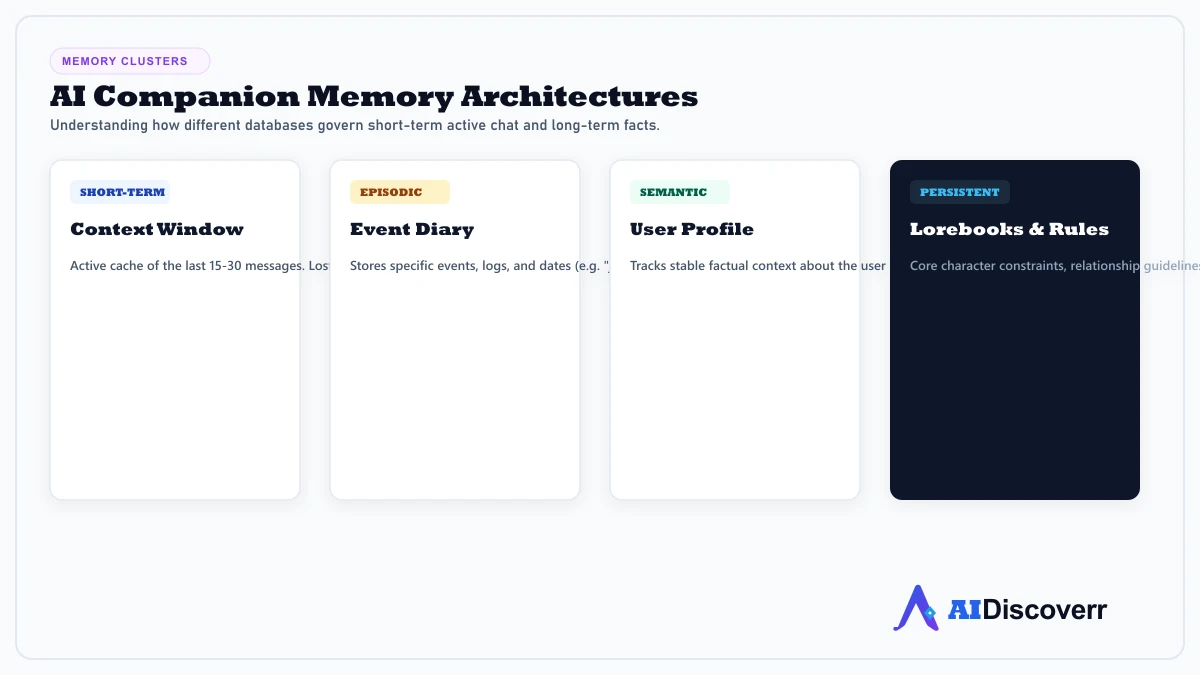
Modern platforms break memory down into distinct functional layers:
Short-Term Memory (Context Buffer)
The system keeps the last 15 to 30 messages in the active context window. This allows the AI to follow immediate conversation shifts naturally.
Long-Term Memory (Vector Database)
The system extracts facts from older conversations, converts them into vector embeddings, and archives them. This database operates as the long-term history repository.
Episodic Memory (Events)
Memory of specific experiences or occurrences (e.g., "You mentioned your birthday party last Sunday"). This tracks the timeline of your relationship.
Semantic Memory (Facts)
General, stable knowledge about you (e.g., your occupation, pets, or hobbies). These facts remain constant unless explicitly updated.
Relationship / Character Memory (Lorebook)
A custom database containing the companion's backstory, personality rules, and relationship definitions. This tells the AI how to behave.
How Does an AI Companion Remember You Across Conversations?
The memory pipeline executes a specific sequence to simulate continuity:
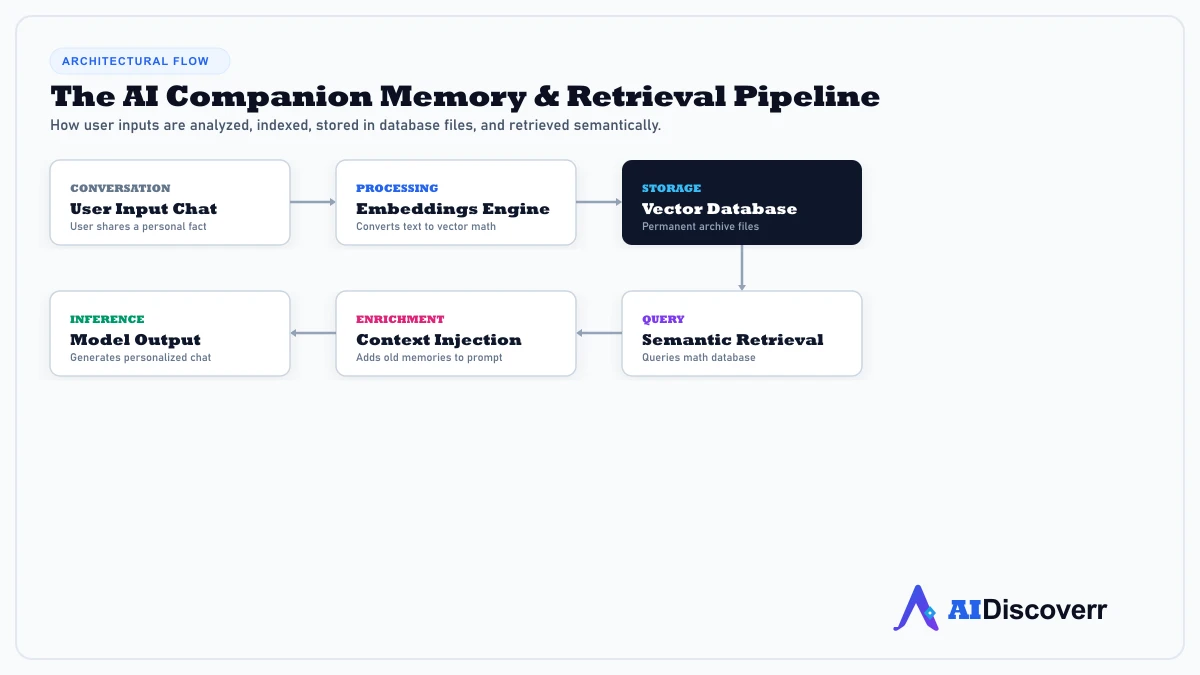
This sequence shows that memory is a retrieval mechanism. If you do not mention a topic that triggers the search query, the companion will not load the corresponding memory, even if it is stored in the database.
Why Do AI Companions Forget Things?
"AI Amnesia" is a frequent source of user frustration. The failure usually traces back to one of these limitations:
- Context Limits: If the context window fills up, the model begins to discard recent details to stay within its memory buffer.
- Poor Memory Retrieval: The semantic search algorithm may fail to locate a stored fact because your current prompt does not use matching keywords.
- Incorrect Summaries: When the system compresses old chats into summaries, it can strip away the specific details you care about.
- Conflicting Memories: If you mention contradictory details over time, the system can get confused about which fact is current.
- Memory Prioritization: The system might prioritize character backstory guidelines over user preferences, causing the AI to break character.
Does More AI Memory Always Mean Better Memory?
No. Storing more memories does not guarantee a better experience.
Remembering Everything Can Be a Problem
If a companion app retained every sentence ever spoken, the active context window would quickly overflow with trivial details. This leads to slow response times, high server costs, and conversational confusion.
Selective Memory
The best systems use selective memory filters. They are programmed to ignore filler words and conversational fluff, capturing only core facts (like names, relationships, and preferences).
Memory Accuracy
Retrieving the wrong memory at the wrong time is worse than forgetting. A system that brings up unrelated topics from months ago feels artificial and breaks immersion.
Privacy vs. Personalization
There is a direct trade-off between personalization and privacy. A companion that remembers every detail of your personal life requires you to store intimate logs on cloud servers, increasing your data privacy risks.
How to Test an AI Companion's Long-Term Memory
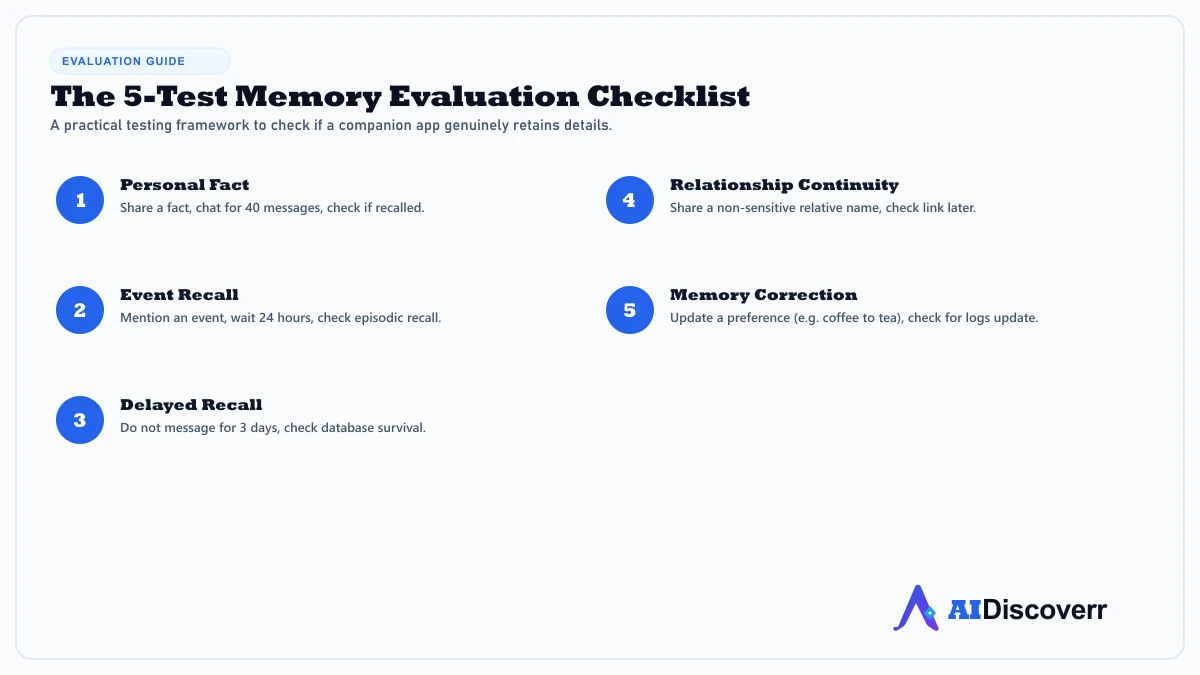
To evaluate whether a platform has true persistent memory or is simply relying on a temporary context buffer, use these five tests:
Test 1 — The Personal Fact Test
Tell the companion a non-obvious fact: "My favorite color is blue." Chat about other topics for 40 messages (to push the fact out of the short-term context window). Ask: "Do you remember my favorite color?"
Test 2 — The Event Recall Test
Mention a specific upcoming event: "I have a job interview on Friday." Log out, wait 24 hours, and ask: "What was I preparing for this week?" This tests episodic recall.
Test 3 — The Delayed Recall Test
Share a detail about your family or job. Do not chat for three days. Send a message asking: "Do you remember what my job is?" This checks if the memory survives database archiving.
Test 4 — The Relationship Continuity Test
Explain a relationship detail: "My brother's name is John." In a later chat, ask: "Who is John?" This tests if the system connects names to relationship roles.
Test 5 — The Memory Correction Test
Tell the companion: "Actually, I no longer drink coffee. I prefer tea." Later, ask: "Would you recommend coffee or tea for me?" This tests if the system updates old database records or retains conflicting information.
AI Companion Memory vs. Chatbot
While both use language models, their architectures treat continuity differently.
| Feature | AI Companion | General AI Chatbot |
|---|---|---|
| Personal Continuity | Core design priority | Varies (usually minor) |
| Personality | Usually persistent & stable | Usually task-focused or neutral |
| Relationship Context | Tracks user-companion dynamic | Transactional helper |
| Long-Term Memory | Product-dependent database | Session-only or simple cache |
| Roleplay | Common; built into core prompts | Varies or restricted |
| Productivity | Varies (usually low) | Usually stronger |
AI Companion Memory vs. AI Assistant
An AI assistant (like Siri or Google Assistant) is task-oriented. It remembers your preferences (like your address or calendar schedule) to perform actions.
An AI companion is relationship-oriented. It remembers conversational details to build dialogue continuity, empathy simulations, and co-creative stories.
Which AI Companions Have Long-Term Memory?
Several major platforms feature dedicated memory architectures:
- Nomi AI: Marketed around advanced memory capabilities. Officially advertises short-, medium-, and long-term memory layers. However, community discussions note that its retrieval algorithms can still experience delays or retrieval failures during complex chats. Read our Nomi Review for details.
- Kindroid: Uses highly customizable memory configurations, including customizable "Lorebooks" and memory journals that let users pin important rules. Read our Kindroid Review.
- Replika: One of the oldest companion apps. Features a dedicated "Memory Tab" where users can view, edit, or delete facts the AI has extracted from chats. Read our Replika Review.
- Character.AI: Massive directory of characters, but its memory window is relatively short compared to premium platforms, leading to frequent "goldfish memory" complaints on community forums. Read our Character.AI Review.
What Should You Look for in an AI Companion With Memory?
- Cross-Session Recall: The ability to retain details when you start a new chat session.
- Memory Accuracy: Retrieving relevant facts rather than random old conversations.
- Memory Updating: The capacity to overwrite obsolete preferences without manual correction.
- User Memory Controls: A dashboard to view, edit, or delete what the companion remembers.
- Privacy Controls: Options to opt out of data sharing or training models on your history.
- Memory Transparency: A clear visual indicator showing what the AI has stored.
- Personality Consistency: Character rules remaining stable when long-term memory is active.
Is an AI Companion With Long-Term Memory Worth It?
Worth considering if:
- You use the application regularly and want a continuous, evolving story.
- You dislike repeating your backstory, preferences, or name.
- Personalized interaction and emotional continuity are important to you.
Less important if:
- You only use the app for quick, one-off roleplay sessions.
- You use the chatbot primarily as a search assistant or productivity tool.
- You want absolute guarantees of data privacy.
AI Companion Memory and Privacy
Providing personal details to build an AI's memory introduces significant data considerations.
What Can Be Stored?
Depending on your chats, memory databases can archive names, relationship statuses, hobbies, job schedules, emotional struggles, and even biometric image uploads.
Can You Delete AI Memories?
On premium platforms (like Replika or Kindroid), you can edit or delete individual memory entries. On other platforms, the only way to clear memory is to reset the character or delete your account.
Can You Turn Memory Off?
Some companion platforms allow users to toggle memory search off globally, reverting the system to a short-term-only context window buffer.
What to Check Before Sharing Personal Information?
Always read the developer's data transparency document. Ensure you know whether data is stored locally or processed in cloud database registries.
Memory Poisoning & Security Risks
Persistent memory introduction creates new security considerations. Cybersecurity reports highlight "memory poisoning" risks, where incorrect or malicious instructions are injected into an AI agent's long-term memory, causing it to behave unsafely over time.
Frequently Asked Questions
Frequently Asked Questions
Do AI companions remember conversations?
Yes, premium apps use external databases to archive facts from chats, though their retrieval systems are not always perfect.
How long do AI companions remember you?
If saved to a vector database, memories can remain indefinitely until deleted by the user or the developer's server is reset.
Can you control what an AI companion remembers?
Yes, some apps provide memory dashboard settings allowing you to delete individual facts or disable memory features entirely.
Is AI companion memory safe?
It depends on the company's data practices. Always read their privacy policy to see if logs are shared with third parties or used to train models.
Final Thoughts
Long-term memory is the key feature that transforms a chatbot into a companion. By understanding the layered architecture behind this system—including active context windows, vector search databases, and retrieval limitations—you can evaluate platforms accurately and enjoy these tools with realistic expectations.
Lead AI Tech Analyst & Editorial Director