Nano Banana Review 2026: Features, Models, Pricing & How to Use It
Table of Contents
Last verified: August 13, 2026
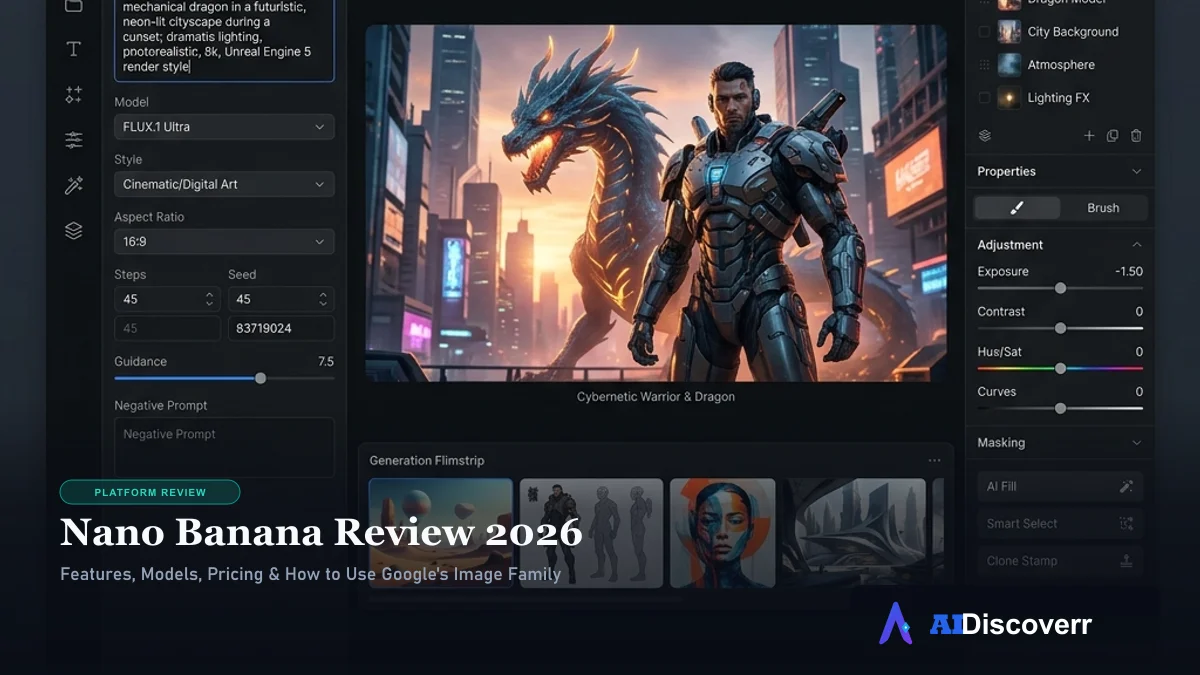
Nano Banana is Google's family of AI image-generation and editing models built into the Gemini ecosystem. It can create images from text, edit existing images, combine references, maintain character consistency, and refine visuals through conversational instructions.
But there is an important detail: Nano Banana is no longer just one model. Google now uses the Nano Banana name across multiple Gemini image models, including Nano Banana 2, Nano Banana 2 Lite, and Nano Banana Pro. So if you're trying to decide whether Nano Banana is worth using, the first step is understanding which model you're actually getting.
What Is Nano Banana?
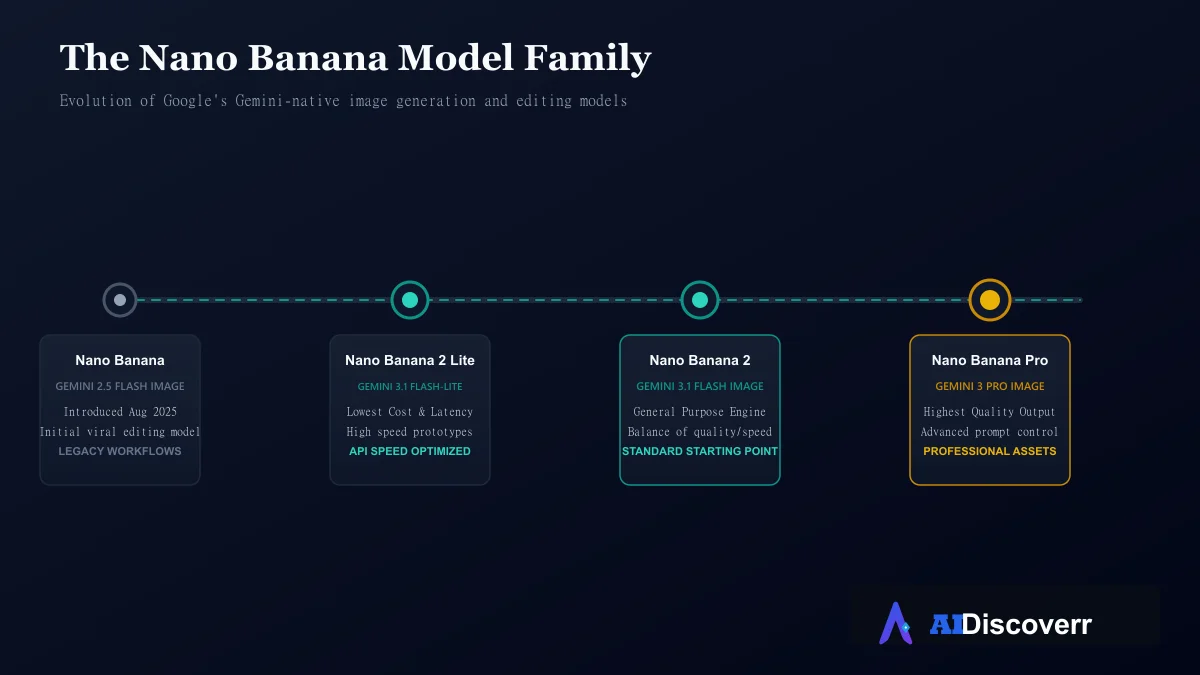
Nano Banana started as the informal name associated with Google's Gemini 2.5 Flash Image model, introduced in August 2025. Google's developer announcement described Gemini 2.5 Flash Image as a native image-generation and editing model capable of combining images, maintaining character consistency, and performing targeted transformations through natural language.
The name became popular because of the model's viral image-editing capabilities. Google later expanded the family. Today, the term can refer to several generations and tiers, which is an important distinction to make. If you search for "Nano Banana" in 2026, you may actually be looking for Nano Banana 2 or Nano Banana Pro, rather than the original Gemini 2.5 Flash Image model.
Nano Banana Models Explained
Google now organizes its image generation technology under several distinct models to cater to different workloads and quality standards:
Nano Banana (Original)
The original Nano Banana corresponds to Gemini 2.5 Flash Image. Google describes this model as optimized for fast, high-volume visual creation and conversational image editing. It remains relevant when you encounter older developer integrations or legacy API code.
Nano Banana 2 Lite
Nano Banana 2 Lite is based on Gemini 3.1 Flash-Lite Image. It is designed around speed and cost efficiency rather than maximum image quality, making it the ideal choice for high-volume generation, fast prototypes, applications where latency matters, and workflows where maximum details are not strictly necessary.
Nano Banana 2
Nano Banana 2 is based on Gemini 3.1 Flash Image. Google positions it as a fast, efficient general-purpose image-generation model. It is designed for everyday image generation, conversational editing, reference image workflows, better text rendering, and character consistency. For most users looking for a current general-purpose Nano Banana model, Nano Banana 2 is the logical starting point.
Nano Banana Pro
Nano Banana Pro corresponds to Gemini 3 Pro Image. Google positions it as the higher-quality option for professional image generation and editing. It is better suited to users who need detailed output, advanced creative control, complex instructions, and high-resolution professional assets. Google's current Gemini documentation says Nano Banana Pro is available with a Google AI Plan in Gemini for image regeneration when the Pro model is selected.
Nano Banana 2 vs. Nano Banana Pro
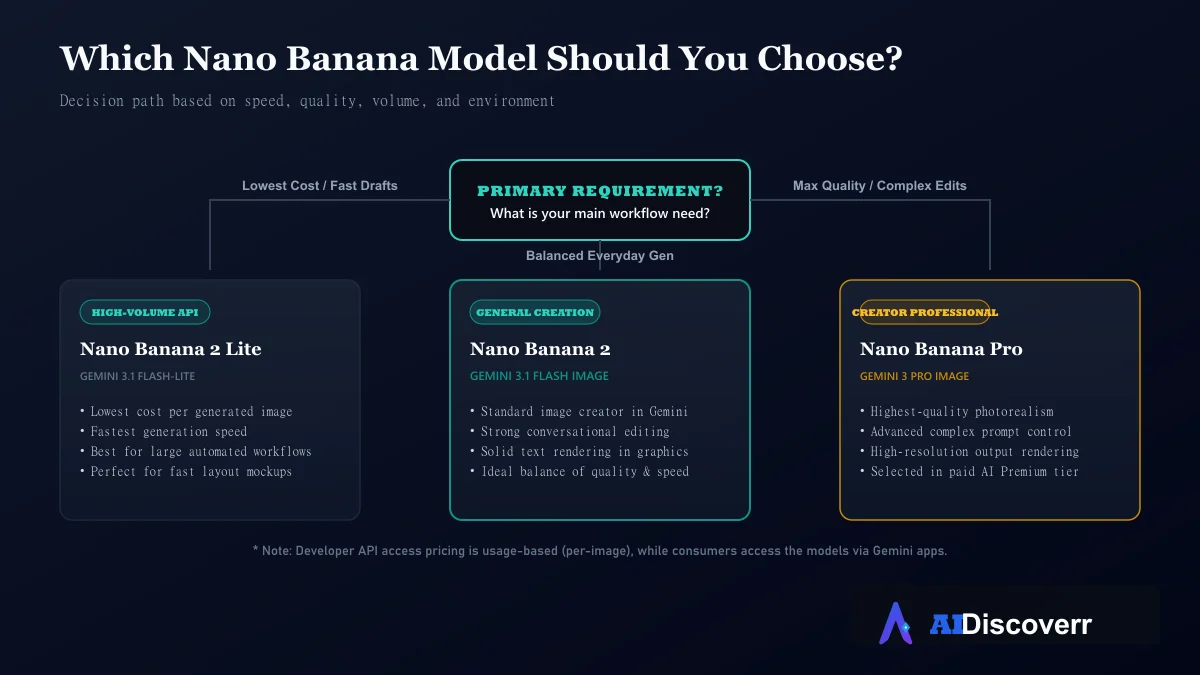
The simplest way to think about the two primary 2026 models is that Nano Banana 2 is your general-purpose workhorse, while Nano Banana Pro is the higher-end professional option.
| Feature | Nano Banana 2 | Nano Banana Pro |
|---|---|---|
| Main model | Gemini 3.1 Flash Image | Gemini 3 Pro Image |
| Focus | Speed + quality balance | Highest-quality generation |
| Image generation & editing | Yes | Yes |
| Reference images | Yes | Yes |
| Complex instructions | Strong | Stronger professional positioning |
| High-resolution workflows | Yes | Yes |
| Best for | Everyday creators | Professional assets |
What Can Nano Banana Do?
The Nano Banana model family brings several powerful capabilities to Google's multimodal ecosystem:
Generate Images From Text
You can describe an image using natural language. For example: "Create a clean product photograph of a black wireless headphone on a white studio background with soft lighting." Google recommends describing the subject, setting, style, and visual details rather than relying on a vague one-line prompt.
Edit Existing Photos (Image-to-Image)
Instead of creating a completely new image, you can provide an existing image and request a targeted change. For example: "Keep the person, lighting, and background unchanged. Replace the blue jacket with a black leather jacket."Google describes this type of targeted modification as part of Nano Banana's native image-editing capabilities.
Maintain Character Consistency
Nano Banana can maintain the appearance of a person or character across multiple generated images. This is incredibly useful for visual storytelling, marketing campaigns, character concepts, social media content, and product visualization.
Combine Reference Images
You can use multiple images as references to combine visual ideas. For example, you might provide a person, a clothing reference, and a background, and instruct the model to create a new scene. The exact supported reference-image limits depend on the model and interface.
Make Local Edits
You can change one part of an image without redesigning everything. This includes changing an object's color, replacing an object, adjusting text on a sign, modifying backgrounds, and correcting small visual details.
How to Use Nano Banana in Gemini
For most beginners, the consumer Gemini app is the easiest starting point.
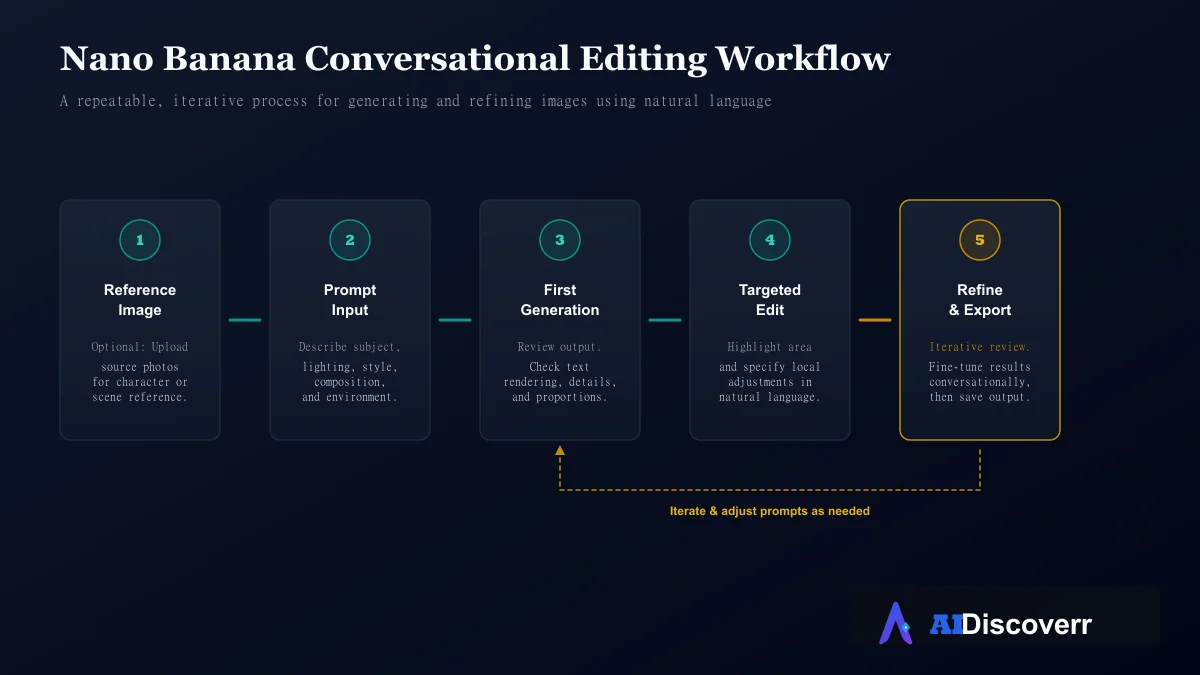
Google's current instructions for using the tool are:
- Open Gemini (gemini.google.com).
- Go to the image-generation area or type your prompt in the chat.
- Choose a template or enter your detailed text prompt.
- Generate the image.
- Review the result, highlight any area you want to change, and type additional refinement instructions.
The important part is the final step. Don't assume the first generation needs to be perfect. A better workflow is: Generate → inspect → identify one problem → edit → inspect again.
How to Write Better Prompts
For image generation, structure your prompt with core visual details:
- Subject: What should appear?
- Action: What is happening in the scene?
- Environment: Where is the subject located?
- Composition: What should the camera angle or perspective look like?
- Lighting: What kind of light should be used (e.g. soft studio light, warm golden hour)?
- Style: Photorealistic, illustration, watercolor, product photography, etc.
For editing, a useful structure is: "Keep [elements unchanged]. Change [specific element]. Match [lighting/style/perspective]."This is often much more useful than writing a long list of unrelated instructions.
How to Use in Google AI Studio
Developers can also work with Nano Banana models through Google AI Studio and the Gemini API. This route is more appropriate if you want to prototype an AI image application, automate image generation, integrate image generation into software, control model selection programmatically, or build production pipelines.
Nano Banana API Pricing
Gemini app subscription pricing and Gemini API pricing are not the same thing. The API uses usage-based pricing. Google's current API pricing lists Nano Banana 2 (Gemini 3.1 Flash Image) at:
- $0.045 per 0.5K image
- $0.067 per 1K image
- $0.101 per 2K image
- $0.151 per 4K image
The API also has a batch pricing option with lower rates:
- $0.022 per 0.5K
- $0.034 per 1K
- $0.050 per 2K
- $0.076 per 4K
Nano Banana 2 Lite is cheaper, with standard pricing listing approximately $0.0336 per 1K image.
Is Nano Banana Free?
It depends on how you access it. Google provides Nano Banana image-generation capabilities through Gemini, with availability and limits depending on your account type, product, and region. In June 2026, Google announced that eligible U.S. users could access personalized Nano Banana-powered image generation in Gemini for free.
So avoid saying "Nano Banana is completely free." A more accurate statement is: Nano Banana can be accessed through free Gemini experiences in some circumstances, while paid Gemini plans and API usage provide different capabilities and limits.
Real-World Use Cases
- Product Photography: Creating product concepts, mockups, and marketing visuals.
- Social Media: Creators generating visual variations for posts and campaigns.
- Marketing: Quick prototyping of advertising concepts and promotional graphics.
- Photo Editing: Changing specific elements on an existing photo without redrawing.
- Character Design: Leveraging character consistency for visual storytelling.
- Interior Design: Exploring furniture, colors, layouts, and room styles.
- Diagrams & Infographics: Making diagrams using Nano Banana 2's improved text capabilities.
Strengths & Limitations
Where It Shines
Conversational editing
Refine images instead of starting over each time
Strong reference-image workflow: Use images as context for edits
Character consistency
Keep characters identical across multiple scenes
Typography
Newer models show highly improved text-rendering in images
Multiple model options
Choose between speed, cost, and high-end quality
Where It Falls Short
Results can still vary
May struggle with highly complex, difficult edits
Confusing model naming
Term 'Nano Banana' refers to multiple different tiers
Availability differs
Access and features vary by region, account, and plan
Copyright responsibility
Google warns users to consider copyright and privacy rights
Is Nano Banana Safe to Use?
The technology itself is provided through Google's secure ecosystem, but users remain responsible for what they generate. Pay particular attention when uploading photos of other people, editing identifiable faces, recreating copyrighted material, or generating commercial content.
There is also a separate safety issue: not every website using "Nano Banana" in its name is an official Google service. A Reddit discussion specifically raised concerns about nanobanana.ai being confused with Google's technology. For safety, start with Google's official Gemini, Google AI Studio, or Google developer documentation rather than assuming a similarly named third-party website is operated by Google.
Nano Banana vs. Competitors
Rather than declaring one universal winner, select the tool that best fits your workflow strengths.
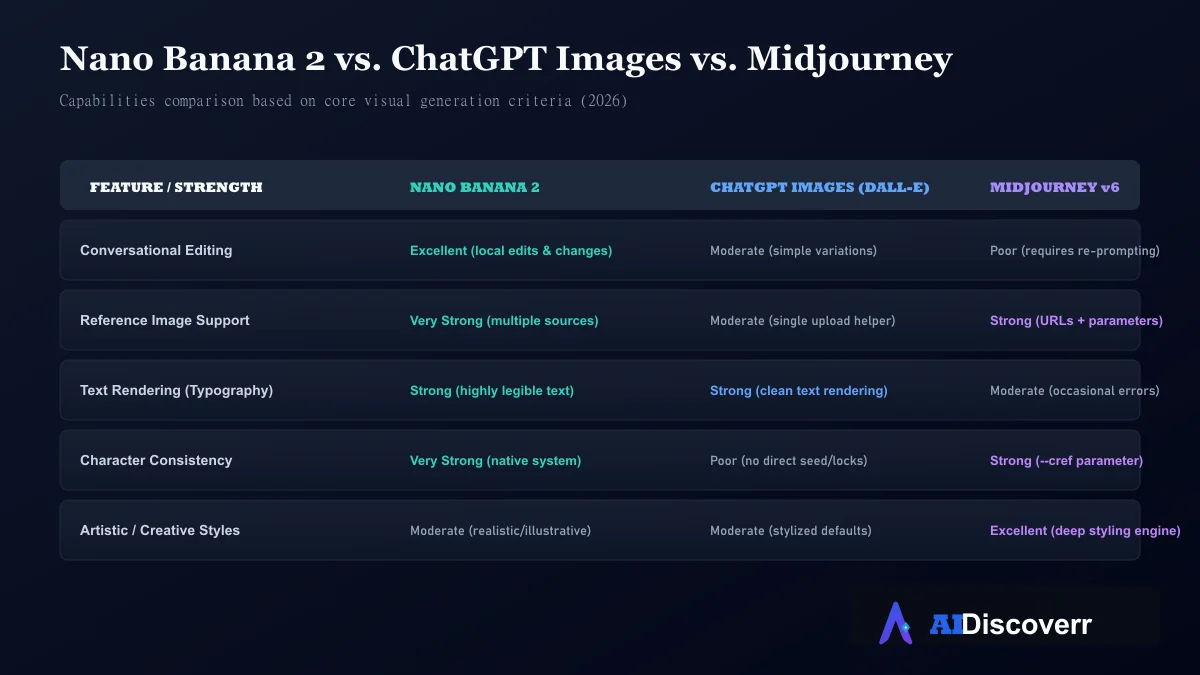
Choose Nano Banana when:
- You work heavily with reference images.
- Iterative local photo editing matters to your job.
- You want native Gemini ecosystem and workspace integration.
- Character consistency across generations is important.
Consider ChatGPT Images when:
- You already work extensively inside ChatGPT.
- Conversational reasoning is central to your workflow.
- Your image creation is tightly connected to other text generation tasks.
Consider Midjourney when:
- You want the highest aesthetic and artistic quality.
- You are focused on visual exploration and digital art communities.
- You need granular manual parameters (e.g. aspect ratios, chaos).
Who Should Use Nano Banana?
Nano Banana is a strong option for content creators, marketers, designers, social media managers, bloggers, product teams, and developers who want conversational image editing and strong reference image integration.
You may want another tool if you need a dedicated artist community (like Midjourney) or a workflow with highly specialized manual controls.
Final Verdict
Nano Banana is more than a viral AI image generator. It has evolved into a family of Google's Gemini image-generation and editing models. For most everyday users, Nano Banana 2 is the logical general-purpose starting point. Nano Banana 2 Lite makes more sense when speed and cost efficiency matter, while Nano Banana Pro is aimed at higher-quality professional work.
Its biggest strengths are conversational editing, reference-image workflows, character consistency, and increasingly capable text/image generation. Its biggest weakness is the confusing model naming and the fact that capabilities vary depending on where you access it.
Bottom line: If you want an AI image tool that combines generation and detailed conversational editing inside the Gemini ecosystem, Nano Banana is absolutely worth trying.
Frequently Asked Questions
What is Nano Banana?
Nano Banana is Google's name for its Gemini image-generation and editing model family. The current family includes Nano Banana 2, Nano Banana 2 Lite and Nano Banana Pro, along with the original Nano Banana model.
Is Nano Banana the same as Gemini?
Not exactly. Nano Banana refers to Gemini's image-generation and editing models, while Gemini is Google's broader AI platform.
Is Nano Banana free?
Some Nano Banana-powered features are available through free Gemini experiences, but availability, limits and capabilities vary.
What is Nano Banana 2?
Nano Banana 2 is Google's name for Gemini 3.1 Flash Image, a faster general-purpose image-generation and editing model.
What is Nano Banana Pro?
Nano Banana Pro is Google's name for Gemini 3 Pro Image, positioned as the higher-quality professional image-generation model.
Can Nano Banana edit existing photos?
Yes. Image editing is one of its core capabilities. You can provide an image and describe the changes you want.
Can Nano Banana keep a character consistent?
Yes. Google specifically identifies character consistency as a capability of Nano Banana 2.
Can developers use Nano Banana?
Yes. Developers can access Nano Banana models through Google's Gemini API and related developer tooling.
How much does Nano Banana API cost?
Nano Banana 2's current standard API image-output pricing is approximately $0.067 for a 1K image, $0.101 for 2K and $0.151 for 4K.
Editorial review. Not affiliated with Google. Features and prices change — confirm details on google.com before you subscribe.
Lead AI Tech Analyst & Editorial Director