iFoto Review 2026: Features, Pricing, Safety & How It Works
Table of Contents
Lead AI Tech Analyst & Editorial Director
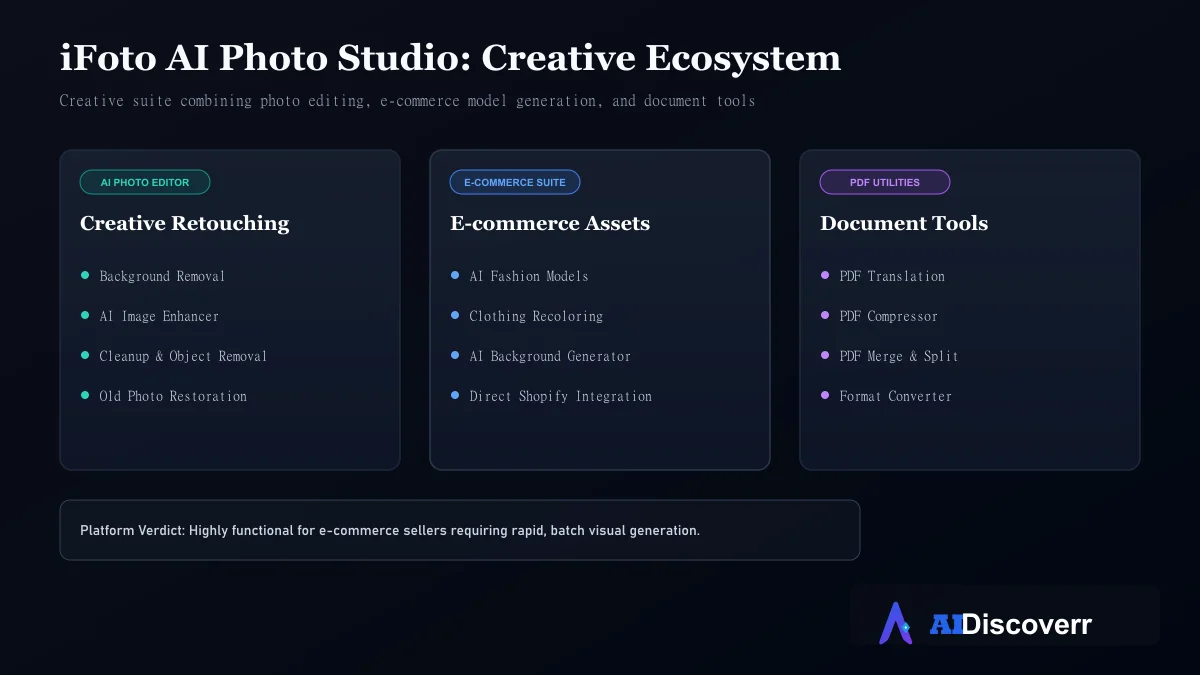
iFoto is an AI-powered photo studio that combines photo editing with e-commerce image-generation tools. It can remove backgrounds, enhance images, generate product backgrounds, create AI fashion models, recolor clothing and perform several other image-editing tasks.
But is iFoto actually worth using in 2026?
What Is iFoto?
iFoto is an online AI photo studio designed around image editing and e-commerce content creation.
Instead of requiring separate tools for background removal, product-image enhancement, clothing changes and AI-generated scenes, iFoto attempts to put these functions into one platform.
Its current product ecosystem includes more than just photo editing. The site also lists PDF tools such as PDF translation, compression, merging and file conversion.
For most users searching for an iFoto review, however, the AI photo and e-commerce features are the most relevant.
What Can iFoto Do?
1. Remove Image Backgrounds
Background removal is one of iFoto's core features. The company says its background remover can automatically remove backgrounds and create transparent or e-commerce-ready backgrounds.
This is useful for product listings, marketplace images, social media graphics, catalog images, and profile photos. The App Store listing also says background removal is available with a free-use allowance.
2. Generate AI Fashion Models
This is one of iFoto's more distinctive e-commerce features. The platform can transform fashion-product imagery into visuals featuring AI-generated models. That can help sellers who want to show clothing without organizing a traditional photoshoot.
iFoto specifically positions its AI Fashion Models and AI Background tools around e-commerce photography.
Why this matters
Traditional fashion photography can require models, locations, lighting, photographers, multiple outfits, and retouching. AI tools can reduce some of that production work.
However, AI-generated fashion images still need quality control. Product details, garment shape, hands, faces and proportions should be checked before publishing.
3. Recolor Clothing
iFoto also supports clothing recoloring. The idea is simple: upload a product image and create versions showing different colors. This can be useful for online stores that sell the same product in multiple colors.
The iFoto App Store listing specifically describes recoloring clothing or other products from a single image.
4. Generate Product Backgrounds
iFoto can generate backgrounds designed around products. This can turn a basic product photo into a more polished marketing image.
For example:
- Original: product photographed on a plain background.
- AI workflow: isolate the product → generate a suitable environment → create a more commercial-looking composition.
This is particularly useful for Shopify stores, Amazon sellers, Etsy sellers, social media campaigns, and product advertisements. The official site lists both AI Background for Products and AI Background for Models.
5. Enhance Photos
The platform also provides an AI photo enhancer designed to improve image quality and resolution. This can be useful when the original product image is low resolution, soft, poorly lit, or too small for a marketplace listing.
But enhancement cannot magically recreate missing information perfectly. Users should still start with the highest-quality source image available.
6. Clean Up Images
iFoto provides a cleanup tool for removing unwanted objects, people, logos and other elements from images. This can be useful when a product photograph contains background clutter, unwanted objects, people, or distracting elements.
Results can vary depending on the complexity of the image, so important commercial images should always be reviewed manually.
Who Is iFoto Best For?
- E-commerce sellers: This is probably the strongest audience. If you sell products online, iFoto brings several relevant tools into one platform.
- Fashion brands: AI fashion models and clothing recoloring are particularly relevant to apparel businesses.
- Small businesses: Small businesses may use iFoto to produce product visuals without building a full photography workflow.
- Social media creators: The photo-editing and image-generation tools can also help creators produce visual content.
- Marketplace sellers: The official App Store listing specifically mentions product-image workflows for platforms including Amazon, Shopify, eBay and Etsy.
Who Should NOT Use iFoto?
iFoto may not be the best choice if you:
- Need professional manual Photoshop-level editing
- Require precise control over every pixel
- Need advanced professional retouching
- Work with highly regulated or sensitive images
- Need a completely offline editor
- Want a simple photo editor with no AI features
- Need predictable results from every AI generation
It is primarily an AI-assisted workflow tool, not a replacement for every professional image-editing application.
iFoto Features Explained
| Feature | Best use |
|---|---|
| Background Remover | Product and portrait cutouts |
| Photo Enhancer | Improving image quality |
| AI Fashion Models | Clothing/product marketing |
| Clothing Recolor | Showing product color variants |
| AI Background | Product lifestyle scenes |
| Cleanup | Removing unwanted elements |
| Old Photo Restoration | Repairing older images |
| Colorization | Adding color to black-and-white images |
| Profile Picture Maker | Social profiles |
| Image Compressor | Reducing image file size |
| Shopify Image Optimizer | E-commerce workflows |
How Does iFoto Work?
The general workflow is straightforward:
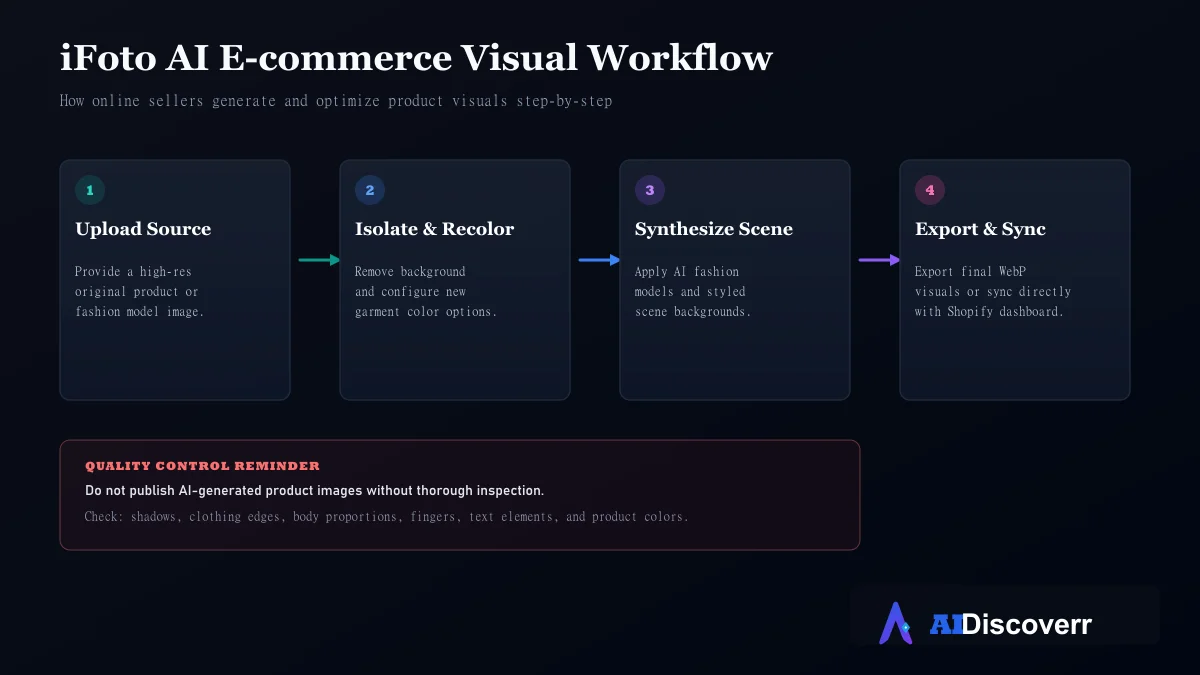
Upload → Select an AI tool → Configure the task → Generate/edit → Review → Download
For example, with an e-commerce product:
- Upload the product photo.
- Remove the original background.
- Select an AI background.
- Generate the new scene.
- Check the product edges.
- Review important product details.
- Download the finished image.
The current iFoto dashboard shows an upload-based workflow and also provides an option to select photos from Shopify.
Important quality-control step
Do not publish AI-generated product images without checking them. Look closely at product shapes, logos, text, fingers, clothing details, jewelry, shadows, edges, and colors. AI-generated visuals can look impressive while still containing small errors.
How to Use iFoto
Step 1: Choose the right tool. Start by deciding what you need (e.g., Background Remover, Photo Enhancer, Clothing Recolor, AI Fashion Models, or AI Background).
Step 2: Upload your image. Provide the source image. For commercial work, use the highest-quality original available.
Step 3: Generate or edit. Let the selected AI feature process the image.
Step 4: Inspect the result. Don't immediately download and publish it. Check the important product details for distortion or artifacts.
Step 5: Download. Once the result meets your requirements, export the final image.
iFoto Pricing: Is It Free?
This is one area where users should be careful.
iFoto currently offers free tools and paid Pro functionality. Its official pricing page confirms that a Pro subscription exists and says Pro provides access to the broader AI and photo-tool suite.
However, the current official pricing page does not expose a clear current dollar price for the plans in its text content. An older iFoto article stated a Pro price of $12.99/month, but that information is not sufficient to claim that $12.99 is the current August 2026 price.
The official page also states that users can cancel through their dashboard.
Is iFoto Safe and Legit?
This question needs a nuanced answer.
Is iFoto a real service?
Yes. There is an operating iFoto website, mobile application, product ecosystem and public software presence. The Apple App Store lists INSTANT VISION as the developer of the iFoto app.
That supports the conclusion that iFoto is a real software service. But legitimate service does not automatically mean a risk-free experience.
What does iFoto's privacy policy say?
iFoto's privacy policy says that it processes personal information for providing its services. The policy specifically mentions collecting and storing information such as pictures, billing information when necessary, complaint information, and information provided during support.
It also says service providers may process information for infrastructure and IT services. The policy provides user rights including access, correction, deletion and restriction rights under applicable circumstances.
iFoto Safety: What About Billing Complaints?
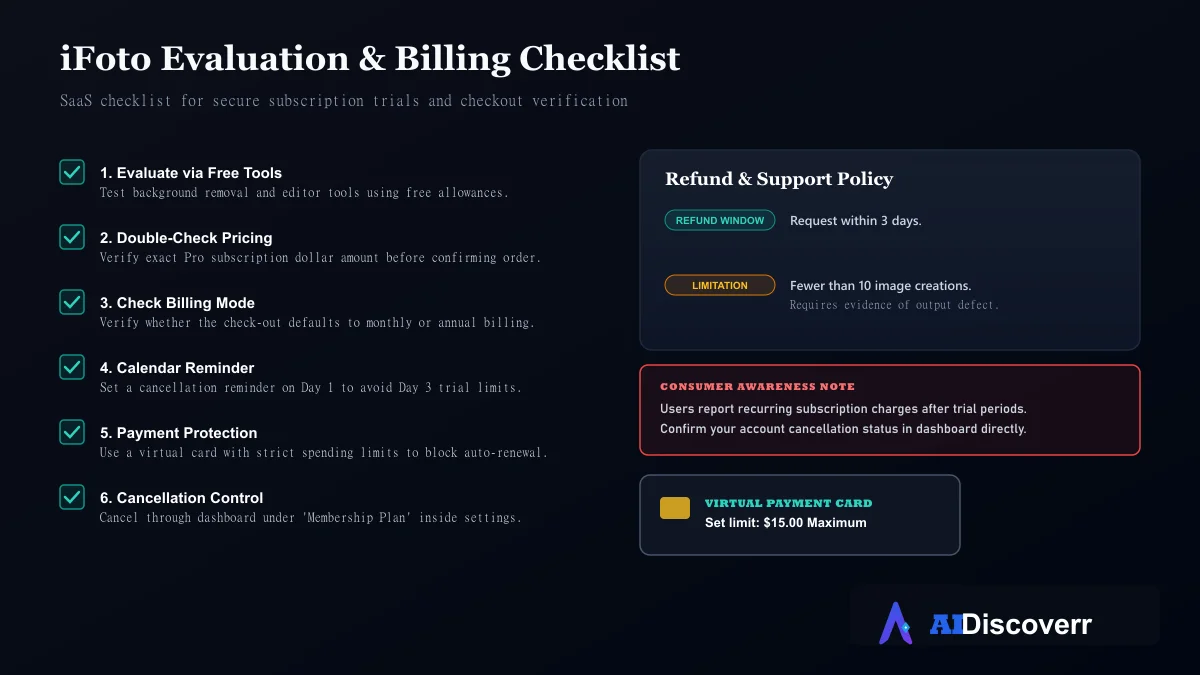
This is where prospective customers should pay attention. Public review platforms contain a significant number of complaints about unexpected subscription charges.
Trustpilot currently displays 242 reviews and shows 91% of them as 1-star, while also stating that the company's rating is unavailable because of a guideline issue. There are also Reddit discussions from users describing unexpected charges after low-cost trial/payment experiences.
Important distinction
These are user reports, not proof that every iFoto customer will experience the same issue.
The appropriate conclusion is: If you decide to use iFoto, carefully review the checkout screen, trial terms, recurring billing information and cancellation process before paying. This approach is more useful and more accurate than simply calling the service a scam.
Can You Get a Refund From iFoto?
The current official pricing page says that users can request a refund within 3 days when fewer than 10 images have been created and there are problems with the image effects.
Because refund rules can change, users should check the current official terms before making a payment.
iFoto Pros and Cons
Where It Shines
Large collection of AI photo tools
Strong e-commerce focus (AI fashion models, clothing recoloring)
Background removal and photo enhancement are simple to use
Shopify-related functionality and direct sync options
Web and mobile availability
Free tools are available
Where It Falls Short
Large feature set can feel overwhelming
AI results still require manual quality checking
Not a full replacement for professional photo-editing software (e.g., Photoshop)
Current pricing is not clearly exposed in the crawled pricing-page text
Independent reviews contain significant billing and cancellation complaints
Users must be cautious with subscription auto-renewals
iFoto Alternatives
There isn't one universal "best" alternative. The right option depends on your workflow.
G2 currently lists Canva, Simplified, 1min.AI, TESS AI, AKOOL, Vyond, Gemini, Fotor, Recraft and Adobe Firefly among iFoto alternatives.
For e-commerce-focused workflows, other platforms such as Photoroom also appear in iFoto's competitive landscape. Product Hunt lists Photoroom alongside iFoto in the same general product category.
Consider an alternative if:
- You want general graphic design: Canva may be a better fit.
- You primarily need e-commerce image editing: Photoroom is worth comparing.
- You need broader creative AI: Adobe Firefly may make more sense.
- You need traditional image editing: A professional offline editor provides more control.
The important point is not to choose an alternative based only on feature count. Choose based on the workflow you actually need.
Is iFoto Worth It in 2026?
For the right user, yes, potentially.
iFoto makes the most sense when you need several e-commerce image tasks in one place. For example:
Product photo → background removal → AI model → clothing recolor → background generation → enhancement
That workflow is much more relevant to an online seller than to someone who simply wants a basic photo editor. However, we would not recommend purchasing blindly.
Before paying:
- Check the current pricing.
- Read the subscription terms.
- Check the cancellation process.
- Understand the refund conditions.
- Test the free tools first.
- Avoid uploading sensitive images unless you are comfortable with the privacy terms.
- Review generated product images carefully.
Final Verdict
iFoto is a capable AI photo and e-commerce creative platform, particularly for online sellers, fashion businesses and creators who need to produce product visuals quickly.
Its biggest advantage is the breadth of its toolset. Background removal, AI fashion models, clothing recoloring, AI backgrounds, enhancement and cleanup are all available within the same ecosystem.
The biggest reason for caution is not necessarily the technology itself. It is the need to understand the current subscription, refund and billing terms before paying, especially given the volume of negative independent user reports.
Frequently Asked Questions
Is iFoto free?
iFoto provides free tools, including free background-removal functionality, but it also offers paid Pro functionality. Exact current paid pricing should be checked on the official pricing page because pricing can change.
Is iFoto safe to use?
iFoto is an operating software service with web and mobile products, but users should review its privacy policy and subscription terms before uploading sensitive images or purchasing a plan.
Is iFoto legit?
Yes, iFoto is a real AI photo software service with an official website and mobile application. However, legitimate does not mean every user experience is positive, so check independent reviews and payment terms before subscribing.
Does iFoto have AI fashion models?
Yes. AI Fashion Models are one of iFoto's main e-commerce features.
Can iFoto change clothing colors?
Yes. Its clothing-recoloring tool can create different color versions of clothing or products from an existing image.
Can iFoto remove backgrounds?
Yes. Background removal is one of iFoto's core photo-editing tools, and the platform currently promotes free background removal.
Can iFoto create product photos?
Yes. iFoto provides AI product-background and e-commerce image-generation features designed to create more polished product visuals.
Does iFoto work with Shopify?
Yes. The current iFoto platform lists an image optimizer for Shopify, and its dashboard supports selecting photos from Shopify.
How do I cancel iFoto?
According to iFoto's current pricing page, users can go to the dashboard, select Membership Plan, and cancel their subscription there.
Can I get a refund from iFoto?
iFoto's current pricing information says refunds may be available within three days when fewer than 10 images have been created and there are image-effect problems. Check the current terms before relying on this policy.
Is iFoto good for e-commerce?
Yes. E-commerce is one of iFoto's clearest target use cases, with features such as AI fashion models, product backgrounds, clothing recoloring and Shopify-related image tools.